UGUI源码学习-三(3)、LayoutRebuilder

LayoutSystem

你可能比较疑惑,为什么没有三(2)。 三(2)主要介绍LayoutSystem的一些组件功能,可以直接浏览:Unity 补完计划(四):UGUI-4:LayoutSystem

在看过上面文章后,我们再来认识下LayoutRebuilder

一、什么是LayoutRebuilder

LayoutRebuilder 是 UGUI 布局系统的调度核心,它实现了 ICanvasElement 接口,是布局重建队列里真正被处理的“元素”。之前提到的 CanvasUpdateRegistry 负责“收集脏元素、帧末统一重建”,而 LayoutRebuilder 就是布局队列里那个脏元素的实际代理——它代表某个布局根,在帧末执行具体的布局计算。

它解决的核心问题是:UI 元素的尺寸、位置变了,怎么高效地重新计算整棵布局树,并且保证父子依赖顺序正确。

LayoutRebuilder 本身不实现任何布局逻辑——它只是一个调度器,真正干活的是一些接口的实现类。所以我们先来认识一下一些接口类

当一个 UI 元素需要重新布局时,会调用 LayoutRebuilder.MarkLayoutForRebuild 方法,将该元素的 RectTransform 包装为 LayoutRebuilder 对象,并添加到 CanvasUpdateRegistry.m_LayoutRebuildQueue 队列中,等待 Canvas 刷新时调用 LayoutRebuilder.Rebuild 方法。
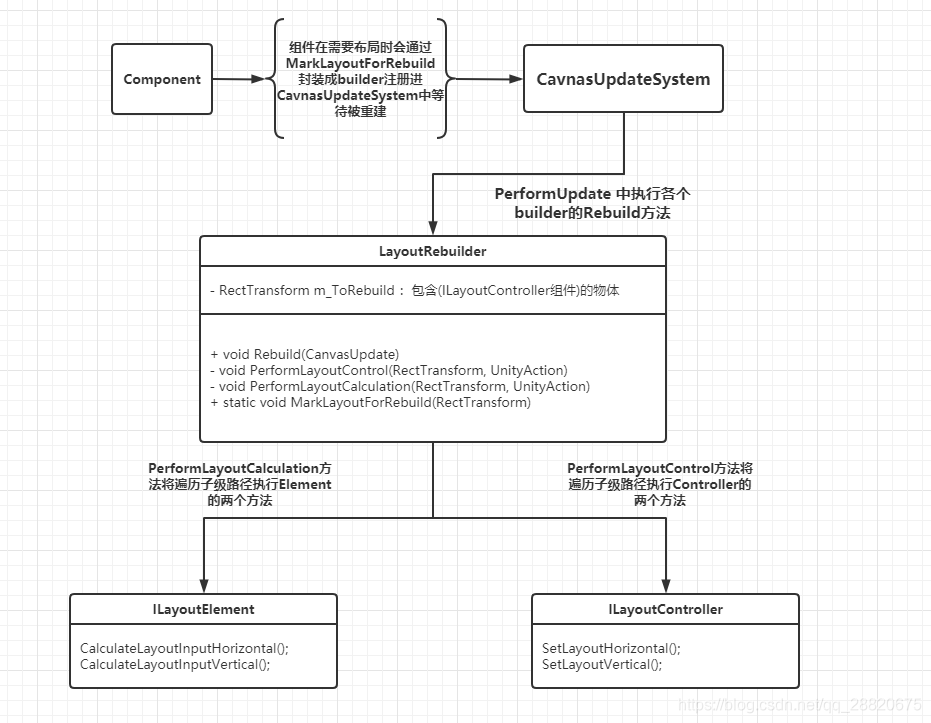
二、布局系统的五个核心接口(均定义在ILayoutElement.cs中)

2.1 ILayoutElement——提供“期望尺寸”

职责:告诉布局系统“我希望多大”。
ILayoutElement 定义了一个可以被 LayoutController 控制的基本布局单元,代码如下:

1
2
3
4
5
6
7
8
9
10
11
12
13
14
public interface ILayoutElement
{
void CalculateLayoutInputHorizontal();
void CalculateLayoutInputVertical();

float minWidth { get; }
float preferredWidth { get; }
float flexibleWidth { get; }
float minHeight { get; }
float preferredHeight { get; }
float flexibleHeight { get; }

int layoutPriority { get; }
}

它提供三组尺寸(宽/高各一套):

属性 含义
minWidth / minHeight 最小尺寸:再小就显示不下了
preferredWidth / preferredHeight 首选尺寸:最理想的大小
flexibleWidth / flexibleHeight 弹性系数:父级有多余空间时,按这个比例分配

CalculateLayoutInputHorizontal/Vertical() 是计算入口——布局系统调它,让元素自己算好上面那些值。

layoutPriority 决定多个 ILayoutElement 同时存在时谁说了算(值大的优先)。

谁实现:Text(按文本长度算期望宽高)、Image(按 sprite 算)、LayoutElement(手动配置)、LayoutGroup(按子元素算)。

2.2 ILayoutController——执行“设置布局”

1
2
3
4
5
public interface ILayoutController
{
void SetLayoutHorizontal();
void SetLayoutVertical();
}

它不提供数据,只执行。SetLayoutHorizontal() 负责设置水平方向的尺寸/位置,SetLayoutVertical() 负责垂直方向。

谁实现:HorizontalLayoutGroup / VerticalLayoutGroup / GridLayoutGroup(排列子元素)、ContentSizeFitter / AspectRatioFitter(改自己尺寸)。

2.3 ILayoutGroup——标记“我是布局容器”

1
public interface ILayoutGroup : ILayoutController { }

空接口,继承 ILayoutController,唯一作用是类型标记:表示“我是一个布局容器,负责排列子元素”。

用途:LayoutRebuilder.MarkLayoutForRebuild 向上找布局根时,就是用 ILayoutGroup 判断“父级是不是布局容器”。有 ILayoutGroup 的祖先才是布局根

谁实现:HorizontalLayoutGroup / VerticalLayoutGroup / GridLayoutGroup / ScrollRect(部分实现)。

2.4 ILayoutSelfController——标记“我只改自己”

1
public interface ILayoutSelfController : ILayoutController { }

空接口,继承 ILayoutController,标记“这个控制器只改自己的 RectTransform 尺寸,不排列子元素”。

用途:LayoutRebuilder.PerformLayoutControl 里,先处理 ILayoutSelfController,再处理普通 ILayoutController。因为 ContentSizeFitter 要先根据内容定好自己的尺寸,LayoutGroup 才能按这个尺寸排列子元素。

谁实现:ContentSizeFitter、AspectRatioFitter。

2.5 ILayoutIgnorer——标记“我不参与布局”

1
2
3
4
public interface ILayoutIgnorer
{
bool ignoreLayout { get; }
}

布局容器排列子元素时,如果子元素实现了 ILayoutIgnorer 且 ignoreLayout == true,就跳过它——不占位置、不参与排列。

谁实现:LayoutElement 可以勾选 Ignore Layout。

三、接口间的关系

1
2
3
4
5
6
ILayoutController(执行布局)
├── ILayoutGroup(标记:我是容器,排列子元素)
└── ILayoutSelfController(标记:我只改自己尺寸)

ILayoutElement(提供期望尺寸)—— 独立接口,和 Controller 并列
ILayoutIgnorer(标记:不参与布局)—— 独立接口

一个组件可以同时实现多个接口。比如:

组件 实现
HorizontalLayoutGroup ILayoutElement(算自己期望尺寸)+ ILayoutGroup(排列子元素)
ContentSizeFitter ILayoutSelfController(改自己尺寸)
Text ILayoutElement(按文本算期望尺寸)
LayoutElement ILayoutElement + ILayoutIgnorer(手动配置 + 可选忽略)

四、LayoutRebuilder

介绍了几大接口,现在我们回到LayoutRebuilder本身

点击展开代码
1
2
3
4
5
6
7
8
9
10
11
12
13
14
15
16
17
18
19
20
21
22
23
24
25
26
27
28
29
30
31
32
33
34
35
36
37
38
39
40
41
42
43
44
45
46
47
48
49
50
51
52
53
54
55
56
57
58
59
60
61
62
63
64
65
66
67
68
69
70
71
72
73
74
75
76
77
78
79
80
81
82
83
84
85
86
87
88
89
90
91
92
93
94
95
96
97
98
99
100
101
102
103
104
105
106
107
108
109
110
111
112
113
114
115
116
117
118
119
120
121
122
123
124
125
126
127
128
129
130
131
132
133
134
135
136
137
138
139
140
141
142
143
144
145
146
147
148
149
150
151
152
153
154
155
156
157
158
159
160
161
162
163
164
165
166
167
168
169
170
171
172
173
174
175
176
177
178
179
180
181
182
183
184
185
186
187
188
189
190
191
192
193
194
195
196
197
198
199
200
201
202
203
204
205
206
207
208
209
210
211
212
213
214
215
216
217
218
219
220
221
222
223
224
225
226
227
228
229
230
231
232
233
234
235
236
237
238
239
240
241
242
243
244
245
246
247
248
249
250
251
252
253
254
255
256
257
258
259
260
261
262
263
264
265
266
267
268
using System.Collections.Generic;
using UnityEngine.Events;
using UnityEngine.Pool;

namespace UnityEngine.UI
{
/// <summary>
/// Wrapper class for managing layout rebuilding of CanvasElement.
/// </summary>
public class LayoutRebuilder : ICanvasElement
{
private RectTransform m_ToRebuild;
//There are a few of reasons we need to cache the Hash fromt he transform:
// - This is a ValueType (struct) and .Net calculates Hash from the Value Type fields.
// - The key of a Dictionary should have a constant Hash value.
// - It's possible for the Transform to get nulled from the Native side.
// We use this struct with the IndexedSet container, which uses a dictionary as part of it's implementation
// So this struct gets used as a key to a dictionary, so we need to guarantee a constant Hash value.
private int m_CachedHashFromTransform;

static ObjectPool<LayoutRebuilder> s_Rebuilders = new ObjectPool<LayoutRebuilder>(() => new LayoutRebuilder(), null, x => x.Clear());

private void Initialize(RectTransform controller)
{
m_ToRebuild = controller;
m_CachedHashFromTransform = controller.GetHashCode();
}

private void Clear()
{
m_ToRebuild = null;
m_CachedHashFromTransform = 0;
}

static LayoutRebuilder()
{
RectTransform.reapplyDrivenProperties += ReapplyDrivenProperties;
}

static void ReapplyDrivenProperties(RectTransform driven)
{
MarkLayoutForRebuild(driven);
}

public Transform transform { get { return m_ToRebuild; }}

/// <summary>
/// Has the native representation of this LayoutRebuilder been destroyed?
/// </summary>
public bool IsDestroyed()
{
return m_ToRebuild == null;
}

static void StripDisabledBehavioursFromList(List<Component> components)
{
components.RemoveAll(e => e is Behaviour && !((Behaviour)e).isActiveAndEnabled);
}

/// <summary>
/// Forces an immediate rebuild of the layout element and child layout elements affected by the calculations.
/// </summary>
/// <param name="layoutRoot">The layout element to perform the layout rebuild on.</param>
/// <remarks>
/// Normal use of the layout system should not use this method. Instead MarkLayoutForRebuild should be used instead, which triggers a delayed layout rebuild during the next layout pass. The delayed rebuild automatically handles objects in the entire layout hierarchy in the correct order, and prevents multiple recalculations for the same layout elements.
/// However, for special layout calculation needs, ::ref::ForceRebuildLayoutImmediate can be used to get the layout of a sub-tree resolved immediately. This can even be done from inside layout calculation methods such as ILayoutController.SetLayoutHorizontal orILayoutController.SetLayoutVertical. Usage should be restricted to cases where multiple layout passes are unavaoidable despite the extra cost in performance.
/// </remarks>
public static void ForceRebuildLayoutImmediate(RectTransform layoutRoot)
{
var rebuilder = s_Rebuilders.Get();
rebuilder.Initialize(layoutRoot);
rebuilder.Rebuild(CanvasUpdate.Layout);
s_Rebuilders.Release(rebuilder);
}

public void Rebuild(CanvasUpdate executing)
{
switch (executing)
{
case CanvasUpdate.Layout:
// It's unfortunate that we'll perform the same GetComponents querys for the tree 2 times,
// but each tree have to be fully iterated before going to the next action,
// so reusing the results would entail storing results in a Dictionary or similar,
// which is probably a bigger overhead than performing GetComponents multiple times.
PerformLayoutCalculation(m_ToRebuild, e => (e as ILayoutElement).CalculateLayoutInputHorizontal());
PerformLayoutControl(m_ToRebuild, e => (e as ILayoutController).SetLayoutHorizontal());
PerformLayoutCalculation(m_ToRebuild, e => (e as ILayoutElement).CalculateLayoutInputVertical());
PerformLayoutControl(m_ToRebuild, e => (e as ILayoutController).SetLayoutVertical());
break;
}
}

private void PerformLayoutControl(RectTransform rect, UnityAction<Component> action)
{
if (rect == null)
return;

var components = ListPool<Component>.Get();
rect.GetComponents(typeof(ILayoutController), components);
StripDisabledBehavioursFromList(components);

// If there are no controllers on this rect we can skip this entire sub-tree
// We don't need to consider controllers on children deeper in the sub-tree either,
// since they will be their own roots.
if (components.Count > 0)
{
// Layout control needs to executed top down with parents being done before their children,
// because the children rely on the sizes of the parents.

// First call layout controllers that may change their own RectTransform
for (int i = 0; i < components.Count; i++)
if (components[i] is ILayoutSelfController)
action(components[i]);

// Then call the remaining, such as layout groups that change their children, taking their own RectTransform size into account.
for (int i = 0; i < components.Count; i++)
if (!(components[i] is ILayoutSelfController))
{
var scrollRect = components[i];

if (scrollRect && scrollRect is UnityEngine.UI.ScrollRect)
{
if (((UnityEngine.UI.ScrollRect)scrollRect).content != rect)
action(components[i]);
}
else
{
action(components[i]);
}
}

for (int i = 0; i < rect.childCount; i++)
PerformLayoutControl(rect.GetChild(i) as RectTransform, action);
}

ListPool<Component>.Release(components);
}

private void PerformLayoutCalculation(RectTransform rect, UnityAction<Component> action)
{
if (rect == null)
return;

var components = ListPool<Component>.Get();
rect.GetComponents(typeof(ILayoutElement), components);
StripDisabledBehavioursFromList(components);

// If there are no controllers on this rect we can skip this entire sub-tree
// We don't need to consider controllers on children deeper in the sub-tree either,
// since they will be their own roots.
if (components.Count > 0 || rect.TryGetComponent(typeof(ILayoutGroup), out _))
{
// Layout calculations needs to executed bottom up with children being done before their parents,
// because the parent calculated sizes rely on the sizes of the children.

for (int i = 0; i < rect.childCount; i++)
PerformLayoutCalculation(rect.GetChild(i) as RectTransform, action);

for (int i = 0; i < components.Count; i++)
action(components[i]);
}

ListPool<Component>.Release(components);
}

/// <summary>
/// Mark the given RectTransform as needing it's layout to be recalculated during the next layout pass.
/// </summary>
/// <param name="rect">Rect to rebuild.</param>
public static void MarkLayoutForRebuild(RectTransform rect)
{
if (rect == null || rect.gameObject == null)
return;

var comps = ListPool<Component>.Get();
bool validLayoutGroup = true;
RectTransform layoutRoot = rect;
var parent = layoutRoot.parent as RectTransform;
while (validLayoutGroup && !(parent == null || parent.gameObject == null))
{
validLayoutGroup = false;
parent.GetComponents(typeof(ILayoutGroup), comps);

for (int i = 0; i < comps.Count; ++i)
{
var cur = comps[i];
if (cur != null && cur is Behaviour && ((Behaviour)cur).isActiveAndEnabled)
{
validLayoutGroup = true;
layoutRoot = parent;
break;
}
}

parent = parent.parent as RectTransform;
}

// We know the layout root is valid if it's not the same as the rect,
// since we checked that above. But if they're the same we still need to check.
if (layoutRoot == rect && !ValidController(layoutRoot, comps))
{
ListPool<Component>.Release(comps);
return;
}

MarkLayoutRootForRebuild(layoutRoot);
ListPool<Component>.Release(comps);
}

private static bool ValidController(RectTransform layoutRoot, List<Component> comps)
{
if (layoutRoot == null || layoutRoot.gameObject == null)
return false;

layoutRoot.GetComponents(typeof(ILayoutController), comps);
for (int i = 0; i < comps.Count; ++i)
{
var cur = comps[i];
if (cur != null && cur is Behaviour && ((Behaviour)cur).isActiveAndEnabled)
{
return true;
}
}

return false;
}

private static void MarkLayoutRootForRebuild(RectTransform controller)
{
if (controller == null)
return;

var rebuilder = s_Rebuilders.Get();
rebuilder.Initialize(controller);
if (!CanvasUpdateRegistry.TryRegisterCanvasElementForLayoutRebuild(rebuilder))
s_Rebuilders.Release(rebuilder);
}

public void LayoutComplete()
{
s_Rebuilders.Release(this);
}

public void GraphicUpdateComplete()
{}

public override int GetHashCode()
{
return m_CachedHashFromTransform;
}

/// <summary>
/// Does the passed rebuilder point to the same CanvasElement.
/// </summary>
/// <param name="obj">The other object to compare</param>
/// <returns>Are they equal</returns>
public override bool Equals(object obj)
{
return obj.GetHashCode() == GetHashCode();
}

public override string ToString()
{
return "(Layout Rebuilder for) " + m_ToRebuild;
}
}
}

4.0 该类的定位:(用于)布局根的重建代理

RectTransform 本身不是 ICanvasElement,不能直接塞进 CanvasUpdateRegistry.m_LayoutRebuildQueue。所以 UGUI 用 LayoutRebuilder 做了一层代理:

1
2
3
4
5
6
7
8
9
LayoutRebuilder.MarkLayoutForRebuild(rect)
→ 向上找到布局根
→ 创建一个 LayoutRebuilder(从对象池借)
→ 让它代表这个布局根,注册到 CanvasUpdateRegistry 的布局队列
↓ (帧末)
CanvasUpdateRegistry.PerformUpdate
→ 遍历布局队列
→ 调用 LayoutRebuilder.Rebuild(CanvasUpdate.Layout)
→ 真正执行布局计算

LayoutRebuilder 持有 m_ToRebuild(要重建的 RectTransform,即布局根),实现了 ICanvasElement 的 Rebuild / transform / LayoutComplete / IsDestroyed,这样就能和 CanvasUpdateRegistry 对接

4.1 对象池:避免频繁创建

1
2
3
4
5
6
static ObjectPool<LayoutRebuilder> s_Rebuilders = new ObjectPool<LayoutRebuilder>(
() => new LayoutRebuilder(), // 创建
null, // 获取时
x => x.Clear() // 释放时清理
);

LayoutRebuilder 是高频创建的对象——每次布局变脏都要一个。所以用 ObjectPool 复用:

  • Get():从池里借一个,Initialize(controller) 设置 m_ToRebuild 和哈希。

  • Release():归还池,Clear() 清空 m_ToRebuild 和哈希。

LayoutComplete() 就是调 s_Rebuilders.Release(this)——CanvasUpdateRegistry 在布局重建完所有元素后,会调每个元素的 LayoutComplete(),把 LayoutRebuilder 归还池里

4.2 缓存哈希:为什么需要

1
2
3
4
5
6
7
private int m_CachedHashFromTransform;

private void Initialize(RectTransform controller)
{
m_ToRebuild = controller;
m_CachedHashFromTransform = controller.GetHashCode();
}

注释解释得很清楚,三个原因:

  1. Transform 是 Unity 对象(引用类型,但底层是原生对象),它的 GetHashCode() 依赖原生对象的状态。

  2. IndexedSet 内部用 Dictionary 存元素,key 的哈希必须稳定。

  3. 原生对象可能被销毁——销毁后 RectTransform.GetHashCode() 可能变化或抛异常。

所以 LayoutRebuilder 在 Initialize 时就把哈希缓存下来,之后 GetHashCode() 直接返回 m_CachedHashFromTransform,不依赖 RectTransform 的实时状态。Equals 也基于这个缓存哈希比较——两个 LayoutRebuilder 哈希相同,就认为它们代表同一个布局根。

这是为了配合 IndexedSet 的去重:同一个布局根被多次标记脏,IndexedSet 通过哈希判断“已经有了”,不会重复加入队列。

4.3 MarkLayoutForRebuild:标记入口

这是外部调用的入口(LayoutRebuilder.SetLayoutDirty 最终会走到这里)。

4.3.1 第一步:向上找布局根

1
2
3
4
5
6
7
8
9
10
11
12
13
14
15
16
17
18
RectTransform layoutRoot = rect;
var parent = layoutRoot.parent as RectTransform;
while (validLayoutGroup && !(parent == null || parent.gameObject == null))
{
validLayoutGroup = false;
parent.GetComponents(typeof(ILayoutGroup), comps);
for (int i = 0; i < comps.Count; ++i)
{
var cur = comps[i];
if (cur != null && cur is Behaviour && ((Behaviour)cur).isActiveAndEnabled)
{
validLayoutGroup = true;
layoutRoot = parent; // 父级有活跃的 ILayoutGroup,布局根上移
break;
}
}
parent = parent.parent as RectTransform;
}

从当前 rect 开始,沿父级向上找最近的有活跃 ILayoutGroup 的祖先,把它作为布局根。

为什么向上找:布局是树状的。一个子元素的尺寸变了,可能影响父级 LayoutGroup 的排列,进而影响整个布局树。只重建子元素不够,必须从布局根开始重建整棵子树。ILayoutGroup 是 HorizontalLayoutGroup / VerticalLayoutGroup / GridLayoutGroup 等布局容器的接口——它们负责排列子元素,是布局的“根”。

4.3.2 第二步:验证布局根

1
2
3
4
5
if (layoutRoot == rect && !ValidController(layoutRoot, comps))
{
ListPool<Component>.Release(comps);
return;
}

如果向上没找到布局组(layoutRoot == rect),还要检查 rect 自己有没有活跃的 ILayoutController(ContentSizeFitter、AspectRatioFitter 等)。有才继续,没有就直接返回——既没有布局组父级、自己也不是布局控制器,就不需要重建布局。

4.3.3 第三步:注册到队列

1
MarkLayoutRootForRebuild(layoutRoot);
1
2
3
4
5
6
7
private static void MarkLayoutRootForRebuild(RectTransform controller)
{
var rebuilder = s_Rebuilders.Get();
rebuilder.Initialize(controller);
if (!CanvasUpdateRegistry.TryRegisterCanvasElementForLayoutRebuild(rebuilder))
s_Rebuilders.Release(rebuilder);
}

从池里借一个 LayoutRebuilder,初始化指向布局根,尝试注册到 CanvasUpdateRegistry 的布局队列。如果注册失败(队列里已经有同一个布局根的 rebuilder),立刻归还池——避免泄漏。

这就是“脏标记只登记、不执行”在布局侧的体现:MarkLayoutForRebuild 只负责把布局根登记到队列,真正的布局计算等帧末 PerformUpdate 才做。

4.4 Rebuild:真正的布局计算(⭐)

1
2
3
4
5
6
7
8
9
10
11
12
public void Rebuild(CanvasUpdate executing)
{
switch (executing)
{
case CanvasUpdate.Layout:
PerformLayoutCalculation(m_ToRebuild, e => (e as ILayoutElement).CalculateLayoutInputHorizontal());
PerformLayoutControl(m_ToRebuild, e => (e as ILayoutController).SetLayoutHorizontal());
PerformLayoutCalculation(m_ToRebuild, e => (e as ILayoutElement).CalculateLayoutInputVertical());
PerformLayoutControl(m_ToRebuild, e => (e as ILayoutController).SetLayoutVertical());
break;
}
}

只响应 CanvasUpdate.Layout 阶段(Prelayout / PostLayout 不做事)。核心是四个步骤,顺序严格:

步骤 方法 接口 方向
1 PerformLayoutCalculation ILayoutElement.CalculateLayoutInputHorizontal 自底向上
2 PerformLayoutControl ILayoutController.SetLayoutHorizontal 自顶向下
3 PerformLayoutCalculation ILayoutElement.CalculateLayoutInputVertical 自底向上
4 PerformLayoutControl ILayoutController.SetLayoutVertical 自顶向下
先水平、后垂直,各自“先算后设”。因为宽度和高度可能互相依赖,但 UGUI 选择先完整处理水平方向(计算期望宽度 → 设置实际宽度),再处理垂直方向。

4.4.1 PerformLayoutCalculation:自底向上计算

1
2
3
4
5
6
7
8
9
10
11
12
13
14
15
16
17
18
19
20
21
private void PerformLayoutCalculation(RectTransform rect, UnityAction<Component> action)
{
if (rect == null) return;

var components = ListPool<Component>.Get();
rect.GetComponents(typeof(ILayoutElement), components);
StripDisabledBehavioursFromList(components);

if (components.Count > 0 || rect.TryGetComponent(typeof(ILayoutGroup), out _))
{
// 先递归子级
for (int i = 0; i < rect.childCount; i++)
PerformLayoutCalculation(rect.GetChild(i) as RectTransform, action);

// 再处理自己
for (int i = 0; i < components.Count; i++)
action(components[i]);
}

ListPool<Component>.Release(components);
}

关键:先递归子级,再处理自己——自底向上。

原因:ILayoutElement.CalculateLayoutInputHorizontal 计算的是“这个元素期望多大”。父级的期望尺寸依赖子级的期望尺寸(比如 VerticalLayoutGroup 的高度 = 所有子元素高度之和 + 间距)。所以必须子级先算完,父级才能算。

ILayoutElement 是 Text、Image、LayoutElement、LayoutGroup 等实现的接口,提供 minWidth、preferredWidth、flexibleWidth 等期望值。

条件 components.Count > 0 || rect.TryGetComponent(typeof(ILayoutGroup)):如果当前节点既没有 ILayoutElement 也不是 ILayoutGroup,说明这棵子树不参与布局计算,整棵跳过——优化。

  • 即如果当前节点自己提供了期望尺寸(ILayoutElement),或者它是布局容器(ILayoutGroup,意味着子树里可能有需要计算的元素),就继续递归;两者都不满足,说明这棵子树和布局计算无关,整棵跳过。
  • 对比 PerformLayoutControl 为什么不需要额外检查rect.TryGetComponent(typeof(ILayoutGroup)),因为 ILayoutGroup : ILayoutController——ILayoutGroup 本身就是 ILayoutController 的子接口。任何 ILayoutGroup 都会被 GetComponents(typeof(ILayoutController)) 捕获.
  • 一般 布局组被禁用 时会触发rect.TryGetComponent(typeof(ILayoutGroup))。即布局组自己被禁用了,它不再排列子元素,但子元素可能还有自己的 ILayoutElement(比如 Text 的期望尺寸)。

4.4.2 PerformLayoutControl:自顶向下设置

1
2
3
4
5
6
7
8
9
10
11
12
13
14
15
16
17
18
19
20
21
22
23
24
25
26
27
28
29
30
31
32
33
34
35
36
37
38
private void PerformLayoutControl(RectTransform rect, UnityAction<Component> action)
{
if (rect == null) return;

var components = ListPool<Component>.Get();
rect.GetComponents(typeof(ILayoutController), components);
StripDisabledBehavioursFromList(components);

if (components.Count > 0)
{
// 先处理自己
for (int i = 0; i < components.Count; i++)
if (components[i] is ILayoutSelfController)
action(components[i]);

for (int i = 0; i < components.Count; i++)
if (!(components[i] is ILayoutSelfController))
{
// ScrollRect 特殊处理:content 是当前 rect 时跳过
var scrollRect = components[i];
if (scrollRect && scrollRect is ScrollRect)
{
if (((ScrollRect)scrollRect).content != rect)
action(components[i]);
}
else
{
action(components[i]);
}
}

// 再递归子级
for (int i = 0; i < rect.childCount; i++)
PerformLayoutControl(rect.GetChild(i) as RectTransform, action);
}

ListPool<Component>.Release(components);
}
  • 关键:先处理自己,再递归子级——自顶向下。

  • 原因:ILayoutController.SetLayoutHorizontal 设置的是“这个元素实际的尺寸和子元素的位置”。父级先确定自己的尺寸和子元素的排列方式,子级再根据父级给的空间设置自己的尺寸。父级没定,子级没法定。

两轮处理 ILayoutController:

  1. 先 ILayoutSelfController:ContentSizeFitter、AspectRatioFitter 这类“只改自己尺寸”的控制器。它们根据 ILayoutElement 算出的期望值,设置自己的 RectTransform 尺寸。

  2. 再非 ILayoutSelfController:HorizontalLayoutGroup / VerticalLayoutGroup / GridLayoutGroup 这类“排列子元素”的控制器。它们根据自己当前的尺寸(可能刚被 ILayoutSelfController 改过),设置子元素的位置和尺寸。

顺序不能反:ContentSizeFitter 先定自己的大小,LayoutGroup 才能按这个大小排列子元素。

ScrollRect 特殊处理:

1
2
if (((ScrollRect)scrollRect).content != rect)
action(components[i]);

ScrollRect 的 content 子物体不应该被当作普通布局元素处理——ScrollRect 自己管理 content 的位置(滚动偏移)。如果对 content 调用 SetLayoutHorizontal,会覆盖 ScrollRect 设置的滚动位置。所以这里跳过“content == 当前 rect”的情况。

4.4.3 和其他组件的配合

  • ContentSizeFitter:实现 ILayoutSelfController,在 PerformLayoutControl 第一轮被调用,根据 ILayoutElement 的期望值设置自己的尺寸。

  • HorizontalLayoutGroup / VerticalLayoutGroup:实现 ILayoutController + ILayoutGroup,在 PerformLayoutControl 第二轮被调用,排列子元素;同时它们也是 ILayoutElement,在 PerformLayoutCalculation 里计算自己的期望尺寸。

  • LayoutElement:实现 ILayoutElement,提供 minWidth / preferredWidth / flexibleWidth 等期望值,在 PerformLayoutCalculation 里被读取。

  • Text / Image:实现 ILayoutElement,提供基于内容的期望尺寸(比如 Text 的 preferredWidth 取决于文本长度)。

  • ScrollRect:在 PerformLayoutControl 里被特殊处理,避免覆盖 content 的滚动位置

4.4.4 布局重建的完整链路(⭐)

1
2
3
4
5
6
7
8
9
10
11
12
13
14
15
16
17
某个 UI 变化触发布局变脏
→ LayoutRebuilder.MarkLayoutForRebuild(rect)
→ 向上找布局根(最近的活跃 ILayoutGroup 祖先,或自己如果是 ILayoutController)
→ 从对象池借 LayoutRebuilder,初始化指向布局根
→ CanvasUpdateRegistry.TryRegisterCanvasElementForLayoutRebuild(rebuilder)
→ 塞进 m_LayoutRebuildQueue(AddUnique 去重)
↓ (帧末 willRenderCanvases)
CanvasUpdateRegistry.PerformUpdate
→ 按层级深度排序布局队列(父先于子)
→ 遍历队列,对每个 LayoutRebuilder 调 Rebuild(CanvasUpdate.Layout)
→ PerformLayoutCalculation(水平,自底向上)
→ PerformLayoutControl(水平,自顶向下)
→ PerformLayoutCalculation(垂直,自底向上)
→ PerformLayoutControl(垂直,自顶向下)
→ 遍历队列,调 LayoutComplete()
→ s_Rebuilders.Release(this) 归还对象池
→ Clear 布局队列

4.4.5 几个值得注意的设计点(⭐)

  1. 为什么向上找布局根,而不是只重建当前元素

布局是树状依赖。子元素变脏可能影响父级 LayoutGroup 的排列,进而影响整棵子树。从布局根开始重建,保证整棵树的一致性。如果只重建当前元素,父级不会重新排列它,布局会错乱。

  1. 为什么计算自底向上、控制自顶向下

计算(CalculateLayoutInput):父级的期望尺寸依赖子级,所以子先算。

控制(SetLayout):子级的实际尺寸依赖父级给的空间,所以父先设。

两个方向刚好相反,这是布局系统的核心对称性。

  1. 为什么用对象池

每次布局变脏都要一个 LayoutRebuilder,如果每次 new,高频布局变化会产生大量 GC。对象池复用,LayoutComplete 时归还,零分配。

  1. 缓存哈希的意义

IndexedSet 用 Dictionary 存元素,key 的哈希必须稳定。RectTransform 原生对象可能被销毁,实时 GetHashCode() 不可靠。Initialize 时缓存哈希,保证 GetHashCode() / Equals 稳定,去重才能正确工作。

  1. ForceRebuildLayoutImmediate:同步重建(⭐)
1
2
3
4
5
6
7
8
9

public static void ForceRebuildLayoutImmediate(RectTransform layoutRoot)
{
var rebuilder = s_Rebuilders.Get();
rebuilder.Initialize(layoutRoot);
rebuilder.Rebuild(CanvasUpdate.Layout);
s_Rebuilders.Release(rebuilder);
}

和 MarkLayoutForRebuild 的区别:它不注册到队列,直接从池里借一个 LayoutRebuilder,立即调 Rebuild,然后归还。用于“需要立刻拿到布局结果”的特殊场景(比如在 SetLayoutHorizontal 内部需要子树的即时尺寸)。注释明确警告:正常布局流程不应该用它,因为它绕过了延迟批处理,可能造成重复计算和性能问题。

4.5 静态构造函数 + ReapplyDrivenProperties

1
2
3
4
5
6
7
8
9
static LayoutRebuilder()
{
RectTransform.reapplyDrivenProperties += ReapplyDrivenProperties;
}

static void ReapplyDrivenProperties(RectTransform driven)
{
MarkLayoutForRebuild(driven);
}

作用:订阅 RectTransform.reapplyDrivenProperties 事件。当 Unity 重新应用 RectTransform 的 driven properties(被驱动属性)时,自动把该 RectTransform 标记为需要布局重建。

什么是 driven properties:当 RectTransform 的尺寸/位置被 ContentSizeFitter、LayoutGroup、AspectRatioFitter 等布局组件“驱动”时,这些属性就是 driven properties。Unity 在某些时机(如 Canvas.ForceUpdateCanvases、布局重建后、RectTransform 的父级变化等)会重新应用这些驱动值。每次重新应用,都可能改变实际尺寸/位置,所以需要重新标记布局脏。

为什么放在静态构造函数里:静态构造函数在第一次访问 LayoutRebuilder 时执行一次,把事件订阅上。之后任何 RectTransform 的 driven properties 被重新应用,都会触发 MarkLayoutForRebuild。这是布局变脏的第二个触发源(第一个是 LayoutRebuilder.SetLayoutDirty 显式调用)。

五、总结

本文我们主要分析了 LayoutRebuilder 的实现。LayoutRebuilder 是一个用于管理 UI 元素布局更新的包装类,它实现了 ICanvasElement 接口,把一个 RectTransform 包装为可注册到 CanvasUpdateRegistry 布局队列的元素,在帧末 willRenderCanvases 触发时调用 Rebuild 执行布局更新。

在 Rebuild 函数中,LayoutRebuilder 按水平、垂直两个方向分别更新布局,每个方向内部又分为两步:先调用 ILayoutElement.CalculateLayoutInputHorizontal/Vertical 计算期望尺寸,再调用 ILayoutController.SetLayoutHorizontal/Vertical 设置实际布局。需要注意两个方向上的顺序差异:计算是自底向上(子级先算,父级依赖子级的结果),设置是自顶向下(父级先设,子级依赖父级给的空间)。在控制阶段(设置阶段),还会先处理 ILayoutSelfController(如 ContentSizeFitter,改自己尺寸),再处理普通 ILayoutController(如 LayoutGroup,排列子元素)。

LayoutRebuilder 内部使用对象池 s_Rebuilders 复用实例,LayoutComplete() 时归还,避免高频创建产生 GC;并用 m_CachedHashFromTransform 缓存 RectTransform 的哈希,保证 IndexedSet 去重时哈希稳定(原生对象可能被销毁,实时哈希不可靠)。此外,静态构造函数订阅了 RectTransform.reapplyDrivenProperties 事件,作为布局变脏的第二个触发源。

LayoutRebuilder 向外提供了两个静态入口:MarkLayoutForRebuild 用于标记一个 RectTransform 需要重新布局(向上找最近的 ILayoutGroup 祖先作为布局根,注册到队列),ForceRebuildLayoutImmediate 用于立即强制更新一个 RectTransform 的布局(不注册队列,直接借池、Rebuild、归还)。在之后的文章中我们将会看到各种 UI 元素是如何利用这些静态函数来更新布局的。