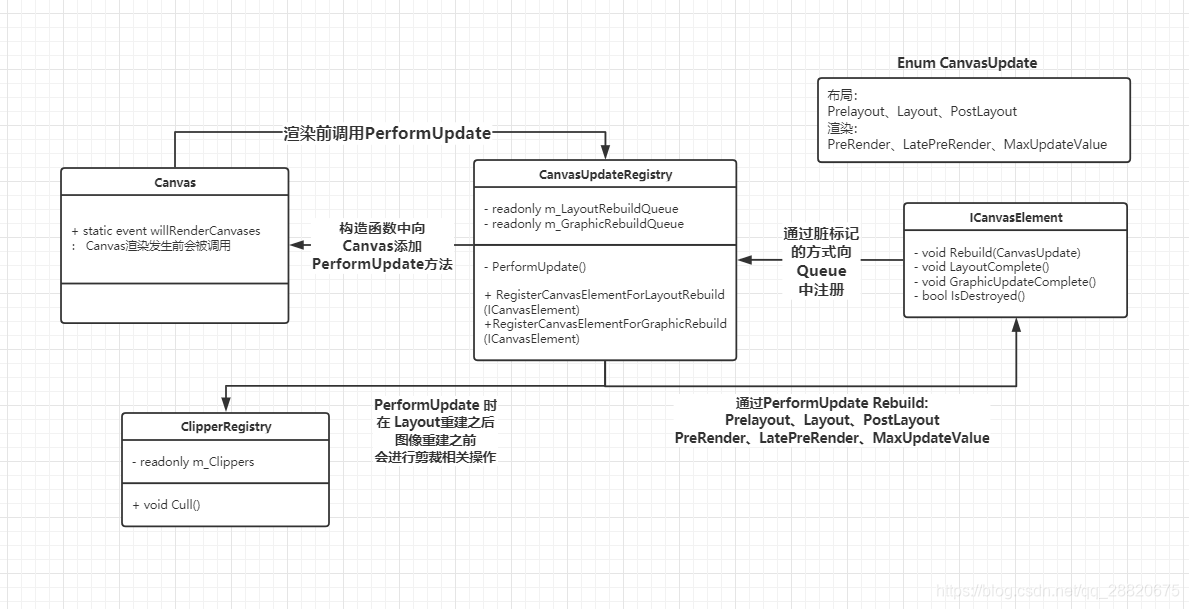
using System; using System.Collections.Generic; using UnityEngine.UI.Collections;
namespaceUnityEngine.UI { ///<summary> /// Values of 'update' called on a Canvas update. ///</summary> ///<remarks> If modifying also modify m_CanvasUpdateProfilerStrings to match.</remarks> publicenum CanvasUpdate { ///<summary> /// Called before layout. ///</summary> Prelayout = 0, ///<summary> /// Called for layout. ///</summary> Layout = 1, ///<summary> /// Called after layout. ///</summary> PostLayout = 2, ///<summary> /// Called before rendering. ///</summary> PreRender = 3, ///<summary> /// Called late, before render. ///</summary> LatePreRender = 4, ///<summary> /// Max enum value. Always last. ///</summary> MaxUpdateValue = 5 }
///<summary> /// This is an element that can live on a Canvas. ///</summary> publicinterfaceICanvasElement { ///<summary> /// Rebuild the element for the given stage. ///</summary> ///<param name="executing">The current CanvasUpdate stage being rebuild.</param> voidRebuild(CanvasUpdate executing);
///<summary> /// Get the transform associated with the ICanvasElement. ///</summary> Transform transform { get; }
///<summary> /// Callback sent when this ICanvasElement has completed layout. ///</summary> voidLayoutComplete();
///<summary> /// Callback sent when this ICanvasElement has completed Graphic rebuild. ///</summary> voidGraphicUpdateComplete();
///<summary> /// Used if the native representation has been destroyed. ///</summary> ///<returns>Return true if the element is considered destroyed.</returns> boolIsDestroyed(); }
///<summary> /// A place where CanvasElements can register themselves for rebuilding. ///</summary> publicclassCanvasUpdateRegistry { privatestatic CanvasUpdateRegistry s_Instance;
///<summary> /// Get the singleton registry instance. ///</summary> publicstatic CanvasUpdateRegistry instance { get { if (s_Instance == null) s_Instance = new CanvasUpdateRegistry(); return s_Instance; } }
privateboolObjectValidForUpdate(ICanvasElement element) { var valid = element != null;
var isUnityObject = element is Object; if (isUnityObject) valid = (element as Object) != null; //Here we make use of the overloaded UnityEngine.Object == null, that checks if the native object is alive.
return valid; }
privatevoidCleanInvalidItems() { // So MB's override the == operator for null equality, which checks // if they are destroyed. This is fine if you are looking at a concrete // mb, but in this case we are looking at a list of ICanvasElement // this won't forward the == operator to the MB, but just check if the // interface is null. IsDestroyed will return if the backend is destroyed.
var layoutRebuildQueueCount = m_LayoutRebuildQueue.Count; for (int i = layoutRebuildQueueCount - 1; i >= 0; --i) { var item = m_LayoutRebuildQueue[i]; if (item == null) { m_LayoutRebuildQueue.RemoveAt(i); continue; }
if (item.IsDestroyed()) { m_LayoutRebuildQueue.RemoveAt(i); item.LayoutComplete(); } }
var graphicRebuildQueueCount = m_GraphicRebuildQueue.Count; for (int i = graphicRebuildQueueCount - 1; i >= 0; --i) { var item = m_GraphicRebuildQueue[i]; if (item == null) { m_GraphicRebuildQueue.RemoveAt(i); continue; }
if (item.IsDestroyed()) { m_GraphicRebuildQueue.RemoveAt(i); item.GraphicUpdateComplete(); } } }
// now layout is complete do culling... UnityEngine.Profiling.Profiler.BeginSample(m_CullingUpdateProfilerString); ClipperRegistry.instance.Cull(); UnityEngine.Profiling.Profiler.EndSample();
m_PerformingGraphicUpdate = true;
for (var i = (int)CanvasUpdate.PreRender; i < (int)CanvasUpdate.MaxUpdateValue; i++) { UnityEngine.Profiling.Profiler.BeginSample(m_CanvasUpdateProfilerStrings[i]); for (var k = 0; k < m_GraphicRebuildQueue.Count; k++) { try { var element = m_GraphicRebuildQueue[k]; if (ObjectValidForUpdate(element)) element.Rebuild((CanvasUpdate)i); } catch (Exception e) { Debug.LogException(e, m_GraphicRebuildQueue[k].transform); } } UnityEngine.Profiling.Profiler.EndSample(); }
for (int i = 0; i < m_GraphicRebuildQueue.Count; ++i) m_GraphicRebuildQueue[i].GraphicUpdateComplete();
///<summary> /// Try and add the given element to the layout rebuild list. /// Will not return if successfully added. ///</summary> ///<param name="element">The element that is needing rebuilt.</param> publicstaticvoidRegisterCanvasElementForLayoutRebuild(ICanvasElement element) { instance.InternalRegisterCanvasElementForLayoutRebuild(element); }
///<summary> /// Try and add the given element to the layout rebuild list. ///</summary> ///<param name="element">The element that is needing rebuilt.</param> ///<returns> /// True if the element was successfully added to the rebuilt list. /// False if either already inside a Graphic Update loop OR has already been added to the list. ///</returns> publicstaticboolTryRegisterCanvasElementForLayoutRebuild(ICanvasElement element) { return instance.InternalRegisterCanvasElementForLayoutRebuild(element); }
privateboolInternalRegisterCanvasElementForLayoutRebuild(ICanvasElement element) { if (m_LayoutRebuildQueue.Contains(element)) returnfalse;
/* TODO: this likely should be here but causes the error to show just resizing the game view (case 739376) if (m_PerformingLayoutUpdate) { Debug.LogError(string.Format("Trying to add {0} for layout rebuild while we are already inside a layout rebuild loop. This is not supported.", element)); return false; }*/
return m_LayoutRebuildQueue.AddUnique(element); }
///<summary> /// Try and add the given element to the rebuild list. /// Will not return if successfully added. ///</summary> ///<param name="element">The element that is needing rebuilt.</param> publicstaticvoidRegisterCanvasElementForGraphicRebuild(ICanvasElement element) { instance.InternalRegisterCanvasElementForGraphicRebuild(element); }
///<summary> /// Try and add the given element to the rebuild list. ///</summary> ///<param name="element">The element that is needing rebuilt.</param> ///<returns> /// True if the element was successfully added to the rebuilt list. /// False if either already inside a Graphic Update loop OR has already been added to the list. ///</returns> publicstaticboolTryRegisterCanvasElementForGraphicRebuild(ICanvasElement element) { return instance.InternalRegisterCanvasElementForGraphicRebuild(element); }
privateboolInternalRegisterCanvasElementForGraphicRebuild(ICanvasElement element) { if (m_PerformingGraphicUpdate) { Debug.LogError(string.Format("Trying to add {0} for graphic rebuild while we are already inside a graphic rebuild loop. This is not supported.", element)); returnfalse; }
///<summary> /// Remove the given element from both the graphic and the layout rebuild lists. ///</summary> ///<param name="element"></param> publicstaticvoidUnRegisterCanvasElementForRebuild(ICanvasElement element) { instance.InternalUnRegisterCanvasElementForLayoutRebuild(element); instance.InternalUnRegisterCanvasElementForGraphicRebuild(element); }
///<summary> /// Disable the given element from both the graphic and the layout rebuild lists. ///</summary> ///<param name="element"></param> publicstaticvoidDisableCanvasElementForRebuild(ICanvasElement element) { instance.InternalDisableCanvasElementForLayoutRebuild(element); instance.InternalDisableCanvasElementForGraphicRebuild(element); }
privatevoidInternalUnRegisterCanvasElementForLayoutRebuild(ICanvasElement element) { if (m_PerformingLayoutUpdate) { Debug.LogError(string.Format("Trying to remove {0} from rebuild list while we are already inside a rebuild loop. This is not supported.", element)); return; }
privatevoidInternalUnRegisterCanvasElementForGraphicRebuild(ICanvasElement element) { if (m_PerformingGraphicUpdate) { Debug.LogError(string.Format("Trying to remove {0} from rebuild list while we are already inside a rebuild loop. This is not supported.", element)); return; } element.GraphicUpdateComplete(); instance.m_GraphicRebuildQueue.Remove(element); }
privatevoidInternalDisableCanvasElementForLayoutRebuild(ICanvasElement element) { if (m_PerformingLayoutUpdate) { Debug.LogError(string.Format("Trying to remove {0} from rebuild list while we are already inside a rebuild loop. This is not supported.", element)); return; }
privatevoidInternalDisableCanvasElementForGraphicRebuild(ICanvasElement element) { if (m_PerformingGraphicUpdate) { Debug.LogError(string.Format("Trying to remove {0} from rebuild list while we are already inside a rebuild loop. This is not supported.", element)); return; } element.GraphicUpdateComplete(); instance.m_GraphicRebuildQueue.DisableItem(element); }
///<summary> /// Are graphics layouts currently being calculated.. ///</summary> ///<returns>True if the rebuild loop is CanvasUpdate.Prelayout, CanvasUpdate.Layout or CanvasUpdate.Postlayout</returns> publicstaticboolIsRebuildingLayout() { return instance.m_PerformingLayoutUpdate; }
///<summary> /// Are graphics currently being rebuild. ///</summary> ///<returns>True if the rebuild loop is CanvasUpdate.PreRender or CanvasUpdate.Render</returns> publicstaticboolIsRebuildingGraphics() { return instance.m_PerformingGraphicUpdate; } } }
///<summary> /// Try and add the given element to the layout rebuild list. /// Will not return if successfully added. ///</summary> ///<param name="element">The element that is needing rebuilt.</param> publicstaticvoidRegisterCanvasElementForLayoutRebuild(ICanvasElement element) { instance.InternalRegisterCanvasElementForLayoutRebuild(element); }
///<summary> /// Try and add the given element to the layout rebuild list. ///</summary> ///<param name="element">The element that is needing rebuilt.</param> ///<returns> /// True if the element was successfully added to the rebuilt list. /// False if either already inside a Graphic Update loop OR has already been added to the list. ///</returns> publicstaticboolTryRegisterCanvasElementForLayoutRebuild(ICanvasElement element) { return instance.InternalRegisterCanvasElementForLayoutRebuild(element); }
privateboolInternalRegisterCanvasElementForLayoutRebuild(ICanvasElement element) { if (m_LayoutRebuildQueue.Contains(element)) returnfalse;
/* TODO: this likely should be here but causes the error to show just resizing the game view (case 739376) if (m_PerformingLayoutUpdate) { Debug.LogError(string.Format("Trying to add {0} for layout rebuild while we are already inside a layout rebuild loop. This is not supported.", element)); return false; }*/
///<summary> /// Try and add the given element to the rebuild list. /// Will not return if successfully added. ///</summary> ///<param name="element">The element that is needing rebuilt.</param> publicstaticvoidRegisterCanvasElementForGraphicRebuild(ICanvasElement element) { instance.InternalRegisterCanvasElementForGraphicRebuild(element); }
///<summary> /// Try and add the given element to the rebuild list. ///</summary> ///<param name="element">The element that is needing rebuilt.</param> ///<returns> /// True if the element was successfully added to the rebuilt list. /// False if either already inside a Graphic Update loop OR has already been added to the list. ///</returns> publicstaticboolTryRegisterCanvasElementForGraphicRebuild(ICanvasElement element) { return instance.InternalRegisterCanvasElementForGraphicRebuild(element); }
privateboolInternalRegisterCanvasElementForGraphicRebuild(ICanvasElement element) { if (m_PerformingGraphicUpdate) { Debug.LogError(string.Format("Trying to add {0} for graphic rebuild while we are already inside a graphic rebuild loop. This is not supported.", element)); returnfalse; }
///<summary> /// Remove the given element from both the graphic and the layout rebuild lists. ///</summary> ///<param name="element"></param> publicstaticvoidUnRegisterCanvasElementForRebuild(ICanvasElement element) { instance.InternalUnRegisterCanvasElementForLayoutRebuild(element); instance.InternalUnRegisterCanvasElementForGraphicRebuild(element); }
///<summary> /// Disable the given element from both the graphic and the layout rebuild lists. ///</summary> ///<param name="element"></param> publicstaticvoidDisableCanvasElementForRebuild(ICanvasElement element) { instance.InternalDisableCanvasElementForLayoutRebuild(element); instance.InternalDisableCanvasElementForGraphicRebuild(element); }
privatevoidInternalUnRegisterCanvasElementForLayoutRebuild(ICanvasElement element) { if (m_PerformingLayoutUpdate) { Debug.LogError(string.Format("Trying to remove {0} from rebuild list while we are already inside a rebuild loop. This is not supported.", element)); return; }
privatevoidInternalUnRegisterCanvasElementForGraphicRebuild(ICanvasElement element) { if (m_PerformingGraphicUpdate) { Debug.LogError(string.Format("Trying to remove {0} from rebuild list while we are already inside a rebuild loop. This is not supported.", element)); return; } element.GraphicUpdateComplete(); instance.m_GraphicRebuildQueue.Remove(element); }
privatevoidInternalDisableCanvasElementForLayoutRebuild(ICanvasElement element) { if (m_PerformingLayoutUpdate) { Debug.LogError(string.Format("Trying to remove {0} from rebuild list while we are already inside a rebuild loop. This is not supported.", element)); return; }
privatevoidInternalDisableCanvasElementForGraphicRebuild(ICanvasElement element) { if (m_PerformingGraphicUpdate) { Debug.LogError(string.Format("Trying to remove {0} from rebuild list while we are already inside a rebuild loop. This is not supported.", element)); return; } element.GraphicUpdateComplete(); instance.m_GraphicRebuildQueue.DisableItem(element); }
// now layout is complete do culling... UnityEngine.Profiling.Profiler.BeginSample(m_CullingUpdateProfilerString); ClipperRegistry.instance.Cull(); UnityEngine.Profiling.Profiler.EndSample();
m_PerformingGraphicUpdate = true;
for (var i = (int)CanvasUpdate.PreRender; i < (int)CanvasUpdate.MaxUpdateValue; i++) { UnityEngine.Profiling.Profiler.BeginSample(m_CanvasUpdateProfilerStrings[i]); for (var k = 0; k < m_GraphicRebuildQueue.Count; k++) { try { var element = m_GraphicRebuildQueue[k]; if (ObjectValidForUpdate(element)) element.Rebuild((CanvasUpdate)i); } catch (Exception e) { Debug.LogException(e, m_GraphicRebuildQueue[k].transform); } } UnityEngine.Profiling.Profiler.EndSample(); }
for (int i = 0; i < m_GraphicRebuildQueue.Count; ++i) m_GraphicRebuildQueue[i].GraphicUpdateComplete();
privatevoidCleanInvalidItems() { // So MB's override the == operator for null equality, which checks // if they are destroyed. This is fine if you are looking at a concrete // mb, but in this case we are looking at a list of ICanvasElement // this won't forward the == operator to the MB, but just check if the // interface is null. IsDestroyed will return if the backend is destroyed.
var layoutRebuildQueueCount = m_LayoutRebuildQueue.Count; for (int i = layoutRebuildQueueCount - 1; i >= 0; --i) { var item = m_LayoutRebuildQueue[i]; if (item == null) { m_LayoutRebuildQueue.RemoveAt(i); continue; }
if (item.IsDestroyed()) { m_LayoutRebuildQueue.RemoveAt(i); item.LayoutComplete(); } }
var graphicRebuildQueueCount = m_GraphicRebuildQueue.Count; for (int i = graphicRebuildQueueCount - 1; i >= 0; --i) { var item = m_GraphicRebuildQueue[i]; if (item == null) { m_GraphicRebuildQueue.RemoveAt(i); continue; }
if (item.IsDestroyed()) { m_GraphicRebuildQueue.RemoveAt(i); item.GraphicUpdateComplete(); } } }
for (var i = (int)CanvasUpdate.PreRender; i < (int)CanvasUpdate.MaxUpdateValue; i++) { for (var k = 0; k < m_GraphicRebuildQueue.Count; k++) { try { var element = m_GraphicRebuildQueue[k]; if (ObjectValidForUpdate(element)) element.Rebuild((CanvasUpdate)i); } catch (Exception e) { Debug.LogException(e, m_GraphicRebuildQueue[k].transform); } } }
for (int i = 0; i < m_GraphicRebuildQueue.Count; ++i) m_GraphicRebuildQueue[i].GraphicUpdateComplete();