UGUI源码学习-三(4)、LayoutElement 和 LayoutGroup

LayoutElement 和 LayoutGroup

在上一篇中我们分析了 LayoutRebuilder 的实现,其只是在Rebuild函数中调用ILayoutElement 及 ILayoutController 的接口来实现布局的更新,而真正的布局计算是由 LayoutElement 和 LayoutGroup 来完成的。

本篇将介绍 LayoutElement 和 LayoutGroup 的实现,关于这些布局组件的使用请参考LayoutSystem

一、LayoutElement

LayoutElement 是布局系统里最简单、也最直观的一个组件:它不排列子元素,也不改自己尺寸,只做一件事——手动提供布局期望值(minWidth、preferredWidth、flexibleWidth 等),并可选地让自身退出布局(ILayoutIgnorer)。它是 ILayoutElement 和 ILayoutIgnorer 两个接口最纯粹的实现。

1.1 类定义与特性

1
2
3
4
[AddComponentMenu("Layout/Layout Element", 140)]
[RequireComponent(typeof(RectTransform))]
[ExecuteAlways]
public class LayoutElement : UIBehaviour, ILayoutElement, ILayoutIgnorer
  • [RequireComponent(typeof(RectTransform))]:布局只作用于 RectTransform,普通 Transform 没有布局概念。

  • [ExecuteAlways]:在编辑器非运行状态下也执行。这样你在 Inspector 里改 LayoutElement 的值,能立刻看到布局变化,不需要进 Play 模式。

  • 实现 ILayoutElement:提供 6 个期望尺寸 + layoutPriority + 两个 Calculate 方法。

  • 实现 ILayoutIgnorer:提供 ignoreLayout,让自身退出布局。

1.2 字段与属性

1
2
3
4
5
6
7
8
9
10
11
12
13
14
15
16
17
18
19
20
21
22
23
24
25
26
public class LayoutElement : UIBehaviour, ILayoutElement, ILayoutIgnorer
{
[SerializeField] private bool m_IgnoreLayout = false;
[SerializeField] private float m_MinWidth = -1;
[SerializeField] private float m_MinHeight = -1;
[SerializeField] private float m_PreferredWidth = -1;
[SerializeField] private float m_PreferredHeight = -1;
[SerializeField] private float m_FlexibleWidth = -1;
[SerializeField] private float m_FlexibleHeight = -1;
[SerializeField] private int m_LayoutPriority = 1;

// ...
}

public virtual float minWidth { get { return m_MinWidth; } set { if (SetPropertyUtility.SetStruct(ref m_MinWidth, value)) SetDirty(); } }
public virtual float minHeight { get { return m_MinHeight; } set { if (SetPropertyUtility.SetStruct(ref m_MinHeight, value)) SetDirty(); } }
public virtual float preferredWidth { get { return m_PreferredWidth; } set { if (SetPropertyUtility.SetStruct(ref m_PreferredWidth, value)) SetDirty(); } }
public virtual float preferredHeight { get { return m_PreferredHeight; } set { if (SetPropertyUtility.SetStruct(ref m_PreferredHeight, value)) SetDirty(); } }
public virtual float flexibleWidth { get { return m_FlexibleWidth; } set { if (SetPropertyUtility.SetStruct(ref m_FlexibleWidth, value)) SetDirty(); } }
public virtual float flexibleHeight { get { return m_FlexibleHeight; } set { if (SetPropertyUtility.SetStruct(ref m_FlexibleHeight, value)) SetDirty(); } }
public virtual int layoutPriority { get { return m_LayoutPriority; } set { if (SetPropertyUtility.SetStruct(ref m_LayoutPriority, value)) SetDirty(); } }

public virtual void CalculateLayoutInputHorizontal() {}
public virtual void CalculateLayoutInputVertical() {}


对于 ILayoutElement 接口,LayoutElement 实现了最小宽高等属性。这些属性在 LayoutGroup 中会被用来计算布局。此外,CalculateLayoutInputHorizontal 和 CalculateLayoutInputVertical 函数均为空实现,这意味着 LayoutElement 的布局属性不需要计算,而是直接使用用户设置的值。

1.3 标脏SetDirty()

1
2
3
4
5
6
protected void SetDirty()
{
if (!IsActive())
return;
LayoutRebuilder.MarkLayoutForRebuild(transform as RectTransform);
}
  • !IsActive() 直接返回:组件未启用或 GameObject 未激活时,不标脏——未激活的 LayoutElement 不参与布局,标脏没意义。

  • LayoutRebuilder.MarkLayoutForRebuild(transform as RectTransform):这就是上一节提到的静态入口——向上找布局根,注册到 CanvasUpdateRegistry 的布局队列

1.4 标脏时机——生命周期钩子:全都在标脏 以及 每个setter都触发标脏

1.4.1 属性:每个 setter 都触发 SetDirty

1
2
3
4
5
public virtual float minWidth
{
get { return m_MinWidth; }
set { if (SetPropertyUtility.SetStruct(ref m_MinWidth, value)) SetDirty(); }
}

SetPropertyUtility 是一个工具类,用于设置不同类型的属性值,如果新值与旧值不同,则返回 true,否则返回 false。避免重复设置相同的值,减少不必要的计算。

当判断值不同时,触发标脏

1.4.2 生命周期钩子

1
2
3
4
5
protected override void OnEnable()          { base.OnEnable(); SetDirty(); }
protected override void OnTransformParentChanged() { SetDirty(); }
protected override void OnDisable() { SetDirty(); base.OnDisable(); }
protected override void OnDidApplyAnimationProperties() { SetDirty(); }
protected override void OnBeforeTransformParentChanged() { SetDirty(); }
钩子 为什么需要标脏
OnEnable 组件启用了,开始参与布局,需要重新计算
OnDisable 组件禁用了,退出布局,周围元素需要重新排列
OnBeforeTransformParentChanged / OnTransformParentChanged 换父级了,新旧布局树都受影响
OnDidApplyAnimationProperties 动画改了 minWidth 等属性,需要重新布局
OnValidate(编辑器) 在 Inspector 里改了值,立刻刷新布局

二、LayoutGroup

点击展开代码
1
2
3
4
5
6
7
8
9
10
11
12
13
14
15
16
17
18
19
20
21
22
23
24
25
26
27
28
29
30
31
32
33
34
35
36
37
38
39
40
41
42
43
44
45
46
47
48
49
50
51
52
53
54
55
56
57
58
59
60
61
62
63
64
65
66
67
68
69
70
71
72
73
74
75
76
77
78
79
80
81
82
83
84
85
86
87
88
89
90
91
92
93
94
95
96
97
98
99
100
101
102
103
104
105
106
107
108
109
110
111
112
113
114
115
116
117
118
119
120
121
122
123
124
125
126
127
128
129
130
131
132
133
134
135
136
137
138
139
140
141
142
143
144
145
146
147
148
149
150
151
152
153
154
155
156
157
158
159
160
161
162
163
164
165
166
167
168
169
170
171
172
173
174
175
176
177
178
179
180
181
182
183
184
185
186
187
188
189
190
191
192
193
194
195
196
197
198
199
200
201
202
203
204
205
206
207
208
209
210
211
212
213
214
215
216
217
218
219
220
221
222
223
224
225
226
227
228
229
230
231
232
233
234
235
236
237
238
239
240
241
242
243
244
245
246
247
248
249
250
251
252
253
254
255
256
257
258
259
260
261
262
263
264
265
266
267
268
269
270
271
272
273
274
275
276
277
278
279
280
281
282
283
284
285
286
287
288
289
290
291
292
293
294
295
296
297
298
299
300
301
302
303
304
305
306
307
308
309
310
311
312
313
314
315
316
317
318
319
320
321
322
323
324
325
326
327
328
329
330
331
332
333
334
335
336
337
338
339
340
341
342
343
344
345
346
347
348
349
350
351
352
353
354
355
356
357
358
359
360
361
362
363
364
365
366
367
368
369
370
371
372
373
374
375
376
377
378
379
380
381
382
using System.Collections;
using System.Collections.Generic;
using UnityEngine.EventSystems;
using UnityEngine.Pool;

namespace UnityEngine.UI
{
[DisallowMultipleComponent]
[ExecuteAlways]
[RequireComponent(typeof(RectTransform))]
/// <summary>
/// Abstract base class to use for layout groups.
/// </summary>
public abstract class LayoutGroup : UIBehaviour, ILayoutElement, ILayoutGroup
{
[SerializeField] protected RectOffset m_Padding = new RectOffset();

/// <summary>
/// The padding to add around the child layout elements.
/// </summary>
public RectOffset padding { get { return m_Padding; } set { SetProperty(ref m_Padding, value); } }

[SerializeField] protected TextAnchor m_ChildAlignment = TextAnchor.UpperLeft;

/// <summary>
/// The alignment to use for the child layout elements in the layout group.
/// </summary>
/// <remarks>
/// If a layout element does not specify a flexible width or height, its child elements many not use the available space within the layout group. In this case, use the alignment settings to specify how to align child elements within their layout group.
/// </remarks>
public TextAnchor childAlignment { get { return m_ChildAlignment; } set { SetProperty(ref m_ChildAlignment, value); } }

[System.NonSerialized] private RectTransform m_Rect;
protected RectTransform rectTransform
{
get
{
if (m_Rect == null)
m_Rect = GetComponent<RectTransform>();
return m_Rect;
}
}

protected DrivenRectTransformTracker m_Tracker;
private Vector2 m_TotalMinSize = Vector2.zero;
private Vector2 m_TotalPreferredSize = Vector2.zero;
private Vector2 m_TotalFlexibleSize = Vector2.zero;

[System.NonSerialized] private List<RectTransform> m_RectChildren = new List<RectTransform>();
protected List<RectTransform> rectChildren { get { return m_RectChildren; } }

public virtual void CalculateLayoutInputHorizontal()
{
m_RectChildren.Clear();
var toIgnoreList = ListPool<Component>.Get();
for (int i = 0; i < rectTransform.childCount; i++)
{
var rect = rectTransform.GetChild(i) as RectTransform;
if (rect == null || !rect.gameObject.activeInHierarchy)
continue;

rect.GetComponents(typeof(ILayoutIgnorer), toIgnoreList);

if (toIgnoreList.Count == 0)
{
m_RectChildren.Add(rect);
continue;
}

for (int j = 0; j < toIgnoreList.Count; j++)
{
var ignorer = (ILayoutIgnorer)toIgnoreList[j];
if (!ignorer.ignoreLayout)
{
m_RectChildren.Add(rect);
break;
}
}
}
ListPool<Component>.Release(toIgnoreList);
m_Tracker.Clear();
}

public abstract void CalculateLayoutInputVertical();

/// <summary>
/// See LayoutElement.minWidth
/// </summary>
public virtual float minWidth { get { return GetTotalMinSize(0); } }

/// <summary>
/// See LayoutElement.preferredWidth
/// </summary>
public virtual float preferredWidth { get { return GetTotalPreferredSize(0); } }

/// <summary>
/// See LayoutElement.flexibleWidth
/// </summary>
public virtual float flexibleWidth { get { return GetTotalFlexibleSize(0); } }

/// <summary>
/// See LayoutElement.minHeight
/// </summary>
public virtual float minHeight { get { return GetTotalMinSize(1); } }

/// <summary>
/// See LayoutElement.preferredHeight
/// </summary>
public virtual float preferredHeight { get { return GetTotalPreferredSize(1); } }

/// <summary>
/// See LayoutElement.flexibleHeight
/// </summary>
public virtual float flexibleHeight { get { return GetTotalFlexibleSize(1); } }

/// <summary>
/// See LayoutElement.layoutPriority
/// </summary>
public virtual int layoutPriority { get { return 0; } }

// ILayoutController Interface

public abstract void SetLayoutHorizontal();
public abstract void SetLayoutVertical();

// Implementation

protected LayoutGroup()
{
if (m_Padding == null)
m_Padding = new RectOffset();
}

protected override void OnEnable()
{
base.OnEnable();
SetDirty();
}

protected override void OnDisable()
{
m_Tracker.Clear();
LayoutRebuilder.MarkLayoutForRebuild(rectTransform);
base.OnDisable();
}

/// <summary>
/// Callback for when properties have been changed by animation.
/// </summary>
protected override void OnDidApplyAnimationProperties()
{
SetDirty();
}

/// <summary>
/// The min size for the layout group on the given axis.
/// </summary>
/// <param name="axis">The axis index. 0 is horizontal and 1 is vertical.</param>
/// <returns>The min size</returns>
protected float GetTotalMinSize(int axis)
{
return m_TotalMinSize[axis];
}

/// <summary>
/// The preferred size for the layout group on the given axis.
/// </summary>
/// <param name="axis">The axis index. 0 is horizontal and 1 is vertical.</param>
/// <returns>The preferred size.</returns>
protected float GetTotalPreferredSize(int axis)
{
return m_TotalPreferredSize[axis];
}

/// <summary>
/// The flexible size for the layout group on the given axis.
/// </summary>
/// <param name="axis">The axis index. 0 is horizontal and 1 is vertical.</param>
/// <returns>The flexible size</returns>
protected float GetTotalFlexibleSize(int axis)
{
return m_TotalFlexibleSize[axis];
}

/// <summary>
/// Returns the calculated position of the first child layout element along the given axis.
/// </summary>
/// <param name="axis">The axis index. 0 is horizontal and 1 is vertical.</param>
/// <param name="requiredSpaceWithoutPadding">The total space required on the given axis for all the layout elements including spacing and excluding padding.</param>
/// <returns>The position of the first child along the given axis.</returns>
protected float GetStartOffset(int axis, float requiredSpaceWithoutPadding)
{
float requiredSpace = requiredSpaceWithoutPadding + (axis == 0 ? padding.horizontal : padding.vertical);
float availableSpace = rectTransform.rect.size[axis];
float surplusSpace = availableSpace - requiredSpace;
float alignmentOnAxis = GetAlignmentOnAxis(axis);
return (axis == 0 ? padding.left : padding.top) + surplusSpace * alignmentOnAxis;
}

/// <summary>
/// Returns the alignment on the specified axis as a fraction where 0 is left/top, 0.5 is middle, and 1 is right/bottom.
/// </summary>
/// <param name="axis">The axis to get alignment along. 0 is horizontal and 1 is vertical.</param>
/// <returns>The alignment as a fraction where 0 is left/top, 0.5 is middle, and 1 is right/bottom.</returns>
protected float GetAlignmentOnAxis(int axis)
{
if (axis == 0)
return ((int)childAlignment % 3) * 0.5f;
else
return ((int)childAlignment / 3) * 0.5f;
}

/// <summary>
/// Used to set the calculated layout properties for the given axis.
/// </summary>
/// <param name="totalMin">The min size for the layout group.</param>
/// <param name="totalPreferred">The preferred size for the layout group.</param>
/// <param name="totalFlexible">The flexible size for the layout group.</param>
/// <param name="axis">The axis to set sizes for. 0 is horizontal and 1 is vertical.</param>
protected void SetLayoutInputForAxis(float totalMin, float totalPreferred, float totalFlexible, int axis)
{
m_TotalMinSize[axis] = totalMin;
m_TotalPreferredSize[axis] = totalPreferred;
m_TotalFlexibleSize[axis] = totalFlexible;
}

/// <summary>
/// Set the position and size of a child layout element along the given axis.
/// </summary>
/// <param name="rect">The RectTransform of the child layout element.</param>
/// <param name="axis">The axis to set the position and size along. 0 is horizontal and 1 is vertical.</param>
/// <param name="pos">The position from the left side or top.</param>
protected void SetChildAlongAxis(RectTransform rect, int axis, float pos)
{
if (rect == null)
return;

SetChildAlongAxisWithScale(rect, axis, pos, 1.0f);
}

/// <summary>
/// Set the position and size of a child layout element along the given axis.
/// </summary>
/// <param name="rect">The RectTransform of the child layout element.</param>
/// <param name="axis">The axis to set the position and size along. 0 is horizontal and 1 is vertical.</param>
/// <param name="pos">The position from the left side or top.</param>
protected void SetChildAlongAxisWithScale(RectTransform rect, int axis, float pos, float scaleFactor)
{
if (rect == null)
return;

m_Tracker.Add(this, rect,
DrivenTransformProperties.Anchors |
(axis == 0 ? DrivenTransformProperties.AnchoredPositionX : DrivenTransformProperties.AnchoredPositionY));

// Inlined rect.SetInsetAndSizeFromParentEdge(...) and refactored code in order to multiply desired size by scaleFactor.
// sizeDelta must stay the same but the size used in the calculation of the position must be scaled by the scaleFactor.

rect.anchorMin = Vector2.up;
rect.anchorMax = Vector2.up;

Vector2 anchoredPosition = rect.anchoredPosition;
anchoredPosition[axis] = (axis == 0) ? (pos + rect.sizeDelta[axis] * rect.pivot[axis] * scaleFactor) : (-pos - rect.sizeDelta[axis] * (1f - rect.pivot[axis]) * scaleFactor);
rect.anchoredPosition = anchoredPosition;
}

/// <summary>
/// Set the position and size of a child layout element along the given axis.
/// </summary>
/// <param name="rect">The RectTransform of the child layout element.</param>
/// <param name="axis">The axis to set the position and size along. 0 is horizontal and 1 is vertical.</param>
/// <param name="pos">The position from the left side or top.</param>
/// <param name="size">The size.</param>
protected void SetChildAlongAxis(RectTransform rect, int axis, float pos, float size)
{
if (rect == null)
return;

SetChildAlongAxisWithScale(rect, axis, pos, size, 1.0f);
}

/// <summary>
/// Set the position and size of a child layout element along the given axis.
/// </summary>
/// <param name="rect">The RectTransform of the child layout element.</param>
/// <param name="axis">The axis to set the position and size along. 0 is horizontal and 1 is vertical.</param>
/// <param name="pos">The position from the left side or top.</param>
/// <param name="size">The size.</param>
protected void SetChildAlongAxisWithScale(RectTransform rect, int axis, float pos, float size, float scaleFactor)
{
if (rect == null)
return;

m_Tracker.Add(this, rect,
DrivenTransformProperties.Anchors |
(axis == 0 ?
(DrivenTransformProperties.AnchoredPositionX | DrivenTransformProperties.SizeDeltaX) :
(DrivenTransformProperties.AnchoredPositionY | DrivenTransformProperties.SizeDeltaY)
)
);

// Inlined rect.SetInsetAndSizeFromParentEdge(...) and refactored code in order to multiply desired size by scaleFactor.
// sizeDelta must stay the same but the size used in the calculation of the position must be scaled by the scaleFactor.

rect.anchorMin = Vector2.up;
rect.anchorMax = Vector2.up;

Vector2 sizeDelta = rect.sizeDelta;
sizeDelta[axis] = size;
rect.sizeDelta = sizeDelta;

Vector2 anchoredPosition = rect.anchoredPosition;
anchoredPosition[axis] = (axis == 0) ? (pos + size * rect.pivot[axis] * scaleFactor) : (-pos - size * (1f - rect.pivot[axis]) * scaleFactor);
rect.anchoredPosition = anchoredPosition;
}

private bool isRootLayoutGroup
{
get
{
Transform parent = transform.parent;
if (parent == null)
return true;
return transform.parent.GetComponent(typeof(ILayoutGroup)) == null;
}
}

protected override void OnRectTransformDimensionsChange()
{
base.OnRectTransformDimensionsChange();
if (isRootLayoutGroup)
SetDirty();
}

protected virtual void OnTransformChildrenChanged()
{
SetDirty();
}

/// <summary>
/// Helper method used to set a given property if it has changed.
/// </summary>
/// <param name="currentValue">A reference to the member value.</param>
/// <param name="newValue">The new value.</param>
protected void SetProperty<T>(ref T currentValue, T newValue)
{
if ((currentValue == null && newValue == null) || (currentValue != null && currentValue.Equals(newValue)))
return;
currentValue = newValue;
SetDirty();
}

/// <summary>
/// Mark the LayoutGroup as dirty.
/// </summary>
protected void SetDirty()
{
if (!IsActive())
return;

if (!CanvasUpdateRegistry.IsRebuildingLayout())
LayoutRebuilder.MarkLayoutForRebuild(rectTransform);
else
StartCoroutine(DelayedSetDirty(rectTransform));
}

IEnumerator DelayedSetDirty(RectTransform rectTransform)
{
yield return null;
LayoutRebuilder.MarkLayoutForRebuild(rectTransform);
}

#if UNITY_EDITOR
protected override void OnValidate()
{
SetDirty();
}

#endif
}
}

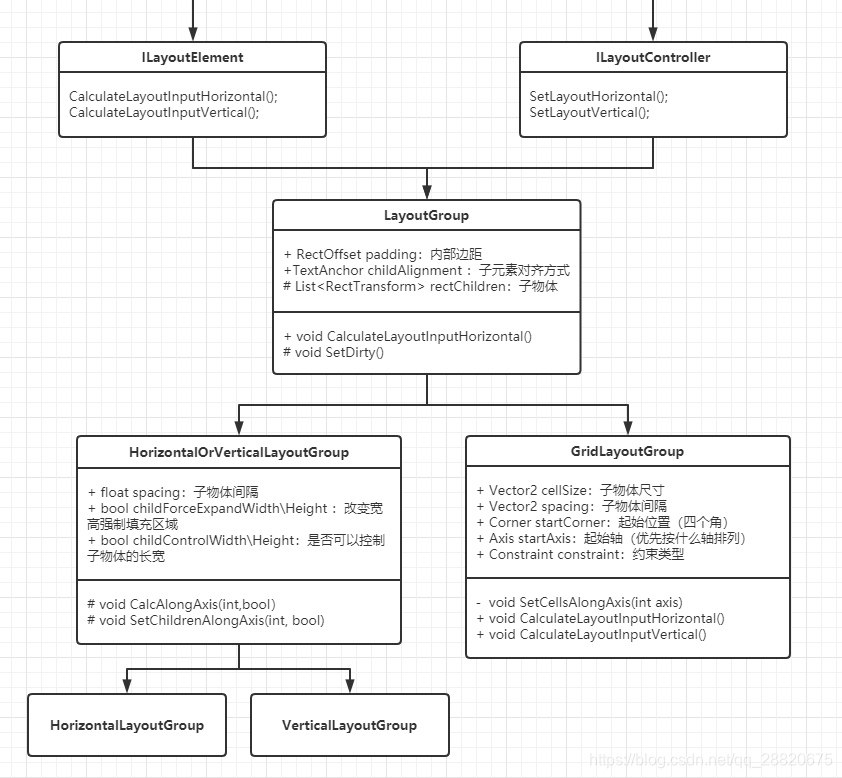
LayoutGroup 是 UGUI 布局系统的抽象基类,HorizontalLayoutGroup、VerticalLayoutGroup、GridLayoutGroup 都继承自它。它把“布局组”的共性部分——收集子元素、汇总子元素的期望尺寸、计算内边距和对齐、设置子元素位置——全部实现好,只留三个抽象方法给子类填具体排列逻辑。

LayoutGroup 的类图如下:

2.1 类定义与接口

1
2
3
4
[DisallowMultipleComponent]
[ExecuteAlways]
[RequireComponent(typeof(RectTransform))]
public abstract class LayoutGroup : UIBehaviour, ILayoutElement, ILayoutGroup
  • abstract:不能直接挂,必须继承。

  • [DisallowMultipleComponent]:同一个 GameObject 上只能有一个布局组——两个布局组同时排列子元素会冲突。

  • [ExecuteAlways]:编辑器非运行状态下也执行,改参数能立刻看到布局变化。

  • 实现 ILayoutElement:布局组自己也是一个“元素”,要向父级布局组汇报自己的期望尺寸。

  • 实现 ILayoutGroup:ILayoutGroup : ILayoutController,所以它也实现了 ILayoutController,负责排列子元素。

2.2 字段与属性

  1. 配置项
1
2
3
4
5
[SerializeField] protected RectOffset m_Padding = new RectOffset();
public RectOffset padding { get; set; }

[SerializeField] protected TextAnchor m_ChildAlignment = TextAnchor.UpperLeft;
public TextAnchor childAlignment { get; set; }

上述的属性在各种布局组件中都有所体现

  1. 缓存的 RectTransform
1
2
3
4
5
6
7
8
9
10
[System.NonSerialized] private RectTransform m_Rect;
protected RectTransform rectTransform
{
get
{
if (m_Rect == null)
m_Rect = GetComponent<RectTransform>();
return m_Rect;
}
}

惰性缓存 RectTransform,避免每次访问都 GetComponent。

  1. DrivenRectTransformTracker(⭐)
1
protected DrivenRectTransformTracker m_Tracker;

这是Unity 提供的驱动属性追踪器。布局组通过 SetChildAlongAxis 设置子元素的 anchorMin / anchorMax / anchoredPosition / sizeDelta 时,会把这些属性登记到 m_Tracker 里,标记为“被布局驱动”。

作用:

  • 防止手动修改冲突:被驱动的属性在 Inspector 里会显示为灰色、不可手动编辑(它们显示为已禁用),避免“布局系统设了、你又手动改”的冲突。

    • DrivenRectTransformTracker 记录的是“当前这一轮,我正在驱动哪些属性”的快照。每轮布局开始前必须 Clear() 清空旧快照,然后用 Add() 逐条登记这一轮实际驱动的属性。不能只 Add 不 Clear——否则会残留已失效的驱动登记、重复登记、列表无限增长,导致驱动关系与实际不符,Inspector 的灰显和 reapplyDrivenProperties 的重应用都会出错。实际上就是实现如下效果:
  • 配合 reapplyDrivenProperties:当布局重建或环境变化时,Unity 会重新应用这些驱动属性,触发 RectTransform.reapplyDrivenProperties 事件——这正是 LayoutRebuilder 静态构造函数里订阅的那个事件。

  • m_Tracker.Clear():在 CalculateLayoutInputHorizontal 和 OnDisable 里清空,重新登记。

  1. 三个总尺寸缓存
1
2
3
private Vector2 m_TotalMinSize = Vector2.zero;
private Vector2 m_TotalPreferredSize = Vector2.zero;
private Vector2 m_TotalFlexibleSize = Vector2.zero;

Vector2 的 x 是水平,y 是垂直。这三个缓存存的是所有子元素汇总后的总期望尺寸——布局组自己的 minWidth / preferredWidth / flexibleWidth 等属性直接返回这些缓存。

  1. 子元素列表
1
2
[System.NonSerialized] private List<RectTransform> m_RectChildren = new List<RectTransform>();
protected List<RectTransform> rectChildren { get { return m_RectChildren; } }

缓存参与布局的子元素(过滤掉 ILayoutIgnorer.ignoreLayout == true 的)。CalculateLayoutInputHorizontal 里填充,子类排列时遍历这个列表。

  1. 六个尺寸属性:返回缓存的总尺寸
1
2
3
4
5
6
7
8
9
10
11
12
public virtual float minWidth { get { return GetTotalMinSize(0); } }
public virtual float preferredWidth { get { return GetTotalPreferredSize(0); } }
public virtual float flexibleWidth { get { return GetTotalFlexibleSize(0); } }
public virtual float minHeight { get { return GetTotalMinSize(1); } }
public virtual float preferredHeight { get { return GetTotalPreferredSize(1); } }
public virtual float flexibleHeight { get { return GetTotalFlexibleSize(1); } }

/// <summary>
/// See LayoutElement.layoutPriority
/// </summary>
public virtual int layoutPriority { get { return 0; } }

  • axis = 0 是水平(x),axis = 1 是垂直(y)。

  • 直接返回 m_TotalMinSize / m_TotalPreferredSize / m_TotalFlexibleSize 的分量。

这些缓存由子类在 CalculateLayoutInputHorizontal / CalculateLayoutInputVertical 里通过 SetLayoutInputForAxis 填充。

layoutPriority 返回 0——布局组作为 ILayoutElement 的优先级是 0,低于 LayoutElement 的默认 1。所以如果子元素上挂了 LayoutElement,它的值会覆盖布局组自己算的。

2.3 ILayoutElement 接口实现

2.3.1 CalculateLayoutInputHorizontal:收集子元素

1
2
3
4
5
6
7
8
9
10
11
12
13
14
15
16
17
18
19
20
21
22
23
24
25
26
27
28
29
30
31
32

public virtual void CalculateLayoutInputHorizontal()
{
m_RectChildren.Clear();
var toIgnoreList = ListPool<Component>.Get();
for (int i = 0; i < rectTransform.childCount; i++)
{
var rect = rectTransform.GetChild(i) as RectTransform;
if (rect == null || !rect.gameObject.activeInHierarchy)
continue;

rect.GetComponents(typeof(ILayoutIgnorer), toIgnoreList);

if (toIgnoreList.Count == 0)
{
m_RectChildren.Add(rect);
continue;
}

for (int j = 0; j < toIgnoreList.Count; j++)
{
var ignorer = (ILayoutIgnorer)toIgnoreList[j];
if (!ignorer.ignoreLayout)
{
m_RectChildren.Add(rect);
break;
}
}
}
ListPool<Component>.Release(toIgnoreList);
m_Tracker.Clear();
}

这个方法在计算阶段被 LayoutRebuilder.PerformLayoutCalculation 调用,做三件事:

  1. 收集参与布局的子元素

遍历所有子 RectTransform,过滤规则:

  • rect == null:不是 RectTransform,跳过。

  • !rect.gameObject.activeInHierarchy:子元素未激活,跳过。

  • 实现了 ILayoutIgnorer 且 ignoreLayout == true:跳过——这就是 LayoutElement 的 Ignore Layout 选项生效的地方。

注意 ILayoutIgnorer 的判断逻辑:一个子元素上可能有多个 ILayoutIgnorer 组件,只要有一个的 ignoreLayout == false,就参与布局。只有所有 ILayoutIgnorer 都返回 true 时,才跳过。这是“多个 ignorer 取并集”的语义。

  1. 清空 m_Tracker

m_Tracker.Clear() 清掉上一轮的驱动登记,准备这一轮重新登记。结果保存在m_RectChildren中

  1. 用 ListPool 复用临时列表

toIgnoreList 从对象池借,用完归还——和 ExecuteEvents 里的 ListPool 是同一个思路,避免每帧分配。

注意它是 virtual 的:GridLayoutGroup 等子类可以重写,但大多数布局组不需要——子元素收集逻辑是通用的。

2.4 抽象方法:子类实现具体排列

1
2
3
public abstract void CalculateLayoutInputVertical();
public abstract void SetLayoutHorizontal();
public abstract void SetLayoutVertical();

三个抽象方法:

方法 阶段 子类做什么
CalculateLayoutInputVertical 计算(垂直) 汇总子元素的垂直期望尺寸,填 m_TotalMinSize 等
SetLayoutHorizontal 控制(水平) 按水平方向排列子元素
SetLayoutVertical 控制(垂直) 按垂直方向排列子元素
  • CalculateLayoutInputHorizontal 是 virtual 且有默认实现(收集子元素),所以子类通常只需要重写这三个。

  • 为什么 CalculateLayoutInputHorizontal 不是抽象的:收集子元素的逻辑对所有布局组都一样,基类实现且必须实现一次子元素收集,因此不为抽象的,另外各子类的水平计算可能有不同,所以定义为了virtual。有了水平方向的保底一次的子元素收集,垂直计算 CalculateLayoutInputVertical就可以写成抽象的了。

2.5 辅助方法

2.5.1 GetTotalMinSize / GetTotalPreferredSize / GetTotalFlexibleSize

1
protected float GetTotalMinSize(int axis) { return m_TotalMinSize[axis]; }

直接读缓存,供六个尺寸属性使用。

2.5.2 SetLayoutInputForAxis:子类填缓存

1
2
3
4
5
6
protected void SetLayoutInputForAxis(float totalMin, float totalPreferred, float totalFlexible, int axis)
{
m_TotalMinSize[axis] = totalMin;
m_TotalPreferredSize[axis] = totalPreferred;
m_TotalFlexibleSize[axis] = totalFlexible;
}

子类在 CalculateLayoutInputHorizontal/Vertical 里算完总尺寸后,调它写进缓存。

2.5.3 GetStartOffset:算第一个子元素的起始位置

1
2
3
4
5
6
7
8
protected float GetStartOffset(int axis, float requiredSpaceWithoutPadding)
{
float requiredSpace = requiredSpaceWithoutPadding + (axis == 0 ? padding.horizontal : padding.vertical);
float availableSpace = rectTransform.rect.size[axis];
float surplusSpace = availableSpace - requiredSpace;
float alignmentOnAxis = GetAlignmentOnAxis(axis);
return (axis == 0 ? padding.left : padding.top) + surplusSpace * alignmentOnAxis;
}

计算第一个子元素在轴向上的起始偏移,考虑三件事:

  • 内边距:padding.left / padding.top。

  • 剩余空间:布局组总尺寸减去“子元素所需空间 + 内边距”。

  • 对齐比例:剩余空间按 childAlignment 分配。

  • 其中,alignmentOnAxis 是一个值为 0、0.5、1 的浮点数,用于表示子物体在给定轴上的对齐方式

举例:垂直布局组高度 500,子元素总共需要 300,padding.top = 10,padding.bottom=10(padding.vertical = padding.top + padding.bottom),childAlignment = MiddleCenter(垂直居中)。surplusSpace = 500 - (300 + 20) = 180,alignmentOnAxis = 0.5,起始偏移 = 10 + 180 * 0.5 = 100——第一个子元素从顶部往下 100 像素开始。

2.5.4 GetAlignmentOnAxis:对齐转比例

1
2
3
4
5
6
7
8
9
10
11
12
13
14
15
16
17
18
19
20
protected float GetAlignmentOnAxis(int axis)
{
if (axis == 0)
return ((int)childAlignment % 3) * 0.5f;
else
return ((int)childAlignment / 3) * 0.5f;
}

public enum TextAnchor
{
UpperLeft,
UpperCenter,
UpperRight,
MiddleLeft,
MiddleCenter,
MiddleRight,
LowerLeft,
LowerCenter,
LowerRight
}

TextAnchor 枚举有 9 个值,按“3×3 网格”排列。(int)childAlignment % 3 得到水平索引(0/1/2),/ 3 得到垂直索引(0/1/2)。乘以 0.5 转成 0 / 0.5 / 1 的比例

2.5.5 SetChildAlongAxis / SetChildAlongAxisWithScale:设置子元素位置/尺寸(⭐)

这是布局组真正“排列子元素”的地方,有两组重载:

1
2
3
4
5
6
7
8
9
10
11
12
13
14
15
16
17
18
19
20
21
22
23
24
25
26
27
28
29
30
31
32
33
34
35
36
37
38
39
40
41
42
43
44
45
46
47
48
49
50
51
52
53
54
55
56
57
58
59
60
61
62
63
64
65
66
67
68
69
70
71
72
// 只设置位置,尺寸不变
protected void SetChildAlongAxis(RectTransform rect, int axis, float pos)
{
if (rect == null)
return;

SetChildAlongAxisWithScale(rect, axis, pos, 1.0f);
}

protected void SetChildAlongAxisWithScale(RectTransform rect, int axis, float pos, float scaleFactor)
{
if (rect == null)
return;

m_Tracker.Add(this, rect,
DrivenTransformProperties.Anchors |
(axis == 0 ? DrivenTransformProperties.AnchoredPositionX : DrivenTransformProperties.AnchoredPositionY));

rect.anchorMin = Vector2.up;
rect.anchorMax = Vector2.up;

Vector2 anchoredPosition = rect.anchoredPosition;
anchoredPosition[axis] = (axis == 0) ? (pos + rect.sizeDelta[axis] * rect.pivot[axis] * scaleFactor)
: (-pos - rect.sizeDelta[axis] * (1f - rect.pivot[axis]) * scaleFactor);
rect.anchoredPosition = anchoredPosition;
}


// 设置位置和尺寸
protected void SetChildAlongAxis(RectTransform rect, int axis, float pos, float size)
{
if (rect == null)
return;

SetChildAlongAxisWithScale(rect, axis, pos, size, 1.0f);
}

/// <summary>
/// Set the position and size of a child layout element along the given axis.
/// </summary>
/// <param name="rect">The RectTransform of the child layout element.</param>
/// <param name="axis">The axis to set the position and size along. 0 is horizontal and 1 is vertical.</param>
/// <param name="pos">The position from the left side or top.</param>
/// <param name="size">The size.</param>
protected void SetChildAlongAxisWithScale(RectTransform rect, int axis, float pos, float size, float scaleFactor)
{
if (rect == null)
return;

m_Tracker.Add(this, rect,
DrivenTransformProperties.Anchors |
(axis == 0 ?
(DrivenTransformProperties.AnchoredPositionX | DrivenTransformProperties.SizeDeltaX) :
(DrivenTransformProperties.AnchoredPositionY | DrivenTransformProperties.SizeDeltaY)
)
);

// Inlined rect.SetInsetAndSizeFromParentEdge(...) and refactored code in order to multiply desired size by scaleFactor.
// sizeDelta must stay the same but the size used in the calculation of the position must be scaled by the scaleFactor.

rect.anchorMin = Vector2.up;
rect.anchorMax = Vector2.up;

Vector2 sizeDelta = rect.sizeDelta;
sizeDelta[axis] = size;
rect.sizeDelta = sizeDelta;

Vector2 anchoredPosition = rect.anchoredPosition;
anchoredPosition[axis] = (axis == 0) ? (pos + size * rect.pivot[axis] * scaleFactor) : (-pos - size * (1f - rect.pivot[axis]) * scaleFactor);
rect.anchoredPosition = anchoredPosition;
}

核心逻辑:

  • 1.登记驱动属性:m_Tracker.Add(this, rect, …) 把要改的属性登记为“被布局驱动”。

  • 2.锚点设为左上:(rect.anchorMin = anchorMax = Vector2.up)——布局组的子元素统一用左上锚点,位置由 anchoredPosition 控制。

  • 3.设置 sizeDelta(如果有 size 参数):直接改子元素尺寸。

  • 4.计算 anchoredPosition:根据 pos、pivot、scaleFactor 算出最终位置。

scaleFactor 的作用:SetChildAlongAxisWithScale 里,sizeDelta 被设置为传入的 size,不乘 scaleFactor——因为 sizeDelta 是本地尺寸,渲染时会自动乘 localScale。而 anchoredPosition 的计算用 size * scaleFactor——因为位置是视觉偏移,必须用缩放后的视觉尺寸来算 pivot 偏移。注释里的 “sizeDelta must stay the same” 指的是“sizeDelta 保持为未缩放的 size”

  • 为什么锚点设成 Vector2.up:Vector2.up 是 (0, 1),即左上角。布局组把所有子元素的锚点统一成左上角,这样 anchoredPosition 就是相对于布局组左上角的位置,排列计算最简单。子元素自己的 pivot 决定“位置点”在元素内部的位置。

可以看出,在 SetChildAlongAxisWithScale 中,会将该子物体的 RectTransform 添加到 m_Tracker 中,表示该子物体的位置和大小由当前布局组件控制。然后根据传入的值设置子物体的位置和大小。但在 SetChildAlongAxis 中,scaleFactor 被固定为 1.0,因此只对子物体有移动的效果。

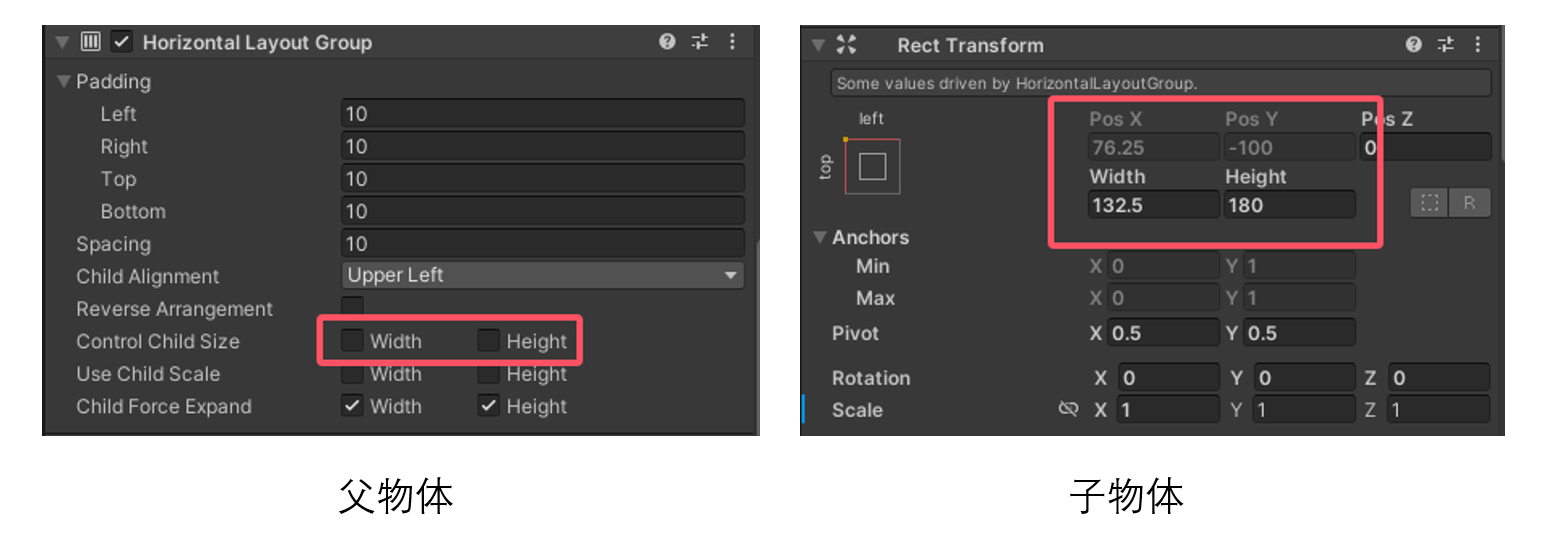
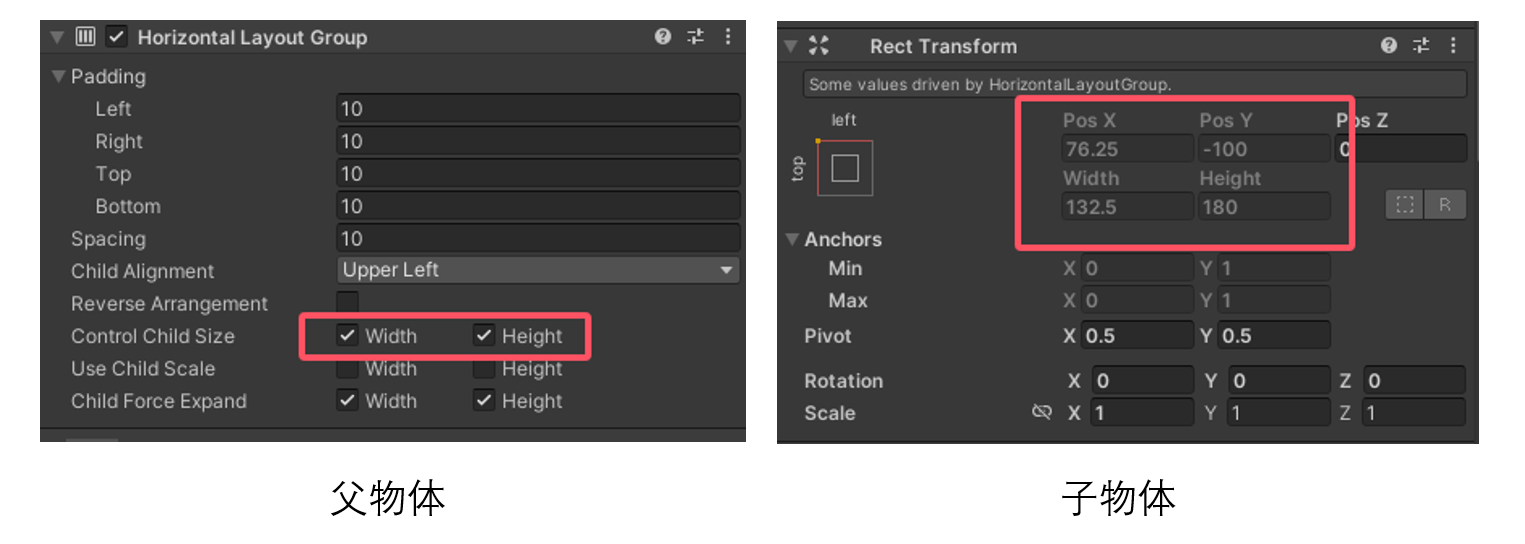
两个重载函数的 m_Tracker 设置并不相同,代表了子物体被布局组件控制的程度不同,以一个例子来说明:


当父物体的 HorizontalLayoutGroup 不勾选 Control Child Size 时,子物体虽然 PosX 与 PosY 均被布局组件控制,但 Width 与 Height 仍然由子物体自身控制。此时在设置布局时,调用的就是没有 size 参数的 SetChildAlongAxisWithScale 函数。


当父物体的 HorizontalLayoutGroup 勾选 Control Child Size 时,子物体的 Width 与 Height 也被布局组件控制。在设置布局时,调用的就是有 size 参数的 SetChildAlongAxisWithScale 函数。

2.6 SetDirty:标脏,带延迟处理(⭐)

1
2
3
4
5
6
7
8
9
10
11
12
13
14
15
16
protected void SetDirty()
{
if (!IsActive())
return;

if (!CanvasUpdateRegistry.IsRebuildingLayout())
LayoutRebuilder.MarkLayoutForRebuild(rectTransform);
else
StartCoroutine(DelayedSetDirty(rectTransform));
}

IEnumerator DelayedSetDirty(RectTransform rectTransform)
{
yield return null;
LayoutRebuilder.MarkLayoutForRebuild(rectTransform);
}

这是 LayoutGroup 和 LayoutElement 标脏逻辑的关键区别:

  • 不在布局重建中:直接 MarkLayoutForRebuild,正常注册到队列。

  • 正在布局重建中(IsRebuildingLayout() == true):不能直接注册——因为 CanvasUpdateRegistry 的布局队列正在被遍历,直接加会破坏遍历。所以用协程延迟一帧,等这一帧布局重建结束,下一帧再注册。

1
这正好呼应之前的 CanvasUpdateRegistry.InternalRegisterCanvasElementForLayoutRebuild 里那段被注释掉的检查——那里本来想“在重建中注册就报错”,但因为 case 739376 注释掉了。LayoutGroup 这边选择主动避免:重建中不直接注册,而是延迟一帧,从源头规避问题。

为什么布局组会在重建中被标脏:布局组排列子元素时,可能改变子元素的尺寸,子元素尺寸变化又触发 OnRectTransformDimensionsChange,进而又标脏。如果直接注册,就撞上“重建中注册”的问题。延迟一帧是安全的兜底。

2.7 生命周期钩子

1
2
3
4
5
protected override void OnEnable()          { base.OnEnable(); SetDirty(); }
protected override void OnDisable() { m_Tracker.Clear(); LayoutRebuilder.MarkLayoutForRebuild(rectTransform); base.OnDisable(); }
protected override void OnDidApplyAnimationProperties() { SetDirty(); }
protected override void OnRectTransformDimensionsChange() { base.OnRectTransformDimensionsChange(); if (isRootLayoutGroup) SetDirty(); }
protected virtual void OnTransformChildrenChanged() { SetDirty(); }
  • OnEnable:布局组启用,开始参与布局,标脏。

  • OnDisable:清空 m_Tracker(不再驱动子元素),然后直接 MarkLayoutForRebuild(不经过 SetDirty 的延迟逻辑,因为禁用时不可能是“重建中”的状态),让周围元素重新排列。

  • OnDidApplyAnimationProperties:动画改了 padding / childAlignment,标脏。

  • OnRectTransformDimensionsChange:自己尺寸变了,标脏——但只有 isRootLayoutGroup 时才标:

    1
    2
    3
    4
    5
    6
    7
    8
    9
    private bool isRootLayoutGroup
    {
    get
    {
    Transform parent = transform.parent;
    if (parent == null) return true;
    return transform.parent.GetComponent(typeof(ILayoutGroup)) == null;
    }
    }
    • 只有“根布局组”(父级没有 ILayoutGroup)才响应自身尺寸变化。为什么?如果自己上面还有父布局组,自己的尺寸是由父布局组排列决定的——父布局组会负责重建,自己不需要再标脏。只有根布局组,尺寸变化来自外部(比如屏幕适配、手动改尺寸),才需要主动标脏。
  • OnTransformChildrenChanged:子元素增删,标脏——布局组需要重新收集子元素、重新排列。

  • OnValidate(编辑器):Inspector 改值,标脏。

2.8 和 LayoutRebuilder 的完整配合

1
2
3
4
5
6
7
8
9
10
11
12
13
14
15
16
17
18
19
20
LayoutGroup 的某个属性变化 / 子元素变化 / 尺寸变化
→ SetDirty()
→ 不在重建中:LayoutRebuilder.MarkLayoutForRebuild(rectTransform)
→ 在重建中:StartCoroutine(DelayedSetDirty) 延迟一帧
→ 向上找布局根(可能是自己,也可能是父级 ILayoutGroup)
→ 注册到 CanvasUpdateRegistry 的布局队列
↓ (帧末 willRenderCanvases)
LayoutRebuilder.Rebuild(CanvasUpdate.Layout)
→ PerformLayoutCalculation(自底向上)
→ LayoutGroup.CalculateLayoutInputHorizontal()
→ 收集子元素(过滤 ILayoutIgnorer)
→ 子类重写里算总尺寸,SetLayoutInputForAxis 填缓存
→ LayoutGroup.CalculateLayoutInputVertical()
→ 子类算垂直总尺寸
→ LayoutGroup 的 minWidth / preferredWidth 等属性被父级读取
→ PerformLayoutControl(自顶向下)
→ LayoutGroup.SetLayoutHorizontal()
→ 子类遍历 rectChildren,SetChildAlongAxis 排列子元素
→ LayoutGroup.SetLayoutVertical()
→ 同上

2.9 总结

维度 设计
双重角色 既是 ILayoutElement(向父级汇报尺寸),又是 ILayoutController(排列子元素)
子元素收集 CalculateLayoutInputHorizontal 统一实现,过滤未激活和 ILayoutIgnorer.ignoreLayout == true 的子元素
尺寸缓存 m_TotalMinSize / m_TotalPreferredSize / m_TotalFlexibleSize,子类通过
驱动追踪 DrivenRectTransformTracker 标记被布局驱动的属性,防止手动修改冲突,配合 reapplyDrivenProperties
排列辅助 GetStartOffset(算起始位置)、GetAlignmentOnAxis(对齐转比例)、SetChildAlongAxis(设位置/尺寸)
标脏延迟 重建中不直接注册,用协程延迟一帧,规避 CanvasUpdateRegistry 的遍历冲突
根布局组判断 OnRectTransformDimensionsChange 只在 isRootLayoutGroup 时标脏,避免非根布局组重复标脏
抽象留白 CalculateLayoutInputVertical / SetLayoutHorizontal / SetLayoutVertical 留给子类实现具体排列逻辑

LayoutGroup 把“布局组”的共性部分全部实现好:收集子元素、汇总尺寸、算内边距和对齐、设置子元素位置、标脏。子类只需要实现三个抽象方法,填具体排列逻辑(水平怎么排、垂直怎么排、总尺寸怎么算)

点击展开
1
2
3
4
5
6
7
8
9
10
11
12
13
14
15
收集子元素(CalculateLayoutInputHorizontal)——遍历子 RectTransform,过滤未激活和 ILayoutIgnorer.ignoreLayout == true 的,填入 m_RectChildren,最后 m_Tracker.Clear()。

汇总尺寸(SetLayoutInputForAxis、GetTotalMinSize / GetTotalPreferredSize / GetTotalFlexibleSize)——子类算完总尺寸后调 SetLayoutInputForAxis 写入 m_TotalMinSize / m_TotalPreferredSize / m_TotalFlexibleSize;六个尺寸属性(minWidth、preferredWidth、flexibleWidth、minHeight、preferredHeight、flexibleHeight)通过三个 GetTotal...Size 读缓存。具体累加逻辑在 HorizontalOrVerticalLayoutGroup.CalcAlongAxis 里。

算内边距和对齐(GetStartOffset、GetAlignmentOnAxis)——GetStartOffset 算第一个子元素起始偏移(含 padding 和剩余空间按对齐比例分配);GetAlignmentOnAxis 把 TextAnchor 转成 0 / 0.5 / 1 的对齐比例。

设置子元素位置(SetChildAlongAxis / SetChildAlongAxisWithScale)——改子元素的 anchorMin / anchorMax / anchoredPosition / sizeDelta,并通过 m_Tracker.Add 登记为驱动属性。

标脏(SetDirty、DelayedSetDirty)——SetDirty 判断是否在布局重建中:不在就 LayoutRebuilder.MarkLayoutForRebuild,在就 StartCoroutine(DelayedSetDirty) 延迟一帧;DelayedSetDirty 是延迟一帧后调 MarkLayoutForRebuild 的协程。

另外补两个和“标脏”配套的:

生命周期触发标脏(OnEnable、OnDisable、OnDidApplyAnimationProperties、OnRectTransformDimensionsChange、OnTransformChildrenChanged、OnValidate)——这些钩子最终都调 SetDirty()(OnDisable 除外,它直接 MarkLayoutForRebuild)。

属性变化触发标脏(SetProperty)——padding 和 childAlignment 的 setter 调它,值变了才 SetDirty()。

三、LayoutUtility

点击展开代码
1
2
3
4
5
6
7
8
9
10
11
12
13
14
15
16
17
18
19
20
21
22
23
24
25
26
27
28
29
30
31
32
33
34
35
36
37
38
39
40
41
42
43
44
45
46
47
48
49
50
51
52
53
54
55
56
57
58
59
60
61
62
63
64
65
66
67
68
69
70
71
72
73
74
75
76
77
78
79
80
81
82
83
84
85
86
87
88
89
90
91
92
93
94
95
96
97
98
99
100
101
102
103
104
105
106
107
108
109
110
111
112
113
114
115
116
117
118
119
120
121
122
123
124
125
126
127
128
129
130
131
132
133
134
135
136
137
138
139
140
141
142
143
144
145
146
147
148
149
150
151
152
153
154
155
156
157
158
159
160
161
162
163
164
165
166
167
168
169
170
171
172
173
174
175
176
177
178
179
180
181
182
183
184
185
186
187
188
using UnityEngine.Pool;

namespace UnityEngine.UI
{
/// <summary>
/// Utility functions for querying layout elements for their minimum, preferred, and flexible sizes.
/// </summary>
public static class LayoutUtility
{
/// <summary>
/// Returns the minimum size of the layout element.
/// </summary>
/// <param name="rect">The RectTransform of the layout element to query.</param>
/// <param name="axis">The axis to query. This can be 0 or 1.</param>
/// <remarks>All components on the GameObject that implement the ILayoutElement are queried. The one with the highest priority which has a value for this setting is used. If multiple componets have this setting and have the same priority, the maximum value out of those is used.</remarks>
public static float GetMinSize(RectTransform rect, int axis)
{
return axis == 0 ? GetMinWidth(rect) : GetMinHeight(rect);
}

/// <summary>
/// Returns the preferred size of the layout element.
/// </summary>
/// <param name="rect">The RectTransform of the layout element to query.</param>
/// <param name="axis">The axis to query. This can be 0 or 1.</param>
/// <remarks>
/// All components on the GameObject that implement the ILayoutElement are queried. The one with the highest priority which has a value for this setting is used. If multiple componets have this setting and have the same priority, the maximum value out of those is used.
/// </remarks>
public static float GetPreferredSize(RectTransform rect, int axis)
{
return axis == 0 ? GetPreferredWidth(rect) : GetPreferredHeight(rect);
}

/// <summary>
/// Returns the flexible size of the layout element.
/// </summary>
/// <remarks>
/// All components on the GameObject that implement the ILayoutElement are queried. The one with the highest priority which has a value for this setting is used. If multiple componets have this setting and have the same priority, the maximum value out of those is used.
/// </remarks>
/// <param name="rect">The RectTransform of the layout element to query.</param>
/// <param name="axis">The axis to query. This can be 0 or 1.</param>
public static float GetFlexibleSize(RectTransform rect, int axis)
{
return axis == 0 ? GetFlexibleWidth(rect) : GetFlexibleHeight(rect);
}

/// <summary>
/// Returns the minimum width of the layout element.
/// </summary>
/// <param name="rect">The RectTransform of the layout element to query.</param>
/// <remarks>
/// All components on the GameObject that implement the ILayoutElement are queried. The one with the highest priority which has a value for this setting is used. If multiple componets have this setting and have the same priority, the maximum value out of those is used.
/// </remarks>
public static float GetMinWidth(RectTransform rect)
{
return GetLayoutProperty(rect, e => e.minWidth, 0);
}

/// <summary>
/// Returns the preferred width of the layout element.
/// </summary>
/// <param name="rect">The RectTransform of the layout element to query.</param>
/// <returns>
/// All components on the GameObject that implement the ILayoutElement are queried. The one with the highest priority which has a value for this setting is used. If multiple componets have this setting and have the same priority, the maximum value out of those is used.
/// </returns>
public static float GetPreferredWidth(RectTransform rect)
{
return Mathf.Max(GetLayoutProperty(rect, e => e.minWidth, 0), GetLayoutProperty(rect, e => e.preferredWidth, 0));
}

/// <summary>
/// Returns the flexible width of the layout element.
/// </summary>
/// <remarks>
/// All components on the GameObject that implement the ILayoutElement are queried. The one with the highest priority which has a value for this setting is used. If multiple componets have this setting and have the same priority, the maximum value out of those is used
/// </remarks>
/// <param name="rect">The RectTransform of the layout element to query.</param>
public static float GetFlexibleWidth(RectTransform rect)
{
return GetLayoutProperty(rect, e => e.flexibleWidth, 0);
}

/// <summary>
/// Returns the minimum height of the layout element.
/// </summary>
/// <param name="rect">The RectTransform of the layout element to query.</param>
/// <remarks>
/// All components on the GameObject that implement the ILayoutElement are queried. The one with the highest priority which has a value for this setting is used. If multiple componets have this setting and have the same priority, the maximum value out of those is used.
/// </remarks>
public static float GetMinHeight(RectTransform rect)
{
return GetLayoutProperty(rect, e => e.minHeight, 0);
}

/// <summary>
/// Returns the preferred height of the layout element.
/// </summary>
/// <param name="rect">The RectTransform of the layout element to query.</param>
/// <remarks>
/// All components on the GameObject that implement the ILayoutElement are queried. The one with the highest priority which has a value for this setting is used. If multiple componets have this setting and have the same priority, the maximum value out of those is used.
/// </remarks>
public static float GetPreferredHeight(RectTransform rect)
{
return Mathf.Max(GetLayoutProperty(rect, e => e.minHeight, 0), GetLayoutProperty(rect, e => e.preferredHeight, 0));
}

/// <summary>
/// Returns the flexible height of the layout element.
/// </summary>
/// <remarks>
/// All components on the GameObject that implement the ILayoutElement are queried. The one with the highest priority which has a value for this setting is used. If multiple componets have this setting and have the same priority, the maximum value out of those is used.
/// </remarks>
/// <param name="rect">The RectTransform of the layout element to query.</param>
public static float GetFlexibleHeight(RectTransform rect)
{
return GetLayoutProperty(rect, e => e.flexibleHeight, 0);
}

/// <summary>
/// Gets a calculated layout property for the layout element with the given RectTransform.
/// </summary>
/// <param name="rect">The RectTransform of the layout element to get a property for.</param>
/// <param name="property">The property to calculate.</param>
/// <param name="defaultValue">The default value to use if no component on the layout element supplies the given property</param>
/// <returns>The calculated value of the layout property.</returns>
public static float GetLayoutProperty(RectTransform rect, System.Func<ILayoutElement, float> property, float defaultValue)
{
ILayoutElement dummy;
return GetLayoutProperty(rect, property, defaultValue, out dummy);
}

/// <summary>
/// Gets a calculated layout property for the layout element with the given RectTransform.
/// </summary>
/// <param name="rect">The RectTransform of the layout element to get a property for.</param>
/// <param name="property">The property to calculate.</param>
/// <param name="defaultValue">The default value to use if no component on the layout element supplies the given property</param>
/// <param name="source">Optional out parameter to get the component that supplied the calculated value.</param>
/// <returns>The calculated value of the layout property.</returns>
public static float GetLayoutProperty(RectTransform rect, System.Func<ILayoutElement, float> property, float defaultValue, out ILayoutElement source)
{
source = null;
if (rect == null)
return 0;
float min = defaultValue;
int maxPriority = System.Int32.MinValue;
var components = ListPool<Component>.Get();
rect.GetComponents(typeof(ILayoutElement), components);

var componentsCount = components.Count;
for (int i = 0; i < componentsCount; i++)
{
var layoutComp = components[i] as ILayoutElement;
if (layoutComp is Behaviour && !((Behaviour)layoutComp).isActiveAndEnabled)
continue;

int priority = layoutComp.layoutPriority;
// If this layout components has lower priority than a previously used, ignore it.
if (priority < maxPriority)
continue;
float prop = property(layoutComp);
// If this layout property is set to a negative value, it means it should be ignored.
if (prop < 0)
continue;

// If this layout component has higher priority than all previous ones,
// overwrite with this one's value.
if (priority > maxPriority)
{
min = prop;
maxPriority = priority;
source = layoutComp;
}
// If the layout component has the same priority as a previously used,
// use the largest of the values with the same priority.
else if (prop > min)
{
min = prop;
source = layoutComp;
}
}

ListPool<Component>.Release(components);
return min;
}
}
}

LayoutUtility 是布局系统的尺寸仲裁工具类,一个纯静态类,没有任何实例状态。它解决的核心问题是:一个 GameObject 上可能挂了多个 ILayoutElement(Text、Image、LayoutElement、LayoutGroup 等),它们的期望尺寸可能冲突,最终该用谁的值?

即返回 LayoutPriority 最高的组件中最大的属性

LayoutGroup 在 CalcAlongAxis 里算子元素尺寸时,最终就是调它来拿值

3.1 GetLayoutProperty

3.1.1 仲裁规则:优先级高者胜,同优先级取最大

GetLayoutProperty 是核心方法,注释写得非常清楚:

1
查询 GameObject 上所有实现 ILayoutElement 的组件。优先级最高的那个,如果它有值,就用它。如果多个组件优先级相同且都有值,取其中的最大值。

拆成三条规则:

规则 代码 含义
优先级低者忽略 if (priority < maxPriority) continue; 已经遇到更高优先级的组件后,低优先级的直接跳过
负值表示忽略 if (prop < 0) continue; 属性返回负数,表示“这个组件不想提供这个值”
优先级高者覆盖 if (priority > maxPriority) 遇到更高优先级,直接用它的值
同优先级取最大 else if (prop > min) 优先级相同,取更大的值

负值规则和 LayoutElement 的默认值 -1 直接对应:LayoutElement 的 6 个尺寸字段默认都是 -1,表示“不覆盖”。GetLayoutProperty 看到 -1 就跳过它,让其他组件(比如 Text 自己算的值)生效。只有你手动设了非负值,LayoutElement 才参与仲裁。

3.1.2 具体代码

1
2
3
4
5
public static float GetLayoutProperty(RectTransform rect, System.Func<ILayoutElement, float> property, float defaultValue)
{
ILayoutElement dummy;
return GetLayoutProperty(rect, property, defaultValue, out dummy);
}

这个重载只是丢弃 source 输出参数,转调下面那个完整版。

1
2
3
4
5
6
7
8
9
10
11
12
13
14
15
16
17
18
19
20
21
22
23
24
25
26
27
28
29
30
31
32
33
34
35
36
37
38
39
40
41
42
43
44
45
46
public static float GetLayoutProperty(RectTransform rect, System.Func<ILayoutElement, float> property, float defaultValue, out ILayoutElement source)
{
source = null;
if (rect == null) return 0;

float min = defaultValue;
int maxPriority = System.Int32.MinValue;
var components = ListPool<Component>.Get();
rect.GetComponents(typeof(ILayoutElement), components);

for (int i = 0; i < components.Count; i++)
{
var layoutComp = components[i] as ILayoutElement;

// 跳过未激活的 Behaviour
if (layoutComp is Behaviour && !((Behaviour)layoutComp).isActiveAndEnabled)
continue;

int priority = layoutComp.layoutPriority;

// 优先级低于当前最高,跳过
if (priority < maxPriority) continue;

float prop = property(layoutComp);

// 负值表示忽略
if (prop < 0) continue;

// 优先级更高,覆盖
if (priority > maxPriority)
{
min = prop;
maxPriority = priority;
source = layoutComp;
}
// 同优先级,取更大值
else if (prop > min)
{
min = prop;
source = layoutComp;
}
}

ListPool<Component>.Release(components);
return min;
}

首先,可以由函数签名看到,GetLayoutProperty 实际上可以获取任意属性,只需要传入一个 Func<ILayoutElement, float> 类型的委托即可。其次,函数内部会遍历 RectTransform 上的所有 ILayoutElement 组件,找到 LayoutPriority 最高的组件中最大的属性值。

out ILayoutElement source:告诉调用方“最终这个值是谁提供的”。调试和扩展时有用——比如你想知道 preferredWidth 到底是 Text 算的还是 LayoutElement 设的,通过 source 就能查到

需要注意的是,这里会直接忽略属性值小于 0 的组件,当一个组件的 minSize 等属性设置为负数时,表示忽略该组件的布局

3.2 其他函数

3.2.1 按轴查询的统一入口 以及 六个具体方向的包装

1
2
3
4
5
6
7
public static float GetMinSize(RectTransform rect, int axis)
{
return axis == 0 ? GetMinWidth(rect) : GetMinHeight(rect);
}
public static float GetPreferredSize(RectTransform rect, int axis) { ... }
public static float GetFlexibleSize(RectTransform rect, int axis) { ... }

axis == 0 走宽度,axis == 1 走高度。这是给 LayoutGroup.CalcAlongAxis 用的——它按 axis 参数统一调,不用自己判断方向。

1
2
3
4
5
6
7
8
9
public static float GetMinWidth(RectTransform rect)
{
return GetLayoutProperty(rect, e => e.minWidth, 0);
}
public static float GetFlexibleWidth(RectTransform rect)
{
return GetLayoutProperty(rect, e => e.flexibleWidth, 0);
}
// ... 同理 minHeight / preferredHeight / flexibleHeight

每个方法把一个 lambda(e => e.minWidth 等)和默认值 0 传给 GetLayoutProperty。e => e.minWidth 就是“从 ILayoutElement 里取 minWidth 属性”的选择器。

3.2.2 preferredWidth / preferredHeight 的特殊处理:

1
2
3
4
5
6
7
public static float GetPreferredWidth(RectTransform rect)
{
return Mathf.Max(
GetLayoutProperty(rect, e => e.minWidth, 0),
GetLayoutProperty(rect, e => e.preferredWidth, 0)
);
}

首选尺寸取 minWidth 和 preferredWidth 的最大值。因为首选尺寸不能小于最小尺寸——如果某个组件说“我最小要 100”,另一个组件说“我首选 80”,那首选值至少得是 100。这是布局的硬约束:preferred >= min。

3.3 在布局流程中的位置

LayoutUtility 被 LayoutGroup.CalcAlongAxis 调用(GetChildSizes 内部):

1
2
3
4
5
LayoutGroup.CalcAlongAxis(axis, isVertical)
→ 遍历 rectChildren
→ GetChildSizes(child, axis, controlSize, useScale, out min, out preferred, out flexible)
→ 内部调 LayoutUtility.GetMinSize / GetPreferredSize / GetFlexibleSize
→ GetLayoutProperty 仲裁:优先级高者胜,同优先级取最大,负值忽略

所以 LayoutGroup 不需要自己处理“多个 ILayoutElement 冲突”,统一交给 LayoutUtility。LayoutGroup 只管“把仲裁后的值按方向累加或取最大”。

四、HorizontalOrVerticalLayoutGroup

点击展开代码
1
2
3
4
5
6
7
8
9
10
11
12
13
14
15
16
17
18
19
20
21
22
23
24
25
26
27
28
29
30
31
32
33
34
35
36
37
38
39
40
41
42
43
44
45
46
47
48
49
50
51
52
53
54
55
56
57
58
59
60
61
62
63
64
65
66
67
68
69
70
71
72
73
74
75
76
77
78
79
80
81
82
83
84
85
86
87
88
89
90
91
92
93
94
95
96
97
98
99
100
101
102
103
104
105
106
107
108
109
110
111
112
113
114
115
116
117
118
119
120
121
122
123
124
125
126
127
128
129
130
131
132
133
134
135
136
137
138
139
140
141
142
143
144
145
146
147
148
149
150
151
152
153
154
155
156
157
158
159
160
161
162
163
164
165
166
167
168
169
170
171
172
173
174
175
176
177
178
179
180
181
182
183
184
185
186
187
188
189
190
191
192
193
194
195
196
197
198
199
200
201
202
203
204
205
206
207
208
209
210
211
212
213
214
215
216
217
218
219
220
221
222
223
224
225
226
227
228
229
230
231
232
233
234
235
236
237
238
239
240
241
242
243
244
245
246
247
248
249
250
251
252
253
254
255
256
257
258
259
260
261
262
263
264
265
266
267
268
269
270
271
272
273
274
275
276
277
278
279
280
281
282
283
284
285
286
287
288
289
290
291
292
293
294
295
296
using System.Collections.Generic;

namespace UnityEngine.UI
{
/// <summary>
/// Abstract base class for HorizontalLayoutGroup and VerticalLayoutGroup to generalize common functionality.
/// </summary>
///
[ExecuteAlways]
public abstract class HorizontalOrVerticalLayoutGroup : LayoutGroup
{
[SerializeField] protected float m_Spacing = 0;

/// <summary>
/// The spacing to use between layout elements in the layout group.
/// </summary>
public float spacing { get { return m_Spacing; } set { SetProperty(ref m_Spacing, value); } }

[SerializeField] protected bool m_ChildForceExpandWidth = true;

/// <summary>
/// Whether to force the children to expand to fill additional available horizontal space.
/// </summary>
public bool childForceExpandWidth { get { return m_ChildForceExpandWidth; } set { SetProperty(ref m_ChildForceExpandWidth, value); } }

[SerializeField] protected bool m_ChildForceExpandHeight = true;

/// <summary>
/// Whether to force the children to expand to fill additional available vertical space.
/// </summary>
public bool childForceExpandHeight { get { return m_ChildForceExpandHeight; } set { SetProperty(ref m_ChildForceExpandHeight, value); } }

[SerializeField] protected bool m_ChildControlWidth = true;

/// <summary>
/// Returns true if the Layout Group controls the widths of its children. Returns false if children control their own widths.
/// </summary>
/// <remarks>
/// If set to false, the layout group will only affect the positions of the children while leaving the widths untouched. The widths of the children can be set via the respective RectTransforms in this case.
///
/// If set to true, the widths of the children are automatically driven by the layout group according to their respective minimum, preferred, and flexible widths. This is useful if the widths of the children should change depending on how much space is available.In this case the width of each child cannot be set manually in the RectTransform, but the minimum, preferred and flexible width for each child can be controlled by adding a LayoutElement component to it.
/// </remarks>
public bool childControlWidth { get { return m_ChildControlWidth; } set { SetProperty(ref m_ChildControlWidth, value); } }

[SerializeField] protected bool m_ChildControlHeight = true;

/// <summary>
/// Returns true if the Layout Group controls the heights of its children. Returns false if children control their own heights.
/// </summary>
/// <remarks>
/// If set to false, the layout group will only affect the positions of the children while leaving the heights untouched. The heights of the children can be set via the respective RectTransforms in this case.
///
/// If set to true, the heights of the children are automatically driven by the layout group according to their respective minimum, preferred, and flexible heights. This is useful if the heights of the children should change depending on how much space is available.In this case the height of each child cannot be set manually in the RectTransform, but the minimum, preferred and flexible height for each child can be controlled by adding a LayoutElement component to it.
/// </remarks>
public bool childControlHeight { get { return m_ChildControlHeight; } set { SetProperty(ref m_ChildControlHeight, value); } }

[SerializeField] protected bool m_ChildScaleWidth = false;

/// <summary>
/// Whether to use the x scale of each child when calculating its width.
/// </summary>
public bool childScaleWidth { get { return m_ChildScaleWidth; } set { SetProperty(ref m_ChildScaleWidth, value); } }

[SerializeField] protected bool m_ChildScaleHeight = false;

/// <summary>
/// Whether to use the y scale of each child when calculating its height.
/// </summary>
public bool childScaleHeight { get { return m_ChildScaleHeight; } set { SetProperty(ref m_ChildScaleHeight, value); } }

/// <summary>
/// Whether the order of children objects should be sorted in reverse.
/// </summary>
/// <remarks>
/// If False the first child object will be positioned first.
/// If True the last child object will be positioned first.
/// </remarks>
public bool reverseArrangement { get { return m_ReverseArrangement; } set { SetProperty(ref m_ReverseArrangement, value); } }

[SerializeField] protected bool m_ReverseArrangement = false;

/// <summary>
/// Calculate the layout element properties for this layout element along the given axis.
/// </summary>
/// <param name="axis">The axis to calculate for. 0 is horizontal and 1 is vertical.</param>
/// <param name="isVertical">Is this group a vertical group?</param>
protected void CalcAlongAxis(int axis, bool isVertical)
{
float combinedPadding = (axis == 0 ? padding.horizontal : padding.vertical);
bool controlSize = (axis == 0 ? m_ChildControlWidth : m_ChildControlHeight);
bool useScale = (axis == 0 ? m_ChildScaleWidth : m_ChildScaleHeight);
bool childForceExpandSize = (axis == 0 ? m_ChildForceExpandWidth : m_ChildForceExpandHeight);

float totalMin = combinedPadding;
float totalPreferred = combinedPadding;
float totalFlexible = 0;

bool alongOtherAxis = (isVertical ^ (axis == 1));
var rectChildrenCount = rectChildren.Count;
for (int i = 0; i < rectChildrenCount; i++)
{
RectTransform child = rectChildren[i];
float min, preferred, flexible;
GetChildSizes(child, axis, controlSize, childForceExpandSize, out min, out preferred, out flexible);

if (useScale)
{
float scaleFactor = child.localScale[axis];
min *= scaleFactor;
preferred *= scaleFactor;
flexible *= scaleFactor;
}

if (alongOtherAxis)
{
totalMin = Mathf.Max(min + combinedPadding, totalMin);
totalPreferred = Mathf.Max(preferred + combinedPadding, totalPreferred);
totalFlexible = Mathf.Max(flexible, totalFlexible);
}
else
{
totalMin += min + spacing;
totalPreferred += preferred + spacing;

// Increment flexible size with element's flexible size.
totalFlexible += flexible;
}
}

if (!alongOtherAxis && rectChildren.Count > 0)
{
totalMin -= spacing;
totalPreferred -= spacing;
}
totalPreferred = Mathf.Max(totalMin, totalPreferred);
SetLayoutInputForAxis(totalMin, totalPreferred, totalFlexible, axis);
}

/// <summary>
/// Set the positions and sizes of the child layout elements for the given axis.
/// </summary>
/// <param name="axis">The axis to handle. 0 is horizontal and 1 is vertical.</param>
/// <param name="isVertical">Is this group a vertical group?</param>
protected void SetChildrenAlongAxis(int axis, bool isVertical)
{
float size = rectTransform.rect.size[axis];
bool controlSize = (axis == 0 ? m_ChildControlWidth : m_ChildControlHeight);
bool useScale = (axis == 0 ? m_ChildScaleWidth : m_ChildScaleHeight);
bool childForceExpandSize = (axis == 0 ? m_ChildForceExpandWidth : m_ChildForceExpandHeight);
float alignmentOnAxis = GetAlignmentOnAxis(axis);

bool alongOtherAxis = (isVertical ^ (axis == 1));
int startIndex = m_ReverseArrangement ? rectChildren.Count - 1 : 0;
int endIndex = m_ReverseArrangement ? 0 : rectChildren.Count;
int increment = m_ReverseArrangement ? -1 : 1;
if (alongOtherAxis)
{
float innerSize = size - (axis == 0 ? padding.horizontal : padding.vertical);

for (int i = startIndex; m_ReverseArrangement ? i >= endIndex : i < endIndex; i += increment)
{
RectTransform child = rectChildren[i];
float min, preferred, flexible;
GetChildSizes(child, axis, controlSize, childForceExpandSize, out min, out preferred, out flexible);
float scaleFactor = useScale ? child.localScale[axis] : 1f;

float requiredSpace = Mathf.Clamp(innerSize, min, flexible > 0 ? size : preferred);
float startOffset = GetStartOffset(axis, requiredSpace * scaleFactor);
if (controlSize)
{
SetChildAlongAxisWithScale(child, axis, startOffset, requiredSpace, scaleFactor);
}
else
{
float offsetInCell = (requiredSpace - child.sizeDelta[axis]) * alignmentOnAxis;
SetChildAlongAxisWithScale(child, axis, startOffset + offsetInCell, scaleFactor);
}
}
}
else
{
float pos = (axis == 0 ? padding.left : padding.top);
float itemFlexibleMultiplier = 0;
float surplusSpace = size - GetTotalPreferredSize(axis);

if (surplusSpace > 0)
{
if (GetTotalFlexibleSize(axis) == 0)
pos = GetStartOffset(axis, GetTotalPreferredSize(axis) - (axis == 0 ? padding.horizontal : padding.vertical));
else if (GetTotalFlexibleSize(axis) > 0)
itemFlexibleMultiplier = surplusSpace / GetTotalFlexibleSize(axis);
}

float minMaxLerp = 0;
if (GetTotalMinSize(axis) != GetTotalPreferredSize(axis))
minMaxLerp = Mathf.Clamp01((size - GetTotalMinSize(axis)) / (GetTotalPreferredSize(axis) - GetTotalMinSize(axis)));

for (int i = startIndex; m_ReverseArrangement ? i >= endIndex : i < endIndex; i += increment)
{
RectTransform child = rectChildren[i];
float min, preferred, flexible;
GetChildSizes(child, axis, controlSize, childForceExpandSize, out min, out preferred, out flexible);
float scaleFactor = useScale ? child.localScale[axis] : 1f;

float childSize = Mathf.Lerp(min, preferred, minMaxLerp);
childSize += flexible * itemFlexibleMultiplier;
if (controlSize)
{
SetChildAlongAxisWithScale(child, axis, pos, childSize, scaleFactor);
}
else
{
float offsetInCell = (childSize - child.sizeDelta[axis]) * alignmentOnAxis;
SetChildAlongAxisWithScale(child, axis, pos + offsetInCell, scaleFactor);
}
pos += childSize * scaleFactor + spacing;
}
}
}

private void GetChildSizes(RectTransform child, int axis, bool controlSize, bool childForceExpand,
out float min, out float preferred, out float flexible)
{
if (!controlSize)
{
min = child.sizeDelta[axis];
preferred = min;
flexible = 0;
}
else
{
min = LayoutUtility.GetMinSize(child, axis);
preferred = LayoutUtility.GetPreferredSize(child, axis);
flexible = LayoutUtility.GetFlexibleSize(child, axis);
}

if (childForceExpand)
flexible = Mathf.Max(flexible, 1);
}

#if UNITY_EDITOR
protected override void Reset()
{
base.Reset();

// For new added components we want these to be set to false,
// so that the user's sizes won't be overwritten before they
// have a chance to turn these settings off.
// However, for existing components that were added before this
// feature was introduced, we want it to be on be default for
// backwardds compatibility.
// Hence their default value is on, but we set to off in reset.
m_ChildControlWidth = false;
m_ChildControlHeight = false;
}

private int m_Capacity = 10;
private Vector2[] m_Sizes = new Vector2[10];

protected virtual void Update()
{
if (Application.isPlaying)
return;

int count = transform.childCount;

if (count > m_Capacity)
{
if (count > m_Capacity * 2)
m_Capacity = count;
else
m_Capacity *= 2;

m_Sizes = new Vector2[m_Capacity];
}

// If children size change in editor, update layout (case 945680 - Child GameObjects in a Horizontal/Vertical Layout Group don't display their correct position in the Editor)
bool dirty = false;
for (int i = 0; i < count; i++)
{
RectTransform t = transform.GetChild(i) as RectTransform;
if (t != null && t.sizeDelta != m_Sizes[i])
{
dirty = true;
m_Sizes[i] = t.sizeDelta;
}
}

if (dirty)
LayoutRebuilder.MarkLayoutForRebuild(transform as RectTransform);
}

#endif
}
}

HorizontalOrVerticalLayoutGroup 是 LayoutGroup 的中间抽象子类,夹在 LayoutGroup 和 HorizontalLayoutGroup / VerticalLayoutGroup 之间。它的存在是为了把“水平排列”和“垂直排列”的共性逻辑统一实现,让两个具体子类只需要设置一个 isVertical 标志,不用各写一遍
- 它用 isVertical ^ (axis == 1) 这一个判断,把“同轴累加”和“异轴取最大值”两种模式统一成一套代码

4.1 继承关系与定位

1
2
3
4
LayoutGroup(抽象基类:收集子元素、汇总尺寸、内边距对齐、标脏)
└── HorizontalOrVerticalLayoutGroup(抽象中间类:统一水平/垂直的排列逻辑)
├── HorizontalLayoutGroup(只设置 isVertical = false)
└── VerticalLayoutGroup(只设置 isVertical = true)

4.2 配置字段:六个开关 + 间距 + 反向排列

1
2
3
4
5
6
7
8
9
10
11
12
13
14
15
16
17
18
19
20
21
22
23
24
25
26
27
public abstract class HorizontalOrVerticalLayoutGroup : LayoutGroup
{
[SerializeField] protected float m_Spacing = 0;
public float spacing { get { return m_Spacing; } set { SetProperty(ref m_Spacing, value); } }

[SerializeField] protected bool m_ChildForceExpandWidth = true;
public bool childForceExpandWidth { get { return m_ChildForceExpandWidth; } set { SetProperty(ref m_ChildForceExpandWidth, value); } }

[SerializeField] protected bool m_ChildForceExpandHeight = true;
public bool childForceExpandHeight { get { return m_ChildForceExpandHeight; } set { SetProperty(ref m_ChildForceExpandHeight, value); } }

[SerializeField] protected bool m_ChildControlWidth = true;
public bool childControlWidth { get { return m_ChildControlWidth; } set { SetProperty(ref m_ChildControlWidth, value); } }

[SerializeField] protected bool m_ChildControlHeight = true;
public bool childControlHeight { get { return m_ChildControlHeight; } set { SetProperty(ref m_ChildControlHeight, value); } }

[SerializeField] protected bool m_ChildScaleWidth = false;
public bool childScaleWidth { get { return m_ChildScaleWidth; } set { SetProperty(ref m_ChildScaleWidth, value); } }

[SerializeField] protected bool m_ChildScaleHeight = false;
public bool childScaleHeight { get { return m_ChildScaleHeight; } set { SetProperty(ref m_ChildScaleHeight, value); } }

public bool reverseArrangement { get { return m_ReverseArrangement; } set { SetProperty(ref m_ReverseArrangement, value); } }

[SerializeField] protected bool m_ReverseArrangement = false;
}

字段 默认值 作用
m_Spacing 0 子元素之间的间距
m_ChildForceExpandWidth true 是否强制子元素在水平方向扩展,填满多余空间
m_ChildForceExpandHeight true 是否强制子元素在垂直方向扩展
m_ChildControlWidth true 布局组是否控制子元素的宽度(否则子元素自己决定宽度)
m_ChildControlHeight true 布局组是否控制子元素的高度
m_ChildScaleWidth false 计算宽度时是否乘子元素的 localScale.x
m_ChildScaleHeight false 计算高度时是否乘子元素的 localScale.y
m_ReverseArrangement false 是否反向排列(最后一个子元素排在最前)

所有属性的 setter 都走 SetProperty——值变了才标脏,和 LayoutElement 的模式一致。

childControlWidth / childControlHeight 是最关键的两个开关,注释解释得很清楚:

  • true:子元素的尺寸由布局组根据 LayoutUtility 仲裁出的 min / preferred / flexible 自动驱动。子元素的 RectTransform 尺寸不能手动改,但可以通过挂 LayoutElement 控制期望值。

  • false:布局组只改子元素的位置,不改尺寸。子元素尺寸由它自己的 RectTransform.sizeDelta 决定。

4.3 CalcAlongAxis:计算阶段(⭐)

1
2
3
4
5
6
7
8
9
10
11
12
13
14
15
16
17
18
19
20
21
22
23
24
25
26
27
28
29
30
31
32
33
34
35
36
37
38
39
40
41
42
43
44
45
46
47
48
49
50
51
52
53
54
55
56
/// <summary>
/// Calculate the layout element properties for this layout element along the given axis.
/// </summary>
/// <param name="axis">The axis to calculate for. 0 is horizontal and 1 is vertical.</param>
/// <param name="isVertical">Is this group a vertical group?</param>
protected void CalcAlongAxis(int axis, bool isVertical)
{
float combinedPadding = (axis == 0 ? padding.horizontal : padding.vertical);
bool controlSize = (axis == 0 ? m_ChildControlWidth : m_ChildControlHeight);
bool useScale = (axis == 0 ? m_ChildScaleWidth : m_ChildScaleHeight);
bool childForceExpandSize = (axis == 0 ? m_ChildForceExpandWidth : m_ChildForceExpandHeight);

float totalMin = combinedPadding;
float totalPreferred = combinedPadding;
float totalFlexible = 0;

bool alongOtherAxis = (isVertical ^ (axis == 1));
var rectChildrenCount = rectChildren.Count;
for (int i = 0; i < rectChildrenCount; i++)
{
RectTransform child = rectChildren[i];
float min, preferred, flexible;
GetChildSizes(child, axis, controlSize, childForceExpandSize, out min, out preferred, out flexible);

if (useScale)
{
float scaleFactor = child.localScale[axis];
min *= scaleFactor;
preferred *= scaleFactor;
flexible *= scaleFactor;
}

if (alongOtherAxis)
{
totalMin = Mathf.Max(min + combinedPadding, totalMin);
totalPreferred = Mathf.Max(preferred + combinedPadding, totalPreferred);
totalFlexible = Mathf.Max(flexible, totalFlexible);
}
else
{
totalMin += min + spacing;
totalPreferred += preferred + spacing;

// Increment flexible size with element's flexible size.
totalFlexible += flexible;
}
}

if (!alongOtherAxis && rectChildren.Count > 0)
{
totalMin -= spacing;
totalPreferred -= spacing;
}
totalPreferred = Mathf.Max(totalMin, totalPreferred);
SetLayoutInputForAxis(totalMin, totalPreferred, totalFlexible, axis);
}

CalcAlongAxis 函数用于遍历子物体并计算在指定轴上 LayoutGroup 本身的 min、preferred、flexible 大小。

先说结论,CalcAlongAxis 函数的处理逻辑为:当要计算的轴与布局方向一致时,会将子物体的 min、preferred、flexible 大小累加,当要计算的轴与布局方向不一致时,会将子物体的 min、preferred、flexible 大小取最大值;最后会调用 SetLayoutInputForAxis 函数更新布局属性

是 CalculateLayoutInputHorizontal / CalculateLayoutInputVertical 最终调用的方法,负责汇总所有子元素的期望尺寸

1
protected void CalcAlongAxis(int axis, bool isVertical)
  • axis:当前计算哪个方向(0 水平、1 垂直)。

  • isVertical:这个布局组本身是不是垂直排列

  1. 核心判断
1
bool alongOtherAxis = (isVertical ^ (axis == 1));

alongOtherAxis == false 表示“排列方向 == 计算方向”,走累加;true 表示“排列方向 != 计算方向”,走取最大值。

  1. 累加分支(同轴)
1
2
3
totalMin += min + spacing;
totalPreferred += preferred + spacing;
totalFlexible += flexible;

子元素沿排列方向排开,总尺寸是累加的。比如水平组算水平尺寸,宽度之和就是总宽度。

  1. 取最大值分支(异轴)
1
2
3
totalMin = Mathf.Max(min + combinedPadding, totalMin);
totalPreferred = Mathf.Max(preferred + combinedPadding, totalPreferred);
totalFlexible = Mathf.Max(flexible, totalFlexible);

子元素在垂直于排列方向的方向上并排,总尺寸取最大的那个。比如水平组算垂直尺寸,取最高的子元素高度就够了。

  1. 循环后的收尾
1
2
3
4
5
6
7
if (!alongOtherAxis && rectChildren.Count > 0)
{
totalMin -= spacing;
totalPreferred -= spacing;
}
totalPreferred = Mathf.Max(totalMin, totalPreferred);
SetLayoutInputForAxis(totalMin, totalPreferred, totalFlexible, axis);
  • 累加分支多减一个 spacing:因为累加时每个子元素后面都加了 spacing,最后一个子元素后面不该有间距。取最大值分支没有累加 spacing,不需要减。

  • totalPreferred = Mathf.Max(totalMin, totalPreferred):保证 preferred >= min,和 LayoutUtility.GetPreferredWidth 里的 Mathf.Max 是同一个约束。

  • SetLayoutInputForAxis:把算好的三个值写进 m_TotalMinSize / m_TotalPreferredSize / m_TotalFlexibleSize,供 LayoutGroup 的六个尺寸属性读取。

4.4 SetChildrenAlongAxis:控制阶段(⭐)

点击展开代码
1
2
3
4
5
6
7
8
9
10
11
12
13
14
15
16
17
18
19
20
21
22
23
24
25
26
27
28
29
30
31
32
33
34
35
36
37
38
39
40
41
42
43
44
45
46
47
48
49
50
51
52
53
54
55
56
57
58
59
60
61
62
63
64
65
66
67
68
69
70
71
72
73
74
75
76
77
78
79
80
81
/// <summary>
/// Set the positions and sizes of the child layout elements for the given axis.
/// </summary>
/// <param name="axis">The axis to handle. 0 is horizontal and 1 is vertical.</param>
/// <param name="isVertical">Is this group a vertical group?</param>
protected void SetChildrenAlongAxis(int axis, bool isVertical)
{
float size = rectTransform.rect.size[axis];
bool controlSize = (axis == 0 ? m_ChildControlWidth : m_ChildControlHeight);
bool useScale = (axis == 0 ? m_ChildScaleWidth : m_ChildScaleHeight);
bool childForceExpandSize = (axis == 0 ? m_ChildForceExpandWidth : m_ChildForceExpandHeight);
float alignmentOnAxis = GetAlignmentOnAxis(axis);

bool alongOtherAxis = (isVertical ^ (axis == 1));
int startIndex = m_ReverseArrangement ? rectChildren.Count - 1 : 0;
int endIndex = m_ReverseArrangement ? 0 : rectChildren.Count;
int increment = m_ReverseArrangement ? -1 : 1;
if (alongOtherAxis)
{
float innerSize = size - (axis == 0 ? padding.horizontal : padding.vertical);

for (int i = startIndex; m_ReverseArrangement ? i >= endIndex : i < endIndex; i += increment)
{
RectTransform child = rectChildren[i];
float min, preferred, flexible;
GetChildSizes(child, axis, controlSize, childForceExpandSize, out min, out preferred, out flexible);
float scaleFactor = useScale ? child.localScale[axis] : 1f;

float requiredSpace = Mathf.Clamp(innerSize, min, flexible > 0 ? size : preferred);
float startOffset = GetStartOffset(axis, requiredSpace * scaleFactor);
if (controlSize)
{
SetChildAlongAxisWithScale(child, axis, startOffset, requiredSpace, scaleFactor);
}
else
{
float offsetInCell = (requiredSpace - child.sizeDelta[axis]) * alignmentOnAxis;
SetChildAlongAxisWithScale(child, axis, startOffset + offsetInCell, scaleFactor);
}
}
}
else
{
float pos = (axis == 0 ? padding.left : padding.top);
float itemFlexibleMultiplier = 0;
float surplusSpace = size - GetTotalPreferredSize(axis);

if (surplusSpace > 0)
{
if (GetTotalFlexibleSize(axis) == 0)
pos = GetStartOffset(axis, GetTotalPreferredSize(axis) - (axis == 0 ? padding.horizontal : padding.vertical));
else if (GetTotalFlexibleSize(axis) > 0)
itemFlexibleMultiplier = surplusSpace / GetTotalFlexibleSize(axis);
}

float minMaxLerp = 0;
if (GetTotalMinSize(axis) != GetTotalPreferredSize(axis))
minMaxLerp = Mathf.Clamp01((size - GetTotalMinSize(axis)) / (GetTotalPreferredSize(axis) - GetTotalMinSize(axis)));

for (int i = startIndex; m_ReverseArrangement ? i >= endIndex : i < endIndex; i += increment)
{
RectTransform child = rectChildren[i];
float min, preferred, flexible;
GetChildSizes(child, axis, controlSize, childForceExpandSize, out min, out preferred, out flexible);
float scaleFactor = useScale ? child.localScale[axis] : 1f;

float childSize = Mathf.Lerp(min, preferred, minMaxLerp);
childSize += flexible * itemFlexibleMultiplier;
if (controlSize)
{
SetChildAlongAxisWithScale(child, axis, pos, childSize, scaleFactor);
}
else
{
float offsetInCell = (childSize - child.sizeDelta[axis]) * alignmentOnAxis;
SetChildAlongAxisWithScale(child, axis, pos + offsetInCell, scaleFactor);
}
pos += childSize * scaleFactor + spacing;
}
}
}

这是 SetLayoutHorizontal / SetLayoutVertical 最终调用的方法,负责设置子元素的位置和尺寸。

1
protected void SetChildrenAlongAxis(int axis, bool isVertical)
  1. 布局属性的获取
1
2
3
4
5
6

float size = rectTransform.rect.size[axis];
bool controlSize = (axis == 0 ? m_ChildControlWidth : m_ChildControlHeight);
bool useScale = (axis == 0 ? m_ChildScaleWidth : m_ChildScaleHeight);
bool childForceExpandSize = (axis == 0 ? m_ChildForceExpandWidth : m_ChildForceExpandHeight);
float alignmentOnAxis = GetAlignmentOnAxis(axis);

首先还是一些布局属性的获取,不知道大家是否还记得 GetAlignmentOnAxis,该函数定义在 LayoutGroup 中,返回值是一个 0、0.5、1 的浮点数,用于计算子物体的起始位置。

  1. 同轴/异轴分支和 CalcAlongAxis 一样:
1
bool alongOtherAxis = (isVertical ^ (axis == 1));
  1. 异轴分支(alongOtherAxis == true):子元素在垂直于排列方向的方向上并排。
1
2
3
4
5
6
7
8
9
10
11
12
13
14
15
16
17
18
19
float innerSize = size - (axis == 0 ? padding.horizontal : padding.vertical);

for (int i = startIndex; m_ReverseArrangement ? i >= endIndex : i < endIndex; i += increment)
{
GetChildSizes(child, axis, controlSize, childForceExpandSize, out min, out preferred, out flexible);
float scaleFactor = useScale ? child.localScale[axis] : 1f;

float requiredSpace = Mathf.Clamp(innerSize, min, flexible > 0 ? size : preferred);
float startOffset = GetStartOffset(axis, requiredSpace * scaleFactor);
if (controlSize)
{
SetChildAlongAxisWithScale(child, axis, startOffset, requiredSpace, scaleFactor);
}
else
{
float offsetInCell = (requiredSpace - child.sizeDelta[axis]) * alignmentOnAxis;
SetChildAlongAxisWithScale(child, axis, startOffset + offsetInCell, scaleFactor);
}
}
  • innerSize:布局组在该方向上的可用空间(扣掉内边距)。

  • requiredSpace = Mathf.Clamp(innerSize, min, flexible > 0 ? size : preferred):子元素在该方向上占用的空间,夹在 min 和“有弹性则用全部 size、否则用 preferred”之间。

  • GetStartOffset:算起始偏移,含内边距和对齐。异轴方向每个子元素都独立居中/对齐,所以每个子元素都调一次 GetStartOffset。

  • controlSize == false:布局组不改子元素尺寸,只改位置。offsetInCell 把子元素在可用空间内按对齐方式偏移。

当沿着其他轴排列时,布局的设置就比较简单了,无需考虑其他子物体的位置,只需要根据布局属性设置子物体的位置和大小即可。会根据 controlSize 的值,分别调用不同的 SetChildAlongAxisWithScale 重载。

可以看到,alignmentOnAxis 这一属性只在 controlSize 为 false 时才会被使用。由于不调整子物体的大小,因此需要根据 alignmentOnAxis 来计算子物体的起始位置。而在 controlSize 为 true 时,子物体的大小由布局组件控制,实际上全部都以 UpperLeft 的方式排列

  1. 同轴分支(alongOtherAxis == false):子元素沿排列方向依次排开(⭐⭐)
1
2
3
4
5
6
7
8
9
10
11
12
13
14
15
16
17
18
19
20
21
22
23
24
25
26
27
28
float pos = (axis == 0 ? padding.left : padding.top);
float itemFlexibleMultiplier = 0;
float surplusSpace = size - GetTotalPreferredSize(axis);

if (surplusSpace > 0)
{
if (GetTotalFlexibleSize(axis) == 0)
pos = GetStartOffset(axis, GetTotalPreferredSize(axis) - (axis == 0 ? padding.horizontal : padding.vertical));
else if (GetTotalFlexibleSize(axis) > 0)
itemFlexibleMultiplier = surplusSpace / GetTotalFlexibleSize(axis);
}

float minMaxLerp = 0;
if (GetTotalMinSize(axis) != GetTotalPreferredSize(axis))
minMaxLerp = Mathf.Clamp01((size - GetTotalMinSize(axis)) / (GetTotalPreferredSize(axis) - GetTotalMinSize(axis)));

for (...)
{
float childSize = Mathf.Lerp(min, preferred, minMaxLerp);
childSize += flexible * itemFlexibleMultiplier;

if (controlSize)
SetChildAlongAxisWithScale(child, axis, pos, childSize, scaleFactor);
else
SetChildAlongAxisWithScale(child, axis, pos + offsetInCell, scaleFactor);

pos += childSize * scaleFactor + spacing;
}

这段是同轴排列的核心逻辑,分三步:

(1) 第一步:处理多余空间 surplusSpace

1
2
3
float pos = (axis == 0 ? padding.left : padding.top);
float itemFlexibleMultiplier = 0;
float surplusSpace = size - GetTotalPreferredSize(axis);

首先,还是计算出了一些布局要用到的参数

其中,pos 代表子物体的起始位置,itemFlexibleMultiplier 代表每一单位的 flexible 能够分配到多少空间,surplusSpace 代表供 flexible 分配的剩余空间

  • 可能这里 flexible 的分配方式有些难以理解,我们以公式说明,假设所有子物体的 flexible 之和为 ftotalf_{\text{total}},剩余空间为 SS,当前子物体的 flexible 为 fif_i,则当前子物体能够分配到的额外空间 sis_i 为:
si=Sftotal⋅fi s_i = \frac{S}{f_{\text{total}}} \cdot f_i

这里预先计算处理的 itemFlexibleMultiplier 就是 Sftotal\frac{S}{f_{\text{total}}}

1
2
3
4
5
6
7
if (surplusSpace > 0)
{
if (GetTotalFlexibleSize(axis) == 0)
pos = GetStartOffset(axis, GetTotalPreferredSize(axis) - (axis == 0 ? padding.horizontal : padding.vertical));
else if (GetTotalFlexibleSize(axis) > 0)
itemFlexibleMultiplier = surplusSpace / GetTotalFlexibleSize(axis);
}

布局组实际尺寸 size 减去所有子元素的首选尺寸之和。如果还有多余空间:

    • 没有弹性子元素(GetTotalFlexibleSize == 0):不拉伸,用 GetStartOffset 按对齐方式分配剩余空间——整体居中/靠右等。

    • 有弹性子元素(GetTotalFlexibleSize > 0):算 itemFlexibleMultiplier = surplusSpace / GetTotalFlexibleSize(axis),每个子元素按自己的 flexible 比例瓜分多余空间。(也就是上面提到的公式)

(1) 第二步:算 minMaxLerp

1
minMaxLerp = Mathf.Clamp01((size - GetTotalMinSize(axis)) / (GetTotalPreferredSize(axis) - GetTotalMinSize(axis)));

布局组实际尺寸在 min 和 preferred 之间的比例。如果 size 刚好等于 min,minMaxLerp = 0;等于 preferred,minMaxLerp = 1。用这个比例对每个子元素的 min 和 preferred 做 Lerp,让子元素尺寸随可用空间平滑变化。

(3) 第三步:逐个设置子元素

1
2
3
4
5
6
7
8
9
10
11
12
13
14
15
16
17
18
19
20
for (int i = startIndex; m_ReverseArrangement ? i >= endIndex : i < endIndex; i += increment)
{
RectTransform child = rectChildren[i];
float min, preferred, flexible;
GetChildSizes(child, axis, controlSize, childForceExpandSize, out min, out preferred, out flexible);
float scaleFactor = useScale ? child.localScale[axis] : 1f;

float childSize = Mathf.Lerp(min, preferred, minMaxLerp);
childSize += flexible * itemFlexibleMultiplier;
if (controlSize)
{
SetChildAlongAxisWithScale(child, axis, pos, childSize, scaleFactor);
}
else
{
float offsetInCell = (childSize - child.sizeDelta[axis]) * alignmentOnAxis;
SetChildAlongAxisWithScale(child, axis, pos + offsetInCell, scaleFactor);
}
pos += childSize * scaleFactor + spacing;
}

最后就是遍历子物体并设置子物体的位置和大小了,这里的逻辑与沿着其他轴排列的逻辑类似,但有两点不同:

子物体的大小由自身的大小及 minMaxLerp 与 itemFlexibleMultiplier 这两个布局属性共同决定。

  • 子元素尺寸 = min 到 preferred 之间的插值 + 按弹性比例分到的多余空间。

子物体的起始位置要进行排列,因此在遍历时会为 pos 加上子物体的大小和 spacing。

(4) 反向排列

1
2
3
int startIndex = m_ReverseArrangement ? rectChildren.Count - 1 : 0;
int endIndex = m_ReverseArrangement ? 0 : rectChildren.Count;
int increment = m_ReverseArrangement ? -1 : 1;

reverseArrangement == true 时从最后一个子元素开始、倒序遍历。位置 pos 仍然从 padding.left / padding.top 开始递增,所以视觉上“最后一个子元素排在最前面”。

4.5 GetChildSizes:获取子元素尺寸

1
2
3
4
5
6
7
8
9
10
11
12
13
14
15
16
17
18
19
private void GetChildSizes(RectTransform child, int axis, bool controlSize, bool childForceExpand,
out float min, out float preferred, out float flexible)
{
if (!controlSize)
{
min = child.sizeDelta[axis];
preferred = min;
flexible = 0;
}
else
{
min = LayoutUtility.GetMinSize(child, axis);
preferred = LayoutUtility.GetPreferredSize(child, axis);
flexible = LayoutUtility.GetFlexibleSize(child, axis);
}

if (childForceExpand)
flexible = Mathf.Max(flexible, 1);
}

两种模式:

  • controlSize == false:布局组不控制尺寸,直接用子元素当前的 sizeDelta 作为 min / preferred,flexible = 0。

  • controlSize == true:通过 LayoutUtility 仲裁子元素上所有 ILayoutElement 的值(GetLayoutProperty 就在这里被用到)。

childForceExpand:如果开了强制扩展,flexible 至少设为 1。这样即使子元素自己没有弹性(flexible = 0),也会被强制拉伸,填满多余空间。这就是 childForceExpandWidth / childForceExpandHeight 开关的实际作用。

4.6 总结

HorizontalOrVerticalLayoutGroup 是 LayoutGroup 的子类,用于实现水平和垂直布局。在类中实现了两个重要的函数: CalcAlongAxis 和 SetChildrenAlongAxis 用于在不同的轴上计算和设置子物体的位置与大小。由于需要考虑多种布局属性,因此这两个函数也较为复杂,但带来的好处就是 HorizontalLayoutGroup 和 VerticalLayoutGroup 只需要少量的代码即可实现水平和垂直布局。

另外需要注意的是,HorizontalOrVerticalLayoutGroup只做单行/单列的处理,多行多列由 GridLayoutGroup 自己处理,后面我们具体提到

五、HorizontalLayoutGroup & VerticalLayoutGroup

实现了HorizontalOrVerticalLayoutGroup后,这两个类就坐享其成了。两个类通过继承HorizontalOrVerticalLayoutGroup,直接调用相关的接口

1
2
3
4
5
6
7
8
9
10
11
12
13
14
15
16
17
18
19
20
21
22
23
24
25
26
27
28
29
30
31
32
33
34
35
36
37
38
39
40
41
42
43
[AddComponentMenu("Layout/Horizontal Layout Group", 150)]
/// <summary>
/// Layout class for arranging child elements side by side.
/// </summary>
public class HorizontalLayoutGroup : HorizontalOrVerticalLayoutGroup
{
protected HorizontalLayoutGroup()
{}

/// <summary>
/// Called by the layout system. Also see ILayoutElement
/// </summary>
public override void CalculateLayoutInputHorizontal()
{
base.CalculateLayoutInputHorizontal();
CalcAlongAxis(0, false);
}

/// <summary>
/// Called by the layout system. Also see ILayoutElement
/// </summary>
public override void CalculateLayoutInputVertical()
{
CalcAlongAxis(1, false);
}

/// <summary>
/// Called by the layout system. Also see ILayoutElement
/// </summary>
public override void SetLayoutHorizontal()
{
SetChildrenAlongAxis(0, false);
}

/// <summary>
/// Called by the layout system. Also see ILayoutElement
/// </summary>
public override void SetLayoutVertical()
{
SetChildrenAlongAxis(1, false);
}
}

第一个方法多了一行 base.CalculateLayoutInputHorizontal():因为父类 LayoutGroup.CalculateLayoutInputHorizontal 的默认实现负责收集子元素,HorizontalLayoutGroup 必须先调 base 把子元素收进 rectChildren,再调 CalcAlongAxis 算水平尺寸。其他三个方法不需要 base,因为垂直计算和两个设置阶段都不需要重新收集子元素。

六、VerticalLayoutGroup

该类与HorizontalLayoutGroup同理

1
2
3
4
5
6
7
8
9
10
11
12
13
14
15
16
17
18
19
20
21
22
23
24
25
26
27
28
29
30
31
32
33
34
35
36
37
38
39
40
41
42
43
44
45
46
namespace UnityEngine.UI
{
[AddComponentMenu("Layout/Vertical Layout Group", 151)]
/// <summary>
/// Layout child layout elements below each other.
/// </summary>
public class VerticalLayoutGroup : HorizontalOrVerticalLayoutGroup
{
protected VerticalLayoutGroup()
{}

/// <summary>
/// Called by the layout system. Also see ILayoutElement
/// </summary>
public override void CalculateLayoutInputHorizontal()
{
base.CalculateLayoutInputHorizontal();
CalcAlongAxis(0, true);
}

/// <summary>
/// Called by the layout system. Also see ILayoutElement
/// </summary>
public override void CalculateLayoutInputVertical()
{
CalcAlongAxis(1, true);
}

/// <summary>
/// Called by the layout system. Also see ILayoutElement
/// </summary>
public override void SetLayoutHorizontal()
{
SetChildrenAlongAxis(0, true);
}

/// <summary>
/// Called by the layout system. Also see ILayoutElement
/// </summary>
public override void SetLayoutVertical()
{
SetChildrenAlongAxis(1, true);
}
}
}

七、GridLayoutGroup

GridLayoutGroup 用于实现网格布局,不同于 HorizontalLayoutGroup 和 VerticalLayoutGroup,GridLayoutGroup 直接继承自 LayoutGroup,并在类中实现了自己的布局逻辑

点击展开代码
1
2
3
4
5
6
7
8
9
10
11
12
13
14
15
16
17
18
19
20
21
22
23
24
25
26
27
28
29
30
31
32
33
34
35
36
37
38
39
40
41
42
43
44
45
46
47
48
49
50
51
52
53
54
55
56
57
58
59
60
61
62
63
64
65
66
67
68
69
70
71
72
73
74
75
76
77
78
79
80
81
82
83
84
85
86
87
88
89
90
91
92
93
94
95
96
97
98
99
100
101
102
103
104
105
106
107
108
109
110
111
112
113
114
115
116
117
118
119
120
121
122
123
124
125
126
127
128
129
130
131
132
133
134
135
136
137
138
139
140
141
142
143
144
145
146
147
148
149
150
151
152
153
154
155
156
157
158
159
160
161
162
163
164
165
166
167
168
169
170
171
172
173
174
175
176
177
178
179
180
181
182
183
184
185
186
187
188
189
190
191
192
193
194
195
196
197
198
199
200
201
202
203
204
205
206
207
208
209
210
211
212
213
214
215
216
217
218
219
220
221
222
223
224
225
226
227
228
229
230
231
232
233
234
235
236
237
238
239
240
241
242
243
244
245
246
247
248
249
250
251
252
253
254
255
256
257
258
259
260
261
262
263
264
265
266
267
268
269
270
271
272
273
274
275
276
277
278
279
280
281
282
283
284
285
286
287
288
289
290
291
292
293
294
295
296
297
298
299
300
301
302
303
304
305
306
307
308
309
310
311
312
313
314
315
316
317
318
319
320
321
322
323
324
325
326
327
328
329
330
331
332
333
334
335
336
337
338
339
340
341
342
343
344
345
346
347
348
349
350
351
352
353
354
355
using UnityEngine;
using System.Collections.Generic;

namespace UnityEngine.UI
{
[AddComponentMenu("Layout/Grid Layout Group", 152)]
/// <summary>
/// Layout class to arrange child elements in a grid format.
/// </summary>
/// <remarks>
/// The GridLayoutGroup component is used to layout child layout elements in a uniform grid where all cells have the same size. The size and the spacing between cells is controlled by the GridLayoutGroup itself. The children have no influence on their sizes.
/// </remarks>
public class GridLayoutGroup : LayoutGroup
{
/// <summary>
/// Which corner is the starting corner for the grid.
/// </summary>
public enum Corner
{
/// <summary>
/// Upper Left corner.
/// </summary>
UpperLeft = 0,
/// <summary>
/// Upper Right corner.
/// </summary>
UpperRight = 1,
/// <summary>
/// Lower Left corner.
/// </summary>
LowerLeft = 2,
/// <summary>
/// Lower Right corner.
/// </summary>
LowerRight = 3
}

/// <summary>
/// The grid axis we are looking at.
/// </summary>
/// <remarks>
/// As the storage is a [][] we make access easier by passing a axis.
/// </remarks>
public enum Axis
{
/// <summary>
/// Horizontal axis
/// </summary>
Horizontal = 0,
/// <summary>
/// Vertical axis.
/// </summary>
Vertical = 1
}

/// <summary>
/// Constraint type on either the number of columns or rows.
/// </summary>
public enum Constraint
{
/// <summary>
/// Don't constrain the number of rows or columns.
/// </summary>
Flexible = 0,
/// <summary>
/// Constrain the number of columns to a specified number.
/// </summary>
FixedColumnCount = 1,
/// <summary>
/// Constraint the number of rows to a specified number.
/// </summary>
FixedRowCount = 2
}

[SerializeField] protected Corner m_StartCorner = Corner.UpperLeft;

/// <summary>
/// Which corner should the first cell be placed in?
/// </summary>
public Corner startCorner { get { return m_StartCorner; } set { SetProperty(ref m_StartCorner, value); } }

[SerializeField] protected Axis m_StartAxis = Axis.Horizontal;

/// <summary>
/// Which axis should cells be placed along first
/// </summary>
/// <remarks>
/// When startAxis is set to horizontal, an entire row will be filled out before proceeding to the next row. When set to vertical, an entire column will be filled out before proceeding to the next column.
/// </remarks>
public Axis startAxis { get { return m_StartAxis; } set { SetProperty(ref m_StartAxis, value); } }

[SerializeField] protected Vector2 m_CellSize = new Vector2(100, 100);

/// <summary>
/// The size to use for each cell in the grid.
/// </summary>
public Vector2 cellSize { get { return m_CellSize; } set { SetProperty(ref m_CellSize, value); } }

[SerializeField] protected Vector2 m_Spacing = Vector2.zero;

/// <summary>
/// The spacing to use between layout elements in the grid on both axises.
/// </summary>
public Vector2 spacing { get { return m_Spacing; } set { SetProperty(ref m_Spacing, value); } }

[SerializeField] protected Constraint m_Constraint = Constraint.Flexible;

/// <summary>
/// Which constraint to use for the GridLayoutGroup.
/// </summary>
/// <remarks>
/// Specifying a constraint can make the GridLayoutGroup work better in conjunction with a [[ContentSizeFitter]] component. When GridLayoutGroup is used on a RectTransform with a manually specified size, there's no need to specify a constraint.
/// </remarks>
public Constraint constraint { get { return m_Constraint; } set { SetProperty(ref m_Constraint, value); } }

[SerializeField] protected int m_ConstraintCount = 2;

/// <summary>
/// How many cells there should be along the constrained axis.
/// </summary>
public int constraintCount { get { return m_ConstraintCount; } set { SetProperty(ref m_ConstraintCount, Mathf.Max(1, value)); } }

protected GridLayoutGroup()
{}

#if UNITY_EDITOR
protected override void OnValidate()
{
base.OnValidate();
constraintCount = constraintCount;
}

#endif

/// <summary>
/// Called by the layout system to calculate the horizontal layout size.
/// Also see ILayoutElement
/// </summary>
public override void CalculateLayoutInputHorizontal()
{
base.CalculateLayoutInputHorizontal();

int minColumns = 0;
int preferredColumns = 0;
if (m_Constraint == Constraint.FixedColumnCount)
{
minColumns = preferredColumns = m_ConstraintCount;
}
else if (m_Constraint == Constraint.FixedRowCount)
{
minColumns = preferredColumns = Mathf.CeilToInt(rectChildren.Count / (float)m_ConstraintCount - 0.001f);
}
else
{
minColumns = 1;
preferredColumns = Mathf.CeilToInt(Mathf.Sqrt(rectChildren.Count));
}

SetLayoutInputForAxis(
padding.horizontal + (cellSize.x + spacing.x) * minColumns - spacing.x,
padding.horizontal + (cellSize.x + spacing.x) * preferredColumns - spacing.x,
-1, 0);
}

/// <summary>
/// Called by the layout system to calculate the vertical layout size.
/// Also see ILayoutElement
/// </summary>
public override void CalculateLayoutInputVertical()
{
int minRows = 0;
if (m_Constraint == Constraint.FixedColumnCount)
{
minRows = Mathf.CeilToInt(rectChildren.Count / (float)m_ConstraintCount - 0.001f);
}
else if (m_Constraint == Constraint.FixedRowCount)
{
minRows = m_ConstraintCount;
}
else
{
float width = rectTransform.rect.width;
int cellCountX = Mathf.Max(1, Mathf.FloorToInt((width - padding.horizontal + spacing.x + 0.001f) / (cellSize.x + spacing.x)));
minRows = Mathf.CeilToInt(rectChildren.Count / (float)cellCountX);
}

float minSpace = padding.vertical + (cellSize.y + spacing.y) * minRows - spacing.y;
SetLayoutInputForAxis(minSpace, minSpace, -1, 1);
}

/// <summary>
/// Called by the layout system
/// Also see ILayoutElement
/// </summary>
public override void SetLayoutHorizontal()
{
SetCellsAlongAxis(0);
}

/// <summary>
/// Called by the layout system
/// Also see ILayoutElement
/// </summary>
public override void SetLayoutVertical()
{
SetCellsAlongAxis(1);
}

private void SetCellsAlongAxis(int axis)
{
// Normally a Layout Controller should only set horizontal values when invoked for the horizontal axis
// and only vertical values when invoked for the vertical axis.
// However, in this case we set both the horizontal and vertical position when invoked for the vertical axis.
// Since we only set the horizontal position and not the size, it shouldn't affect children's layout,
// and thus shouldn't break the rule that all horizontal layout must be calculated before all vertical layout.
var rectChildrenCount = rectChildren.Count;
if (axis == 0)
{
// Only set the sizes when invoked for horizontal axis, not the positions.

for (int i = 0; i < rectChildrenCount; i++)
{
RectTransform rect = rectChildren[i];

m_Tracker.Add(this, rect,
DrivenTransformProperties.Anchors |
DrivenTransformProperties.AnchoredPosition |
DrivenTransformProperties.SizeDelta);

rect.anchorMin = Vector2.up;
rect.anchorMax = Vector2.up;
rect.sizeDelta = cellSize;
}
return;
}

float width = rectTransform.rect.size.x;
float height = rectTransform.rect.size.y;

int cellCountX = 1;
int cellCountY = 1;
if (m_Constraint == Constraint.FixedColumnCount)
{
cellCountX = m_ConstraintCount;

if (rectChildrenCount > cellCountX)
cellCountY = rectChildrenCount / cellCountX + (rectChildrenCount % cellCountX > 0 ? 1 : 0);
}
else if (m_Constraint == Constraint.FixedRowCount)
{
cellCountY = m_ConstraintCount;

if (rectChildrenCount > cellCountY)
cellCountX = rectChildrenCount / cellCountY + (rectChildrenCount % cellCountY > 0 ? 1 : 0);
}
else
{
if (cellSize.x + spacing.x <= 0)
cellCountX = int.MaxValue;
else
cellCountX = Mathf.Max(1, Mathf.FloorToInt((width - padding.horizontal + spacing.x + 0.001f) / (cellSize.x + spacing.x)));

if (cellSize.y + spacing.y <= 0)
cellCountY = int.MaxValue;
else
cellCountY = Mathf.Max(1, Mathf.FloorToInt((height - padding.vertical + spacing.y + 0.001f) / (cellSize.y + spacing.y)));
}

int cornerX = (int)startCorner % 2;
int cornerY = (int)startCorner / 2;

int cellsPerMainAxis, actualCellCountX, actualCellCountY;
if (startAxis == Axis.Horizontal)
{
cellsPerMainAxis = cellCountX;
actualCellCountX = Mathf.Clamp(cellCountX, 1, rectChildrenCount);

if (m_Constraint == Constraint.FixedRowCount)
actualCellCountY = Mathf.Min(cellCountY, rectChildrenCount);
else
actualCellCountY = Mathf.Clamp(cellCountY, 1, Mathf.CeilToInt(rectChildrenCount / (float)cellsPerMainAxis));
}
else
{
cellsPerMainAxis = cellCountY;
actualCellCountY = Mathf.Clamp(cellCountY, 1, rectChildrenCount);

if (m_Constraint == Constraint.FixedColumnCount)
actualCellCountX = Mathf.Min(cellCountX, rectChildrenCount);
else
actualCellCountX = Mathf.Clamp(cellCountX, 1, Mathf.CeilToInt(rectChildrenCount / (float)cellsPerMainAxis));
}

Vector2 requiredSpace = new Vector2(
actualCellCountX * cellSize.x + (actualCellCountX - 1) * spacing.x,
actualCellCountY * cellSize.y + (actualCellCountY - 1) * spacing.y
);
Vector2 startOffset = new Vector2(
GetStartOffset(0, requiredSpace.x),
GetStartOffset(1, requiredSpace.y)
);

// Fixes case 1345471 - Makes sure the constraint column / row amount is always respected
int childrenToMove = 0;
if (rectChildrenCount > m_ConstraintCount && Mathf.CeilToInt((float)rectChildrenCount / (float)cellsPerMainAxis) < m_ConstraintCount)
{
childrenToMove = m_ConstraintCount - Mathf.CeilToInt((float)rectChildrenCount / (float)cellsPerMainAxis);
childrenToMove += Mathf.FloorToInt((float)childrenToMove / ((float)cellsPerMainAxis - 1));
if (rectChildrenCount % cellsPerMainAxis == 1)
childrenToMove += 1;
}

for (int i = 0; i < rectChildrenCount; i++)
{
int positionX;
int positionY;
if (startAxis == Axis.Horizontal)
{
if (m_Constraint == Constraint.FixedRowCount && rectChildrenCount - i <= childrenToMove)
{
positionX = 0;
positionY = m_ConstraintCount - (rectChildrenCount - i);
}
else
{
positionX = i % cellsPerMainAxis;
positionY = i / cellsPerMainAxis;
}
}
else
{
if (m_Constraint == Constraint.FixedColumnCount && rectChildrenCount - i <= childrenToMove)
{
positionX = m_ConstraintCount - (rectChildrenCount - i);
positionY = 0;
}
else
{
positionX = i / cellsPerMainAxis;
positionY = i % cellsPerMainAxis;
}
}

if (cornerX == 1)
positionX = actualCellCountX - 1 - positionX;
if (cornerY == 1)
positionY = actualCellCountY - 1 - positionY;

SetChildAlongAxis(rectChildren[i], 0, startOffset.x + (cellSize[0] + spacing[0]) * positionX, cellSize[0]);
SetChildAlongAxis(rectChildren[i], 1, startOffset.y + (cellSize[1] + spacing[1]) * positionY, cellSize[1]);
}
}
}
}

7.1 配置字段与枚举

  1. 三个枚举:
1
2
3
4
5
6
7
8
9
10
11
12
13
14
15
16
17
18
19
20
21
22
23
24
25
26
27
28
29
30
31
32
33
34
35
36
37
38
39
40
41
42
43
44
45
46
47
48
49
50
public enum Corner
{
/// <summary>
/// Upper Left corner.
/// </summary>
UpperLeft = 0,
/// <summary>
/// Upper Right corner.
/// </summary>
UpperRight = 1,
/// <summary>
/// Lower Left corner.
/// </summary>
LowerLeft = 2,
/// <summary>
/// Lower Right corner.
/// </summary>
LowerRight = 3
}

public enum Axis
{
/// <summary>
/// Horizontal axis
/// </summary>
Horizontal = 0,
/// <summary>
/// Vertical axis.
/// </summary>
Vertical = 1
}

/// <summary>
/// Constraint type on either the number of columns or rows.
/// </summary>
public enum Constraint
{
/// <summary>
/// Don't constrain the number of rows or columns.
/// </summary>
Flexible = 0,
/// <summary>
/// Constrain the number of columns to a specified number.
/// </summary>
FixedColumnCount = 1,
/// <summary>
/// Constraint the number of rows to a specified number.
/// </summary>
FixedRowCount = 2
}
枚举 值 作用
Corner UpperLeft / UpperRight / LowerLeft / LowerRight 网格从哪个角落开始排列
Axis Horizontal / Vertical 先沿哪个轴填充(先填满一行再换行,还是先填满一列再换列)
Constraint Flexible / FixedColumnCount / FixedRowCount 列数/行数是否固定
  1. 配置字段
1
2
3
4
5
6
7
8
9
10
11
12
13
14
15
16
17
18
[SerializeField] protected Corner m_StartCorner = Corner.UpperLeft;
public Corner startCorner { get { return m_StartCorner; } set { SetProperty(ref m_StartCorner, value); } }

[SerializeField] protected Axis m_StartAxis = Axis.Horizontal;
public Axis startAxis { get { return m_StartAxis; } set { SetProperty(ref m_StartAxis, value); } }

[SerializeField] protected Vector2 m_CellSize = new Vector2(100, 100);
public Vector2 cellSize { get { return m_CellSize; } set { SetProperty(ref m_CellSize, value); } }

[SerializeField] protected Vector2 m_Spacing = Vector2.zero;
public Vector2 spacing { get { return m_Spacing; } set { SetProperty(ref m_Spacing, value); } }

[SerializeField] protected Constraint m_Constraint = Constraint.Flexible;
public Constraint constraint { get { return m_Constraint; } set { SetProperty(ref m_Constraint, value); } }

[SerializeField] protected int m_ConstraintCount = 2;
public int constraintCount { get { return m_ConstraintCount; } set { SetProperty(ref m_ConstraintCount, Mathf.Max(1, value)); } }

|字段| 默认值| 作用|
|m_StartCorner| UpperLeft| 起始角落|
|m_StartAxis| Horizontal| 起始轴(先横着填还是先竖着填)|
|m_CellSize| (100, 100)| 每个格子的尺寸|
|m_Spacing| (0, 0)| 格子之间的间距(x 横向、y 纵向)|
|m_Constraint| Flexible| 约束类型|
|m_ConstraintCount| 2| 约束数量(固定列数或固定行数时用)|

所有属性 setter 都走 SetProperty——值变了才标脏。constraintCount 的 setter 额外做了 Mathf.Max(1, value),保证至少为 1。

7.2 CalculateLayoutInputHorizontal:算列数、算水平尺寸

1
2
3
4
5
6
7
8
9
10
11
12
13
14
15
16
17
18
19
20
21
22
23
24
25
public override void CalculateLayoutInputHorizontal()
{
base.CalculateLayoutInputHorizontal(); // 收集子元素

int minColumns = 0;
int preferredColumns = 0;
if (m_Constraint == Constraint.FixedColumnCount)
{
minColumns = preferredColumns = m_ConstraintCount;
}
else if (m_Constraint == Constraint.FixedRowCount)
{
minColumns = preferredColumns = Mathf.CeilToInt(rectChildren.Count / (float)m_ConstraintCount - 0.001f);
}
else
{
minColumns = 1;
preferredColumns = Mathf.CeilToInt(Mathf.Sqrt(rectChildren.Count));
}

SetLayoutInputForAxis(
padding.horizontal + (cellSize.x + spacing.x) * minColumns - spacing.x,
padding.horizontal + (cellSize.x + spacing.x) * preferredColumns - spacing.x,
-1, 0);
}

列数怎么定,取决于 constraint(约束类型)

constraint(约束类型) minColumns值 preferredColumns值
FixedColumnCount m_ConstraintCount 同 minColumns
FixedRowCount ceil(子元素数 / 行数) 同 minColumns
Flexible 1 ceil(sqrt(子元素数))(尽量排成正方形)
1
FixedRowCount 的 -0.001f:Mathf.CeilToInt(count / rows - 0.001f) 是防止浮点误差导致多算一列。比如 10 / 5 = 2.0,直接 CeilToInt(2.0) = 2,没问题;但 10 / 3 ≈ 3.333,CeilToInt(3.333) = 4,也正确。-0.001f 主要处理 count / rows 恰好是整数时,浮点运算可能得到 2.0000001 这种值,CeilToInt 会错误地变成 3,减去 0.001f 后变成 1.9999991,CeilToInt 正确返回 2。

尺寸公式:

1
padding.horizontal + (cellSize.x + spacing.x) * 列数 - spacing.x

展开就是:padding.left + padding.right + 列数 * cellSize.x + (列数 - 1) * spacing.x。减去一个 spacing.x 是因为最后一个格子后面不应该有间距——列数 * spacing.x 多算了一个,减掉。

flexibleWidth 传 -1:网格布局的宽度是固定算出来的,不参与弹性分配。-1 在 LayoutUtility 的仲裁规则里表示“这个组件不提供弹性值”。

7.3 CalculateLayoutInputVertical:算行数、算垂直尺寸

1
2
3
4
5
6
7
8
9
10
11
12
13
14
15
16
17
18
19
20
21
public override void CalculateLayoutInputVertical()
{
int minRows = 0;
if (m_Constraint == Constraint.FixedColumnCount)
{
minRows = Mathf.CeilToInt(rectChildren.Count / (float)m_ConstraintCount - 0.001f);
}
else if (m_Constraint == Constraint.FixedRowCount)
{
minRows = m_ConstraintCount;
}
else
{
float width = rectTransform.rect.width;
int cellCountX = Mathf.Max(1, Mathf.FloorToInt((width - padding.horizontal + spacing.x + 0.001f) / (cellSize.x + spacing.x)));
minRows = Mathf.CeilToInt(rectChildren.Count / (float)cellCountX);
}

float minSpace = padding.vertical + (cellSize.y + spacing.y) * minRows - spacing.y;
SetLayoutInputForAxis(minSpace, minSpace, -1, 1);
}

行数怎么定:

constraint(约束模式) 行数
FixedColumnCount ceil(子元素数 / 列数)
FixedRowCount m_ConstraintCount
Flexible 先用当前宽度反推能放几列 cellCountX,再 ceil(子元素数 / cellCountX)

Flexible 模式的反推列数:

1
int cellCountX = Mathf.Max(1, Mathf.FloorToInt((width - padding.horizontal + spacing.x + 0.001f) / (cellSize.x + spacing.x)));

(width - padding.horizontal + spacing.x) / (cellSize.x + spacing.x) 是“当前宽度能放几个格子”的推导。加 spacing.x 是因为最后一个格子后面没有间距;加 0.001f 是防浮点误差。FloorToInt 向下取整——放不下一个完整格子就不算一列。Mathf.Max(1, …) 保证至少 1 列。

垂直尺寸没有 preferred 和 min 的区别:SetLayoutInputForAxis(minSpace, minSpace, -1, 1) 里 min 和 preferred 都传 minSpace。因为网格的行数是确定的,垂直尺寸也是确定的,不需要“最小”和“首选”两个值。

1
2
3
4
为什么 Flexible 模式下,水平要区分“最少 1 列”和“理想 sqrt 列”,而垂直只有一个确定值?

核心原因:水平是“主动提期望”,垂直是“基于已定宽度算确定值”
水平方向:CalculateLayoutInputHorizontal 执行时,GridLayoutGroup 还不知道自己最终会被给多宽。它只能向父级(或 ContentSizeFitter)“报价”。水平算完了宽度也就定了,也对应布局系统的“水平先于垂直”原则。

7.4 SetLayoutHorizontal / SetLayoutVertical:都转给 SetCellsAlongAxis

1
2
public override void SetLayoutHorizontal()  { SetCellsAlongAxis(0); }
public override void SetLayoutVertical() { SetCellsAlongAxis(1); }

SetCellsAlongAxis(0) 只设尺寸、SetCellsAlongAxis(1) 才设位置 ,具体详解下面介绍

7.5 SetCellsAlongAxis 详细拆解(⭐)

  1. 先看函数注释说明了解到:
1
通常 LayoutController 在水平轴调用时只设水平值,垂直轴调用时只设垂直值。但这里在垂直轴调用时同时设置了水平和垂直位置。因为只设位置不设尺寸,不影响子元素布局,所以不违反“所有水平布局必须先于垂直布局计算”的规则。
  • axis == 1的分支中,同时设置了水平和垂直位置
    1
    2
    SetChildAlongAxis(rectChildren[i], 0, startOffset.x + (cellSize[0] + spacing[0]) * positionX, cellSize[0]);  // ← 设 x 位置
    SetChildAlongAxis(rectChildren[i], 1, startOffset.y + (cellSize[1] + spacing[1]) * positionY, cellSize[1]); // ← 设 y 位置
  • LayoutRebuilder.Rebuild 的四阶段顺序 表明了 “所有水平布局必须先于垂直布局计算”的规则
  1. 为什么不在 axis == 0 时就把位置也设了?
    因为 axis == 0 阶段,布局组自己的尺寸可能还没最终确定(CalculateLayoutInputVertical 还没跑),起始偏移依赖布局组尺寸,所以位置必须等到 axis == 1 阶段再设。

7.5.1 阶段 A:axis == 0——只设尺寸

1
2
3
4
5
6
7
8
9
10
11
12
13
14
15
16
17
if (axis == 0)
{
for (int i = 0; i < rectChildrenCount; i++)
{
RectTransform rect = rectChildren[i];

m_Tracker.Add(this, rect,
DrivenTransformProperties.Anchors |
DrivenTransformProperties.AnchoredPosition |
DrivenTransformProperties.SizeDelta);

rect.anchorMin = Vector2.up;
rect.anchorMax = Vector2.up;
rect.sizeDelta = cellSize;
}
return;
}
  • 所有子元素尺寸统一设为 cellSize——网格布局的核心语义,子元素不能影响尺寸。

  • 锚点设为左上(Vector2.up),和 HorizontalOrVerticalLayoutGroup 一致。

  • m_Tracker.Add 登记驱动属性:锚点、位置、尺寸都被布局组驱动。

7.5.2 阶段 B:axis == 1——算行列数

先根据 constraint 算 cellCountX / cellCountY:

1
2
3
4
5
6
7
8
9
10
11
12
13
14
15
16
17
if (m_Constraint == Constraint.FixedColumnCount)
{
cellCountX = m_ConstraintCount;
if (rectChildrenCount > cellCountX)
cellCountY = rectChildrenCount / cellCountX + (rectChildrenCount % cellCountX > 0 ? 1 : 0);
}
else if (m_Constraint == Constraint.FixedRowCount)
{
cellCountY = m_ConstraintCount;
if (rectChildrenCount > cellCountY)
cellCountX = rectChildrenCount / cellCountY + (rectChildrenCount % cellCountY > 0 ? 1 : 0);
}
else // Flexible
{
cellCountX = Mathf.Max(1, Mathf.FloorToInt((width - padding.horizontal + spacing.x + 0.001f) / (cellSize.x + spacing.x)));
cellCountY = Mathf.Max(1, Mathf.FloorToInt((height - padding.vertical + spacing.y + 0.001f) / (cellSize.y + spacing.y)));
}

针对第一个if,其表达的含义为:

  • 如果是固定列数

    • 行数 = 子元素总数整除列数得到的商,如果除不尽(余数大于 0),就再加 1 行;除得尽就不加。
  • 固定行数同理

  • Flexible:根据布局组当前宽高反推能放几列几行。cellSize + spacing <= 0 时设 int.MaxValue(防除零,表示“无限多”)。

7.5.3 阶段 C:算实际行列数、处理起始轴

1
2
3
4
5
6
7
8
9
10
11
12
13
14
15
16
17
18
19
20
21
22
int cornerX = (int)startCorner % 2;
int cornerY = (int)startCorner / 2;

int cellsPerMainAxis, actualCellCountX, actualCellCountY;
if (startAxis == Axis.Horizontal)
{
cellsPerMainAxis = cellCountX;
actualCellCountX = Mathf.Clamp(cellCountX, 1, rectChildrenCount);
if (m_Constraint == Constraint.FixedRowCount)
actualCellCountY = Mathf.Min(cellCountY, rectChildrenCount);
else
actualCellCountY = Mathf.Clamp(cellCountY, 1, Mathf.CeilToInt(rectChildrenCount / (float)cellsPerMainAxis));
}
else
{
cellsPerMainAxis = cellCountY;
actualCellCountY = Mathf.Clamp(cellCountY, 1, rectChildrenCount);
if (m_Constraint == Constraint.FixedColumnCount)
actualCellCountX = Mathf.Min(cellCountX, rectChildrenCount);
else
actualCellCountX = Mathf.Clamp(cellCountX, 1, Mathf.CeilToInt(rectChildrenCount / (float)cellsPerMainAxis));
}
  • cellsPerMainAxis:主轴上每行/每列放几个。Horizontal 起始轴时是列数,Vertical 起始轴时是行数。

  • actualCellCountX/Y:实际需要的列数/行数,用 Clamp / Min 修正,避免“格子数比子元素还多”的情况。

  • cornerX / cornerY:起始角落的 x 方向(0 左、1 右)和 y 方向(0 上、1 下)。

7.5.4 阶段 D:算起始偏移

1
2
3
4
5
6
7
8
Vector2 requiredSpace = new Vector2(
actualCellCountX * cellSize.x + (actualCellCountX - 1) * spacing.x,
actualCellCountY * cellSize.y + (actualCellCountY - 1) * spacing.y
);
Vector2 startOffset = new Vector2(
GetStartOffset(0, requiredSpace.x),
GetStartOffset(1, requiredSpace.y)
);

GetStartOffset 是 LayoutGroup 里的方法——根据内边距、剩余空间、对齐方式算第一个格子的起始偏移。

7.5.5 阶段 E:childrenToMove——修复 case 1345471

1
2
3
4
5
6
7
8
int childrenToMove = 0;
if (rectChildrenCount > m_ConstraintCount && Mathf.CeilToInt((float)rectChildrenCount / (float)cellsPerMainAxis) < m_ConstraintCount)
{
childrenToMove = m_ConstraintCount - Mathf.CeilToInt((float)rectChildrenCount / (float)cellsPerMainAxis);
childrenToMove += Mathf.FloorToInt((float)childrenToMove / ((float)cellsPerMainAxis - 1));
if (rectChildrenCount % cellsPerMainAxis == 1)
childrenToMove += 1;
}

这段是修复 case 1345471——保证约束的列数/行数始终被遵守。某些边界情况下(子元素数较少、起始轴和约束方向交叉),直接按 i % cellsPerMainAxis 算位置会导致最后一行/列没有填满约束数量。childrenToMove 算的是“需要额外挪到前面”的子元素数量,在阶段 F 里用于特殊定位。

这段逻辑比较绕,实际项目里很少遇到触发条件,知道它“修复约束边界情况”即可,不需要逐行推导。

7.5.6 阶段 F:逐个设置子元素位置

1
2
3
4
5
6
7
8
9
10
11
12
13
14
15
16
17
18
19
20
21
22
23
24
25
26
27
28
29
30
31
32
33
34
35
36
37
38
39
for (int i = 0; i < rectChildrenCount; i++)
{
int positionX;
int positionY;
if (startAxis == Axis.Horizontal)
{
if (m_Constraint == Constraint.FixedRowCount && rectChildrenCount - i <= childrenToMove)
{
positionX = 0;
positionY = m_ConstraintCount - (rectChildrenCount - i);
}
else
{
positionX = i % cellsPerMainAxis;
positionY = i / cellsPerMainAxis;
}
}
else
{
if (m_Constraint == Constraint.FixedColumnCount && rectChildrenCount - i <= childrenToMove)
{
positionX = m_ConstraintCount - (rectChildrenCount - i);
positionY = 0;
}
else
{
positionX = i / cellsPerMainAxis;
positionY = i % cellsPerMainAxis;
}
}

if (cornerX == 1)
positionX = actualCellCountX - 1 - positionX;
if (cornerY == 1)
positionY = actualCellCountY - 1 - positionY;

SetChildAlongAxis(rectChildren[i], 0, startOffset.x + (cellSize[0] + spacing[0]) * positionX, cellSize[0]);
SetChildAlongAxis(rectChildren[i], 1, startOffset.y + (cellSize[1] + spacing[1]) * positionY, cellSize[1]);
}

位置计算三步:

  1. 算 positionX / positionY(格子坐标)

startAxis == Horizontal:先填满一行再换行。positionX = i % cellsPerMainAxis(第几列),positionY = i / cellsPerMainAxis(第几行)。

startAxis == Vertical:先填满一列再换列。positionX = i / cellsPerMainAxis(第几列),positionY = i % cellsPerMainAxis(第几行)。

childrenToMove > 0 时,最后几个子元素走特殊定位,保证约束数量被遵守。

  1. 处理起始角落
1
2
if (cornerX == 1) positionX = actualCellCountX - 1 - positionX;   // 右起,x 翻转
if (cornerY == 1) positionY = actualCellCountY - 1 - positionY; // 下起,y 翻转
  1. SetChildAlongAxis 设位置和尺寸
1
2
SetChildAlongAxis(rectChildren[i], 0, startOffset.x + (cellSize[0] + spacing[0]) * positionX, cellSize[0]);
SetChildAlongAxis(rectChildren[i], 1, startOffset.y + (cellSize[1] + spacing[1]) * positionY, cellSize[1]);
  • 位置:startOffset + (cellSize + spacing) * 格子坐标。

  • 尺寸:cellSize(再次设置,虽然阶段 A 已设过,但这里 SetChildAlongAxis 带 size 参数,会再设一次,保证一致)。

  • 两个轴都调一次,所以 SetLayoutVertical 一次就把 x/y 位置都设了——这就是注释里说的“在垂直轴调用时同时设置水平和垂直位置”。

八、ContentSizeFitter

点击展开代码
1
2
3
4
5
6
7
8
9
10
11
12
13
14
15
16
17
18
19
20
21
22
23
24
25
26
27
28
29
30
31
32
33
34
35
36
37
38
39
40
41
42
43
44
45
46
47
48
49
50
51
52
53
54
55
56
57
58
59
60
61
62
63
64
65
66
67
68
69
70
71
72
73
74
75
76
77
78
79
80
81
82
83
84
85
86
87
88
89
90
91
92
93
94
95
96
97
98
99
100
101
102
103
104
105
106
107
108
109
110
111
112
113
114
115
116
117
118
119
120
121
122
123
124
125
126
127
128
129
130
131
132
133
134
135
136
137
138
139
using UnityEngine.EventSystems;

namespace UnityEngine.UI
{
[AddComponentMenu("Layout/Content Size Fitter", 141)]
[ExecuteAlways]
[RequireComponent(typeof(RectTransform))]
/// <summary>
/// Resizes a RectTransform to fit the size of its content.
/// </summary>
/// <remarks>
/// The ContentSizeFitter can be used on GameObjects that have one or more ILayoutElement components, such as Text, Image, HorizontalLayoutGroup, VerticalLayoutGroup, and GridLayoutGroup.
/// </remarks>
public class ContentSizeFitter : UIBehaviour, ILayoutSelfController
{
/// <summary>
/// The size fit modes avaliable to use.
/// </summary>
public enum FitMode
{
/// <summary>
/// Don't perform any resizing.
/// </summary>
Unconstrained,
/// <summary>
/// Resize to the minimum size of the content.
/// </summary>
MinSize,
/// <summary>
/// Resize to the preferred size of the content.
/// </summary>
PreferredSize
}

[SerializeField] protected FitMode m_HorizontalFit = FitMode.Unconstrained;

/// <summary>
/// The fit mode to use to determine the width.
/// </summary>
public FitMode horizontalFit { get { return m_HorizontalFit; } set { if (SetPropertyUtility.SetStruct(ref m_HorizontalFit, value)) SetDirty(); } }

[SerializeField] protected FitMode m_VerticalFit = FitMode.Unconstrained;

/// <summary>
/// The fit mode to use to determine the height.
/// </summary>
public FitMode verticalFit { get { return m_VerticalFit; } set { if (SetPropertyUtility.SetStruct(ref m_VerticalFit, value)) SetDirty(); } }
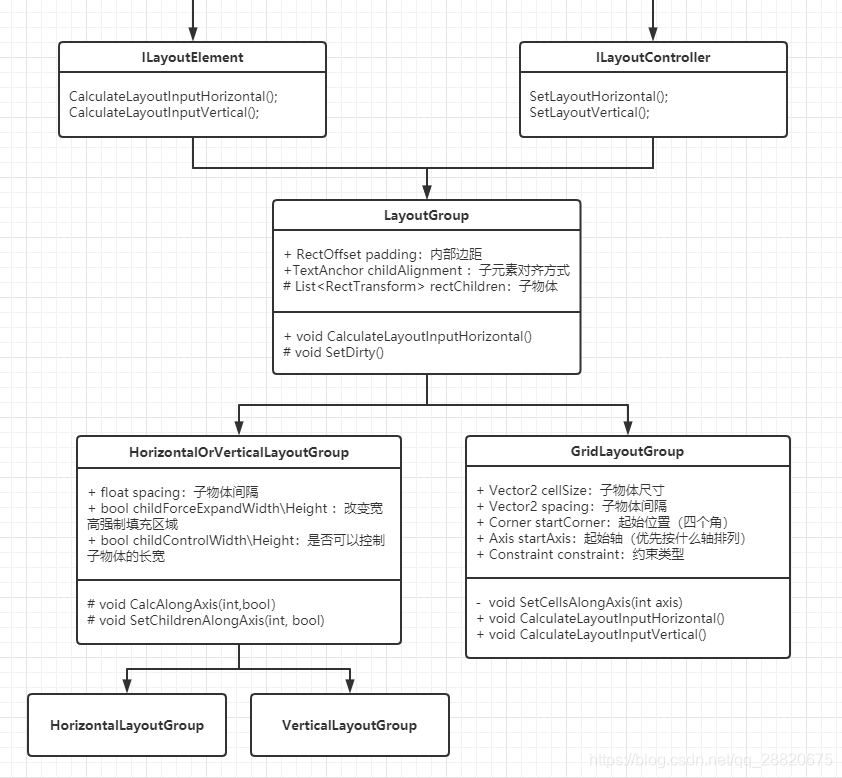
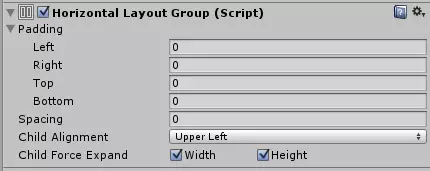
[System.NonSerialized] private RectTransform m_Rect;
private RectTransform rectTransform
{
get
{
if (m_Rect == null)
m_Rect = GetComponent<RectTransform>();
return m_Rect;
}
}

// field is never assigned warning
#pragma warning disable 649
private DrivenRectTransformTracker m_Tracker;
#pragma warning restore 649

protected ContentSizeFitter()
{}

protected override void OnEnable()
{
base.OnEnable();
SetDirty();
}

protected override void OnDisable()
{
m_Tracker.Clear();
LayoutRebuilder.MarkLayoutForRebuild(rectTransform);
base.OnDisable();
}

protected override void OnRectTransformDimensionsChange()
{
SetDirty();
}

private void HandleSelfFittingAlongAxis(int axis)
{
FitMode fitting = (axis == 0 ? horizontalFit : verticalFit);
if (fitting == FitMode.Unconstrained)
{
// Keep a reference to the tracked transform, but don't control its properties:
m_Tracker.Add(this, rectTransform, DrivenTransformProperties.None);
return;
}

m_Tracker.Add(this, rectTransform, (axis == 0 ? DrivenTransformProperties.SizeDeltaX : DrivenTransformProperties.SizeDeltaY));

// Set size to min or preferred size
if (fitting == FitMode.MinSize)
rectTransform.SetSizeWithCurrentAnchors((RectTransform.Axis)axis, LayoutUtility.GetMinSize(m_Rect, axis));
else
rectTransform.SetSizeWithCurrentAnchors((RectTransform.Axis)axis, LayoutUtility.GetPreferredSize(m_Rect, axis));
}

/// <summary>
/// Calculate and apply the horizontal component of the size to the RectTransform
/// </summary>
public virtual void SetLayoutHorizontal()
{
m_Tracker.Clear();
HandleSelfFittingAlongAxis(0);
}

/// <summary>
/// Calculate and apply the vertical component of the size to the RectTransform
/// </summary>
public virtual void SetLayoutVertical()
{
HandleSelfFittingAlongAxis(1);
}

protected void SetDirty()
{
if (!IsActive())
return;

LayoutRebuilder.MarkLayoutForRebuild(rectTransform);
}

#if UNITY_EDITOR
protected override void OnValidate()
{
SetDirty();
}

#endif
}
}

ContentSizeFitter 是 LayoutSystem 闭环中最特殊、也最关键的组件之一。之前我们看的 LayoutGroup 是“我负责排列子物体”,而 ContentSizeFitter 是“我负责改变我自己”——它实现了 ILayoutSelfController,专门用来让 RectTransform 的尺寸去自适应它自身的期望尺寸(比如包裹住里面的 Text 或子物体)。

8.1 类定义与核心枚举

1
2
3
4
5
6
7
8
9
10
11
12
13
14
15
16
17
18
19
20
21
22
23
24
25
26
27
28
29
30
31
32
33
[AddComponentMenu("Layout/Content Size Fitter", 141)]
[ExecuteAlways]
[RequireComponent(typeof(RectTransform))]
public class ContentSizeFitter : UIBehaviour, ILayoutSelfController


public enum FitMode
{
/// <summary>
/// Don't perform any resizing.
/// </summary>
Unconstrained,
/// <summary>
/// Resize to the minimum size of the content.
/// </summary>
MinSize,
/// <summary>
/// Resize to the preferred size of the content.
/// </summary>
PreferredSize
}

[SerializeField] protected FitMode m_HorizontalFit = FitMode.Unconstrained;
/// <summary>
/// The fit mode to use to determine the width.
/// </summary>
public FitMode horizontalFit { get { return m_HorizontalFit; } set { if (SetPropertyUtility.SetStruct(ref m_HorizontalFit, value)) SetDirty(); } }

[SerializeField] protected FitMode m_VerticalFit = FitMode.Unconstrained;
/// <summary>
/// The fit mode to use to determine the height.
/// </summary>
public FitMode verticalFit { get { return m_VerticalFit; } set { if (SetPropertyUtility.SetStruct(ref m_VerticalFit, value)) SetDirty(); } }
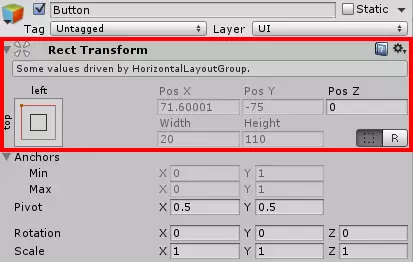
  • 实现 ILayoutSelfController:这意味着在 LayoutRebuilder.PerformLayoutControl 阶段,它会被第一轮优先处理(在普通 LayoutGroup 之前)。

  • FitMode 枚举:

    • Unconstrained:不约束(默认)。

    • MinSize:按最小尺寸 minSize 撑开。

    • PreferredSize:按首选尺寸 preferredSize 撑开(最常用)。

  • 配置字段:horizontalFit 和 verticalFit模式,可以在 Inspector 中分别控制宽高的自适应模式。

8.2 核心执行逻辑:HandleSelfFittingAlongAxis(⭐)

这是它真正干活的方法:

1
2
3
4
5
6
7
8
9
10
11
12
13
14
15
16
17
18
19
private void HandleSelfFittingAlongAxis(int axis)
{
FitMode fitting = (axis == 0 ? horizontalFit : verticalFit);
if (fitting == FitMode.Unconstrained)
{
// 不约束,但依然登记(防止被其他布局组乱动)
m_Tracker.Add(this, rectTransform, DrivenTransformProperties.None);
return;
}

// 登记驱动属性(水平=SizeDeltaX,垂直=SizeDeltaY)
m_Tracker.Add(this, rectTransform, (axis == 0 ? DrivenTransformProperties.SizeDeltaX : DrivenTransformProperties.SizeDeltaY));

// 核心:从 LayoutUtility 获取期望尺寸,并设置给自己的 RectTransform
if (fitting == FitMode.MinSize)
rectTransform.SetSizeWithCurrentAnchors((RectTransform.Axis)axis, LayoutUtility.GetMinSize(m_Rect, axis));
else
rectTransform.SetSizeWithCurrentAnchors((RectTransform.Axis)axis, LayoutUtility.GetPreferredSize(m_Rect, axis));
}

这段代码揭示了一个非常巧妙的细节:

  • 它调用了 LayoutUtility.GetMinSize / GetPreferredSize。LayoutUtility 会去遍历当前 GameObject 上所有的 ILayoutElement 并进行仲裁。

如果这个 GameObject 上还挂了一个 Text 或 LayoutElement,它就能拿到这些组件算出的尺寸。

为什么它只设置自己? 因为它实现的是 ILayoutSelfController,它的任务就是改变自身尺寸。它改变后,可能会触发其他组件的重新布局。

8.3 两个设置阶段与 m_Tracker 的巧妙配合

1
2
3
4
5
6
7
8
9
10
public virtual void SetLayoutHorizontal()
{
m_Tracker.Clear();
HandleSelfFittingAlongAxis(0);
}

public virtual void SetLayoutVertical()
{
HandleSelfFittingAlongAxis(1);
}

注意这里 m_Tracker.Clear() 只写在了水平设置(SetLayoutHorizontal)里!

  • 回想 LayoutRebuilder 的四阶段:水平设置 在 垂直设置 之前。

  • 在水平设置时,先清空旧的驱动登记,然后调用 HandleSelfFittingAlongAxis(0) 登记水平宽度的驱动。

  • 到了垂直设置时,直接调用 HandleSelfFittingAlongAxis(1) 登记高度。如果不在这里省掉 Clear,就会把刚才水平设置的登记给清空。

8.4 生命周期与标脏逻辑

1
2
3
protected override void OnEnable()       { base.OnEnable(); SetDirty(); }
protected override void OnDisable() { m_Tracker.Clear(); LayoutRebuilder.MarkLayoutForRebuild(rectTransform); base.OnDisable(); }
protected override void OnRectTransformDimensionsChange() { SetDirty(); }

最关键的一行是 OnRectTransformDimensionsChange。

  • 当 ContentSizeFitter 根据内容改变了自身尺寸时,会触发这个回调。

  • 它调用 SetDirty(),把自身重新标记为需要布局重建。

  • 这会导致死循环吗? 不会。因为如果尺寸刚好合适,下次执行 SetSizeWithCurrentAnchors 时尺寸没有变化,就不会再次触发 OnRectTransformDimensionsChange。但如果内容变大了,尺寸改变,就会触发新一轮布局重建,这就是“动态自适应”的实现原理。

1
2
3
4
5
6
7
源码里的那个 #pragma warning disable 649

#pragma warning disable 649
private DrivenRectTransformTracker m_Tracker;
#pragma warning restore 649

DrivenRectTransformTracker 是一个 struct。在 C# 中,未赋值(未使用 new 实例化)的 struct 字段会报 CS0649 警告。但 Unity 底层的 m_Tracker.Clear() 和 m_Tracker.Add() 是纯原生方法,直接对它操作是安全的,不需要 new。所以 Unity 官方用 #pragma 屏蔽了这个警告。

九、总结

本文分析了 LayoutSystem 中的 LayoutElement、LayoutGroup、HorizontalOrVerticalLayoutGroup、HorizontalLayoutGroup、VerticalLayoutGroup 以及 GridLayoutGroup 等的实现。结合我们之前学习的内容,调用链总结如下:

1
2
3
4
5
6
7
8
9
10
11
12
13
14
15
16
【6. 驱动层】
├── Canvas.willRenderCanvases 事件触发
│ ↓
├── RectTransform.reapplyDrivenProperties 事件触发
│ ↓ (调用)
【5. 队列层】CanvasUpdateRegistry
├── PerformUpdate()
│ ↓ (从队列取出元素,调用)
【4. 调度层】LayoutRebuilder
├── Rebuild(CanvasUpdate.Layout)
│ ↓ (按四阶段顺序调用:计算/控制 × 水平/垂直)
【3. 实现层】LayoutGroup / HorizontalLayoutGroup / VerticalLayoutGroup / GridLayoutGroup
│ ↓ (在计算阶段,依赖)
【2. 工具层】LayoutUtility
│ ↓ (读取)
【1. 接口层】ILayoutElement / ILayoutController

回到 LayoutSystem 中,我们已经分析完了各种布局组件的实现方式,但请始终别忘记布局系统的整体脉络:

从整体 UGUI 的工作流程来看,布局系统从何而起?当 UI 元素的属性发生变化(如修改尺寸、增删子物体)时,LayoutRebuilder.MarkLayoutForRebuild() 会被调用,这是布局的“触发源”。

随后,组件被注册进 CanvasUpdateRegistry 的 m_LayoutRebuildQueue 队列中。CanvasUpdateRegistry 是连接 UGUI 与底层 Canvas 的桥梁,它监听了 Canvas.willRenderCanvases 事件,并在帧末的 PerformUpdate 方法中统一处理布局(m_LayoutRebuildQueue)及图形(m_GraphicRebuildQueue)两个队列。目前为止,我们还一直停留在 m_LayoutRebuildQueue 的范围内。

容器有了,那么是谁负责调度队列中的任务呢?这就是 LayoutRebuilder 所完成的任务。LayoutRebuilder 将一个待布局的 RectTransform 包装为一个代理对象,在它的 Rebuild 方法中,会严格按照“水平计算 → 水平设置 → 垂直计算 → 垂直设置”的四阶段顺序,去调用相应的接口,并且保持着“计算自底向上、设置自顶向下”的严谨方向。

然而,LayoutRebuilder 只是一个调度者,接口本身并不实现具体的布局逻辑。这就需要 LayoutElement、LayoutGroup 们登场了。它们真正实现了 ILayoutElement 和 ILayoutController 接口,并在内部通过 LayoutUtility 仲裁多个元素的尺寸冲突,最终完成了尺寸计算与位置设置。

除此之外,ILayoutSelfController 也是这条链路中不可或缺的一环,其典型代表就是 ContentSizeFitter。在设置阶段,它会被优先处理,读取计算阶段得出的期望尺寸,从而决定自身最终的大小(撑开或收缩)。

至此,整个 LayoutSystem 实现了完美的动态闭环:从属性变动入队,到帧末四阶段调度计算与分配,再到 ContentSizeFitter 等组件修改自身尺寸触发 reapplyDrivenProperties 重新标脏。自上而下的排布与自下而上的撑开相互配合,构成了 UGUI 自动化布局的完整生态。