UGUI源码学习-二(1)、EventSytem

EventSytem

一、EventSystem是什么

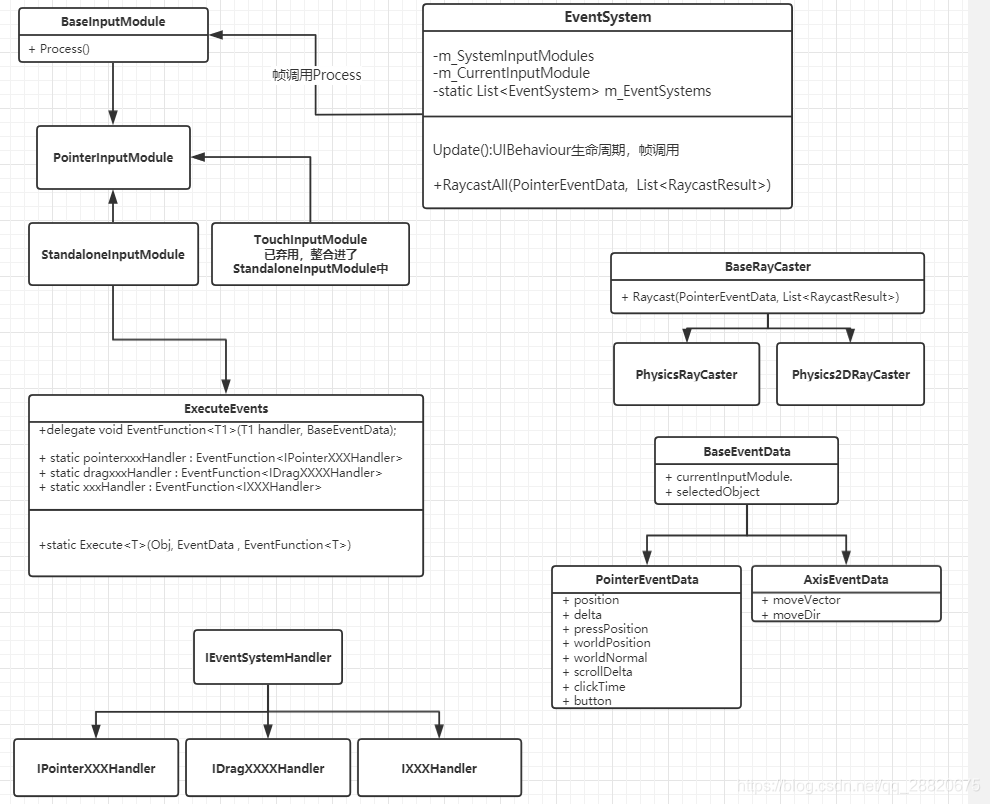
EventSystem 是 UGUI 交互体系的中央调度器。它本身不处理具体的输入,也不实现射线检测,而是负责协调各个模块,将原始的硬件输入(鼠标、触摸、键盘)转化为精确的 UI 事件,并派发给正确的对象。 EventSystem的主要功能包括:

  • 管理所有的输入检测模块(InputModule)。 EventSystem 使用输入模块(Input Modules)来处理不同类型的输入并逐帧调用 Module 的执行函数 Process(),常见的输入模块包括 StandaloneInputModule(用于鼠标和键盘输入)和 TouchInputModule(用于触摸输入)。
  • 调动射线捕捉模块(Raycasters),为 InputModule 提供结果(具体的触点所穿透的对象信息)。 EventSystem 使用射线检测(Raycasting)来确定用户输入的位置和目标。它会发射一条射线,从输入设备(如鼠标或触摸点)的位置出发,检测与之相交的 UI 元素,并将事件传递给 UI 元素。
  • 事件监听及处理(ExecuteEvent)。 EventSystem 会捕获用户的输入事件,生成对应的 EventData 并将这些事件分发给相应的 UI 元素。UI 元素可以通过实现特定的接口(如 IPointerClickHandler、IPointerEnterHandler 等)来监听和处理事件。EventSystem 会根据事件类型调用相应的接口方法。
    EventSystem 中主要的类图如下:

二、EventSystem代码分析

下面精简了EventSystem部分代码,保留了主要的逻辑部分:

点击展开代码
1
2
3
4
5
6
7
8
9
10
11
12
13
14
15
16
17
18
19
20
21
22
23
24
25
26
27
28
29
30
31
32
33
34
35
36
37
38
39
40
41
42
43
44
45
46
47
48
49
50
51
52
53
54
55
56
57
58
59
60
61
62
63
64
65
66
67
68
69
70
71
72
73
74
75
76
77
78
79
80
81
82
83
84
85
86
87
88
89
90
91
92
93
94
95
96
97
98
99
100
101
102
103
104
105
106
107
108
109
110
111
112
113
114
115
116
117
118
119
120
121
122
123
124
125
126
127
128
129
130
131
132
133
134
135
136
137
138
139
140
141
142
143
144
145
146
147
148
149
150
151
152
153
154
155
156
157
158
159
160
161
162
163
164
165
166
167
168
169
170
171
172
173
174
175
176
177
178
179
180
181
182
183
184
185
186
187
188
189
190
191
192
193
194
195
196
197
198
199
200
201
202
203
204
205
206
207
208
209
210
211
212
213
214
215
216
217
218
219
220
221
222
223
224
225
226
227
228
229
230
231
232
233
234
235
236
237
238
239
240
241
242
243
244
245
246
247
248
249
250
251
252
253
254
255
256
257
258
259
260
261
262
263
264
265
266
267
268
269
270
271
272
273
274
275
276
277
278
279
280
281
282
283
284
285
286
287
288
289
290
291
292
293
294
295
296
297
298
299
300
301
302
303
[AddComponentMenu("Event/Event System")]
[DisallowMultipleComponent]
/// <summary>
/// Handles input, raycasting, and sending events.
/// </summary>
/// <remarks>
/// The EventSystem is responsible for processing and handling events in a Unity scene. A scene should only contain one EventSystem. The EventSystem works in conjunction with a number of modules and mostly just holds state and delegates functionality to specific, overrideable components.
/// When the EventSystem is started it searches for any BaseInputModules attached to the same GameObject and adds them to an internal list. On update each attached module receives an UpdateModules call, where the module can modify internal state. After each module has been Updated the active module has the Process call executed.This is where custom module processing can take place.
/// </remarks>
public class EventSystem : UIBehaviour
{
private List<BaseInputModule> m_SystemInputModules = new List<BaseInputModule>();

private BaseInputModule m_CurrentInputModule;

private static List<EventSystem> m_EventSystems = new List<EventSystem>();

/// <summary>
/// Return the current EventSystem.
/// </summary>
public static EventSystem current
{
get { return m_EventSystems.Count > 0 ? m_EventSystems[0] : null; }
set
{
int index = m_EventSystems.IndexOf(value);

if (index > 0)
{
m_EventSystems.RemoveAt(index);
m_EventSystems.Insert(0, value);
}
else if (index < 0)
{
Debug.LogError("Failed setting EventSystem.current to unknown EventSystem " + value);
}
}
}

private GameObject m_CurrentSelected;

/// <summary>
/// The currently active EventSystems.BaseInputModule.
/// </summary>
public BaseInputModule currentInputModule
{
get { return m_CurrentInputModule; }
}

/// <summary>
/// The GameObject currently considered active by the EventSystem.
/// </summary>
public GameObject currentSelectedGameObject
{
get { return m_CurrentSelected; }
}

protected EventSystem()
{}

/// <summary>
/// Recalculate the internal list of BaseInputModules.
/// </summary>
public void UpdateModules()
{
//把当前 GameObject 上所有 BaseInputModule 组件收集进 m_SystemInputModules 这个列表里,而不是返回一个新数组。
GetComponents(m_SystemInputModules);
var systemInputModulesCount = m_SystemInputModules.Count;
for (int i = systemInputModulesCount - 1; i >= 0; i--)
{
if (m_SystemInputModules[i] && m_SystemInputModules[i].IsActive())
continue;

m_SystemInputModules.RemoveAt(i);
}
}

private bool m_SelectionGuard;

/// <summary>
/// Set the object as selected. Will send an OnDeselect the the old selected object and OnSelect to the new selected object.
/// </summary>
/// <param name="selected">GameObject to select.</param>
/// <param name="pointer">Associated EventData.</param>
public void SetSelectedGameObject(GameObject selected, BaseEventData pointer)
{
if (m_SelectionGuard)
{
Debug.LogError("Attempting to select " + selected + "while already selecting an object.");
return;
}

m_SelectionGuard = true;
if (selected == m_CurrentSelected)
{
m_SelectionGuard = false;
return;
}

// Debug.Log("Selection: new (" + selected + ") old (" + m_CurrentSelected + ")");
ExecuteEvents.Execute(m_CurrentSelected, pointer, ExecuteEvents.deselectHandler);
m_CurrentSelected = selected;
ExecuteEvents.Execute(m_CurrentSelected, pointer, ExecuteEvents.selectHandler);
m_SelectionGuard = false;
}

private BaseEventData m_DummyData;
private BaseEventData baseEventDataCache
{
get
{
if (m_DummyData == null)
m_DummyData = new BaseEventData(this);

return m_DummyData;
}
}

/// <summary>
/// Set the object as selected. Will send an OnDeselect the the old selected object and OnSelect to the new selected object.
/// </summary>
/// <param name="selected">GameObject to select.</param>
public void SetSelectedGameObject(GameObject selected)
{
SetSelectedGameObject(selected, baseEventDataCache);
}

//对射线检测产生的所有命中结果(RaycastResult)进行排序,以确定哪个 UI 元素在最“前面”
private static int RaycastComparer(RaycastResult lhs, RaycastResult rhs)
{
if (lhs.module != rhs.module)
{
var lhsEventCamera = lhs.module.eventCamera;
var rhsEventCamera = rhs.module.eventCamera;
if (lhsEventCamera != null && rhsEventCamera != null && lhsEventCamera.depth != rhsEventCamera.depth)
{
// need to reverse the standard compareTo
if (lhsEventCamera.depth < rhsEventCamera.depth)
return 1;
if (lhsEventCamera.depth == rhsEventCamera.depth) //这条if是防御性变成 ,保持三路比较的“完整性”,提升可读性
return 0;

return -1;
}

if (lhs.module.sortOrderPriority != rhs.module.sortOrderPriority)
return rhs.module.sortOrderPriority.CompareTo(lhs.module.sortOrderPriority);

if (lhs.module.renderOrderPriority != rhs.module.renderOrderPriority)
return rhs.module.renderOrderPriority.CompareTo(lhs.module.renderOrderPriority);
}

// Renderer sorting
if (lhs.sortingLayer != rhs.sortingLayer)
{
// Uses the layer value to properly compare the relative order of the layers.
var rid = SortingLayer.GetLayerValueFromID(rhs.sortingLayer);
var lid = SortingLayer.GetLayerValueFromID(lhs.sortingLayer);
return rid.CompareTo(lid);
}

if (lhs.sortingOrder != rhs.sortingOrder)
return rhs.sortingOrder.CompareTo(lhs.sortingOrder);

//当两个命中结果来自同一个根 Canvas 时,谁的 depth 更大,谁就排在前面
// comparing depth only makes sense if the two raycast results have the same root canvas (case 912396)
if (lhs.depth != rhs.depth && lhs.module.rootRaycaster == rhs.module.rootRaycaster)
return rhs.depth.CompareTo(lhs.depth);

if (lhs.distance != rhs.distance)
return lhs.distance.CompareTo(rhs.distance);

//处理2D 物理射线检测 // 只有项目安装了 2D Physics 包,这段代码才参与编译
#if PACKAGE_PHYSICS2D
// Sorting group
if (lhs.sortingGroupID != SortingGroup.invalidSortingGroupID && rhs.sortingGroupID != SortingGroup.invalidSortingGroupID)
{
if (lhs.sortingGroupID != rhs.sortingGroupID)
return lhs.sortingGroupID.CompareTo(rhs.sortingGroupID);
if (lhs.sortingGroupOrder != rhs.sortingGroupOrder)
return rhs.sortingGroupOrder.CompareTo(lhs.sortingGroupOrder);
}
#endif

return lhs.index.CompareTo(rhs.index);
}

//委托实例只在类型初始化时创建一次,之后所有排序都复用同一个实例,零额外分配。
private static readonly Comparison<RaycastResult> s_RaycastComparer = RaycastComparer;

/// <summary>
/// Raycast into the scene using all configured BaseRaycasters.
/// </summary>
/// <param name="eventData">Current pointer data.</param>
/// <param name="raycastResults">List of 'hits' to populate.</param>
public void RaycastAll(PointerEventData eventData, List<RaycastResult> raycastResults)
{
raycastResults.Clear();
var modules = RaycasterManager.GetRaycasters();
var modulesCount = modules.Count;
for (int i = 0; i < modulesCount; ++i)
{
var module = modules[i];
if (module == null || !module.IsActive())
continue;
module.Raycast(eventData, raycastResults);
}

raycastResults.Sort(s_RaycastComparer);
}

protected override void OnEnable()
{
base.OnEnable();
m_EventSystems.Add(this);

}

protected override void OnDisable()
{
if (m_CurrentInputModule != null)
{
m_CurrentInputModule.DeactivateModule();
m_CurrentInputModule = null;
}

m_EventSystems.Remove(this);

base.OnDisable();
}

/*
* 在 EventSystem 每帧更新时,遍历所有已注册的输入模块(Input Module),
* 逐个调用它们的 UpdateModule(),让每个模块刷新自己的内部状态。
* 它是“模块更新”环节,发生在真正处理输入(Process())之前。
*/
private void TickModules()
{
var systemInputModulesCount = m_SystemInputModules.Count;
for (var i = 0; i < systemInputModulesCount; i++)
{
if (m_SystemInputModules[i] != null)
m_SystemInputModules[i].UpdateModule();
}
}

protected virtual void Update()
{
if (current != this) //场景里可能有多个 EventSystem 实例,但同一时刻只应该有一个负责处理输入,那么就由
return;
TickModules(); // 阶段 1:刷新所有输入模块的内部状态

// 阶段 2:选出这一帧应该由哪个输入模块处理
bool changedModule = false;
var systemInputModulesCount = m_SystemInputModules.Count;
for (var i = 0; i < systemInputModulesCount; i++)
{
var module = m_SystemInputModules[i];
if (module.IsModuleSupported() && module.ShouldActivateModule()) //平台支持以及模块是否想被激活
{
if (m_CurrentInputModule != module)
{
ChangeEventModule(module);
changedModule = true;
}
break;
}
}
//没有找到就找第一个有效的模块
// no event module set... set the first valid one...
if (m_CurrentInputModule == null)
{
for (var i = 0; i < systemInputModulesCount; i++)
{
var module = m_SystemInputModules[i];
if (module.IsModuleSupported())
{
ChangeEventModule(module);
changedModule = true;
break;
}
}
}
// 阶段 3:被选中的模块处理输入
if (!changedModule && m_CurrentInputModule != null)
m_CurrentInputModule.Process();
}

private void ChangeEventModule(BaseInputModule module)
{
if (m_CurrentInputModule == module)
return;

if (m_CurrentInputModule != null)
m_CurrentInputModule.DeactivateModule();

if (module != null)
module.ActivateModule();
m_CurrentInputModule = module;
}
}

2.1 eventsystem的功能

由代码的备注,我们可以知道EventSystem的大致情况:

  • 功能:处理输入、射线和发送事件
  • 备注:EventSystem 负责在 Unity 场景中处理和管理事件。一个场景中应该只包含一个 EventSystem。EventSystem 与多个模块协同工作,主要是保存状态并将功能委托给特定的、可重写的组件。当 EventSystem 启动时,它会搜索附加到同一个(EventSystem所在的) GameObject 的所有 BaseInputModules,并将它们添加到一个内部列表中。在每次更新时,每个附加的模块都会接收到一个 UpdateModules 调用,模块可以在此调用中修改内部状态。在每个模块更新之后,活动模块会执行 Process 调用,这是自定义模块处理的地方。
点击展开代码
1
2
3
4
5
6
7
/// <summary>
/// Handles input, raycasting, and sending events.
/// </summary>
/// <remarks>
/// The EventSystem is responsible for processing and handling events in a Unity scene. A scene should only contain one EventSystem. The EventSystem works in conjunction with a number of modules and mostly just holds state and delegates functionality to specific, overrideable components.
/// When the EventSystem is started it searches for any BaseInputModules attached to the same GameObject and adds them to an internal list. On update each attached module receives an UpdateModules call, where the module can modify internal state. After each module has been Updated the active module has the Process call executed.This is where custom module processing can take place.
/// </remarks>

2.2 定义

点击展开代码
1
2
3
4
5
6
7
8
9
10
11
12
13
14
15
16
17
18
19
20
21
22
23
24
25
26
27
28
29
30
private List<BaseInputModule> m_SystemInputModules = new List<BaseInputModule>();

private BaseInputModule m_CurrentInputModule;

private static List<EventSystem> m_EventSystems = new List<EventSystem>();

/// <summary>
/// Return the current EventSystem.
/// </summary>
public static EventSystem current
{
get { return m_EventSystems.Count > 0 ? m_EventSystems[0] : null; }
set
{
int index = m_EventSystems.IndexOf(value);

if (index > 0)
{
m_EventSystems.RemoveAt(index);
m_EventSystems.Insert(0, value);
}
else if (index < 0)
{
Debug.LogError("Failed setting EventSystem.current to unknown EventSystem " + value);
}
}
}

protected EventSystem()
{}
  • 类中定义了三个变量,分别用于管理【输入模块集合】、【当前激活的模块】和【全局事件系统示例】

2.2.1 m_SystemInputModules

  • 作用:缓存当前 EventSystem 上挂载的所有输入模块(如 StandaloneInputModule、TouchInputModule 等)。
  • 填充时机:在 OnEnable / OnDisable 或模块启停时通过 GetComponents() 收集。
  • 简单说:它是「候选模块池」,每帧都会过一遍

2.2.2 m_CurrentInputModule

  • 作用:指向当前实际生效的那个输入模块,同一时刻只会有一个模块负责处理输入事件。
  • 切换时机:当模块集合变化(例如某个模块被禁用/启用)时,ChangeEventModule 会把旧的模块 DeactivateModule(),把新的模块 ActivateModule() 并赋给它

2.2.3 m_EventSystems

  • 作用:静态列表,保存场景/全局中所有处于激活状态的 EventSystem 实例.
    • m_EventSystems 这个字段属于 EventSystem 这个类型本身,而不是属于某个具体的 EventSystem
  • 填充时机:
    • 在 OnEnable 中把实例加入列表;
    • 在 OnDisable 中移除。

数据流大致是:m_SystemInputModules(候选池)→ 每帧 TickModules() → 选出 m_CurrentInputModule(值班)→ 调用其 Process();

2.2.4 current

  • 作用:静态属性,当前场景中生效的EventSystem

2.2.5 构造函数 protected EventSystem()

  • 这个组件只能由 Unity 的组件创建流程(AddComponent / 编辑器挂载)或子类继承来实例化,不能由外部代码直接 new
    • 通过 AddComponent 时,引擎在原生层分配对象,然后由内部机制调用 C# 构造函数。
  • 选 protected 而非 private,是为了给子类继承留出调用 base() 的通道;
  • 选 protected 而非 public,是为了在编译期阻止“绕过 Unity 组件系统直接 new”这种必然出错的用法。
    • Unity 的组件对象是双层结构——C# 包装对象 + C++ 原生对象。如果你直接 new EventSystem()
      • 只创建了 C# 那一层“空壳”;
      • 没有对应的 C++ 原生对象,没有挂到任何 GameObject 上,没有生命周期管理;
      • 后续调用任何依赖原生层的 API 都会出问题。

2.3 具体方法

2.3.1 UpdateModules

点击展开代码
1
2
3
4
5
6
7
8
9
10
11
12
13
14
15
16
/// <summary>
/// Recalculate the internal list of BaseInputModules.
/// </summary>
public void UpdateModules()
{
//把当前 GameObject 上所有 BaseInputModule 组件收集进 m_SystemInputModules 这个列表里,而不是返回一个新数组。
GetComponents(m_SystemInputModules);
var systemInputModulesCount = m_SystemInputModules.Count;
for (int i = systemInputModulesCount - 1; i >= 0; i--)
{
if (m_SystemInputModules[i] && m_SystemInputModules[i].IsActive())
continue;

m_SystemInputModules.RemoveAt(i);
}
}
  • 该方法通过GetComponents(m_SystemInputModules);获取该组件所在的GameObject所挂载的所有基于BaseInputModule的输入模块。如果模块存在且处于激活状态,则保留在列表,否则移除
  • 该函数一般在其他InputModule的OnEnable() 及 OnDisable() 方法中调用,用于更新输入模块列表

2.3.2 SetSelectedGameObject

点击展开代码
1
2
3
4
5
6
7
8
9
10
11
12
13
14
15
16
17
18
19
20
21
22
23
24
25
26
27
28
29
30
31
32
33
34
35
36
37
38
39
40
41
42
43
44
45
46
47
48
49
/// <summary>
/// Set the object as selected. Will send an OnDeselect the the old selected object and OnSelect to the new selected object.
/// </summary>
/// <param name="selected">GameObject to select.</param>
/// <param name="pointer">Associated EventData.</param>
public void SetSelectedGameObject(GameObject selected, BaseEventData pointer)
{
if (m_SelectionGuard)
{
Debug.LogError("Attempting to select " + selected + "while already selecting an object.");
return;
}

m_SelectionGuard = true;
if (selected == m_CurrentSelected)
{
m_SelectionGuard = false;
return;
}

// Debug.Log("Selection: new (" + selected + ") old (" + m_CurrentSelected + ")");
ExecuteEvents.Execute(m_CurrentSelected, pointer, ExecuteEvents.deselectHandler);
m_CurrentSelected = selected;
ExecuteEvents.Execute(m_CurrentSelected, pointer, ExecuteEvents.selectHandler);
m_SelectionGuard = false;
}


private BaseEventData m_DummyData;
private BaseEventData baseEventDataCache
{
get
{
if (m_DummyData == null)
m_DummyData = new BaseEventData(this);

return m_DummyData;
}
}


// <summary>
/// Set the object as selected. Will send an OnDeselect the the old selected object and OnSelect to the new selected object.
/// </summary>
/// <param name="selected">GameObject to select.</param>
public void SetSelectedGameObject(GameObject selected)
{
SetSelectedGameObject(selected, baseEventDataCache);
}
  • 该方法设置选中对象,并且通过ExecuteEvents.Execute通知 “旧选中对象”取消选中,“新选中对象”被选中
    • 即会对 旧对象触发其OnDeselect,对新选中对象触发其OnSelect
  • ExecuteEvents.Execute 如何工作
    • 从 m_CurrentSelected 这个 GameObject 开始,沿父级向上冒泡,找到所有实现了 IDeselectHandler 的组件,对每个组件调用 OnDeselect(pointer)/OnSelect
    • ExecuteEvents.deselectHandler 一个静态缓存的委托
    • ExecuteEvents.Execute 从 target 开始,沿自身和父级向上冒泡,查找实现了 T 接口的组件;T 由传入的 functor 的类型推断得出,决定“找什么接口”;functor 决定“找到后调用哪个方法”。
      • 针对ExecuteEvents.deselectHandler来说 其实就是找实现了IDeselectHandler的组件
      1
      2
      3
      4
      public static EventFunction<IDeselectHandler> deselectHandler
      {
      get { return s_DeselectHandler; }
      }
  • SetSelectedGameObject 方法有两个重载,前者接受一个额外的 BaseEventData 参数,用于传递事件数据;后者只接受一个 GameObject 参数,会使用 baseEventDataCache 方法传递一个默认的 BaseEventData 对象。
    • 因此为了不重复创建 BaseEventData 对象,EventSystem 类中定义了一个 m_DummyData 变量,用于缓存 BaseEventData 对象。这种做法可以减少内存分配的开销。

2.3.2 RaycastAll(射线检测)

点击展开代码
1
2
3
4
5
6
7
8
9
10
11
12
13
14
15
16
17
18
19
20
21
22
23
24
25
26
27
28
29
30
31
32
33
34
35
36
37
38
39
40
41
42
43
44
45
46
47
48
49
50
51
52
53
54
55
56
57
58
59
60
61
62
63
64
65
66
67
68
69
70
71
72
73
74
75
76
77
78
79
80
81
82
83
84
//对射线检测产生的所有命中结果(RaycastResult)进行排序,以确定哪个 UI 元素在最“前面”
private static int RaycastComparer(RaycastResult lhs, RaycastResult rhs)
{
if (lhs.module != rhs.module)
{
var lhsEventCamera = lhs.module.eventCamera;
var rhsEventCamera = rhs.module.eventCamera;
if (lhsEventCamera != null && rhsEventCamera != null && lhsEventCamera.depth != rhsEventCamera.depth)
{
// need to reverse the standard compareTo
if (lhsEventCamera.depth < rhsEventCamera.depth)
return 1;
if (lhsEventCamera.depth == rhsEventCamera.depth) //这条if是防御性变成 ,保持三路比较的“完整性”,提升可读性
return 0;

return -1;
}

if (lhs.module.sortOrderPriority != rhs.module.sortOrderPriority)
return rhs.module.sortOrderPriority.CompareTo(lhs.module.sortOrderPriority);

if (lhs.module.renderOrderPriority != rhs.module.renderOrderPriority)
return rhs.module.renderOrderPriority.CompareTo(lhs.module.renderOrderPriority);
}

// Renderer sorting
if (lhs.sortingLayer != rhs.sortingLayer)
{
// Uses the layer value to properly compare the relative order of the layers.
var rid = SortingLayer.GetLayerValueFromID(rhs.sortingLayer);
var lid = SortingLayer.GetLayerValueFromID(lhs.sortingLayer);
return rid.CompareTo(lid);
}

if (lhs.sortingOrder != rhs.sortingOrder)
return rhs.sortingOrder.CompareTo(lhs.sortingOrder);

//当两个命中结果来自同一个根 Canvas 时,谁的 depth 更大,谁就排在前面
// comparing depth only makes sense if the two raycast results have the same root canvas (case 912396)
if (lhs.depth != rhs.depth && lhs.module.rootRaycaster == rhs.module.rootRaycaster)
return rhs.depth.CompareTo(lhs.depth);

if (lhs.distance != rhs.distance)
return lhs.distance.CompareTo(rhs.distance);

//处理2D 物理射线检测 // 只有项目安装了 2D Physics 包,这段代码才参与编译
#if PACKAGE_PHYSICS2D
// Sorting group
if (lhs.sortingGroupID != SortingGroup.invalidSortingGroupID && rhs.sortingGroupID != SortingGroup.invalidSortingGroupID)
{
if (lhs.sortingGroupID != rhs.sortingGroupID)
return lhs.sortingGroupID.CompareTo(rhs.sortingGroupID);
if (lhs.sortingGroupOrder != rhs.sortingGroupOrder)
return rhs.sortingGroupOrder.CompareTo(lhs.sortingGroupOrder);
}
#endif

return lhs.index.CompareTo(rhs.index);
}

//委托实例只在类型初始化时创建一次,之后所有排序都复用同一个实例,零额外分配。
private static readonly Comparison<RaycastResult> s_RaycastComparer = RaycastComparer;

/// <summary>
/// Raycast into the scene using all configured BaseRaycasters.
/// </summary>
/// <param name="eventData">Current pointer data.</param>
/// <param name="raycastResults">List of 'hits' to populate.</param>
public void RaycastAll(PointerEventData eventData, List<RaycastResult> raycastResults)
{
raycastResults.Clear();
var modules = RaycasterManager.GetRaycasters();
var modulesCount = modules.Count;
for (int i = 0; i < modulesCount; ++i)
{
var module = modules[i];
if (module == null || !module.IsActive())
continue;
module.Raycast(eventData, raycastResults);
}

raycastResults.Sort(s_RaycastComparer);
}
  • 接下来是 RaycastAll 方法,用于对场景中的所有 BaseRaycaster 进行射线检测。
    • 首先会清空射线结果列表raycastResults
    • 通过RaycasterManager,拿到所有基于BaseRaycaster 的注册了的射线
    • 遍历射线列表,如果射线存在且处于激活状态,则通过各个射线的module.Raycast(eventData, raycastResults),将结果加入raycastResults列表中
    • 最后使用s_RaycastComparer排序规则,对射线结果进行排序
  • 关于RaycastAll几个注意的地方:
    • 1.RaycastAll并不直接调用,而是通过InputModule调用。InputModule通过process方法调用RaycastAll
      • 调用路径一般为:EventSystem.Update() → m_CurrentInputModule.Process() → PointerInputModule.GetMousePointerEventData() (或 GetTouchPointerEventData) → EventSystem.RaycastAll() → BaseRaycaster.Raycast() (如 GraphicRaycaster / PhysicsRaycaster)
    • 2.RaycastComparer 方法用于对射线检测结果进行排序,总体而言就是将更接近摄像机的结果排在前面

2.3.3 TickModules、Update、OnEnable、OnDisable

点击展开代码
1
2
3
4
5
6
7
8
9
10
11
12
13
14
15
16
17
18
19
20
21
22
23
24
25
26
27
28
29
30
31
32
33
34
35
36
37
38
39
40
41
42
43
44
45
46
47
48
49
50
51
52
53
54
55
56
57
58
59
60
61
62
63
64
65
66
67
68
69
70
71
72
73
74
75
76
77
78
79
80
81
82
83
84
85
86
87
88
89
protected override void OnEnable()
{
base.OnEnable();
m_EventSystems.Add(this);

}

protected override void OnDisable()
{
if (m_CurrentInputModule != null)
{
m_CurrentInputModule.DeactivateModule();
m_CurrentInputModule = null;
}

m_EventSystems.Remove(this);

base.OnDisable();
}

/*
* 在 EventSystem 每帧更新时,遍历所有已注册的输入模块(Input Module),
* 逐个调用它们的 UpdateModule(),让每个模块刷新自己的内部状态。
* 它是“模块更新”环节,发生在真正处理输入(Process())之前。
*/
private void TickModules()
{
var systemInputModulesCount = m_SystemInputModules.Count;
for (var i = 0; i < systemInputModulesCount; i++)
{
if (m_SystemInputModules[i] != null)
m_SystemInputModules[i].UpdateModule();
}
}

protected virtual void Update()
{
if (current != this) //场景里可能有多个 EventSystem 实例,但同一时刻只应该有一个负责处理输入,那么就由
return;
TickModules(); // 阶段 1:刷新所有输入模块的内部状态

// 阶段 2:选出这一帧应该由哪个输入模块处理
bool changedModule = false;
var systemInputModulesCount = m_SystemInputModules.Count;
for (var i = 0; i < systemInputModulesCount; i++)
{
var module = m_SystemInputModules[i];
if (module.IsModuleSupported() && module.ShouldActivateModule()) //平台支持以及模块是否想被激活
{
if (m_CurrentInputModule != module)
{
ChangeEventModule(module);
changedModule = true;
}
break;
}
}
//没有找到就找第一个有效的模块
// no event module set... set the first valid one...
if (m_CurrentInputModule == null)
{
for (var i = 0; i < systemInputModulesCount; i++)
{
var module = m_SystemInputModules[i];
if (module.IsModuleSupported())
{
ChangeEventModule(module);
changedModule = true;
break;
}
}
}
// 阶段 3:被选中的模块处理输入
if (!changedModule && m_CurrentInputModule != null)
m_CurrentInputModule.Process();
}

private void ChangeEventModule(BaseInputModule module)
{
if (m_CurrentInputModule == module)
return;

if (m_CurrentInputModule != null)
m_CurrentInputModule.DeactivateModule();

if (module != null)
module.ActivateModule();
m_CurrentInputModule = module;
}
  1. OnEnable 和 OnDisable
  • EventSystem 启用时调用 OnEnable,用于将当前的EventSystem 实例添加到 m_EventSystems 列表
  • EventSystem 禁用时调用 OnDisable,用于将当前的EventSystem 实例从m_EventSystems 列表中删除
  1. update
  • update会在每一帧调用TickModules();且保证只有一个eventsystem在调用
  • update会先调用 TickModules()
    • TickModules()会遍历所有的输入模块,调用其UpdateModule(),让模块感知本帧的输入变化、刷新内部缓存以便后面找出一个有效的模块
  • 再次遍历所有的输入模块,找出这一帧应该由哪个输入模块处理(平台支持且当帧像被激活的输入模块)
    • 如果遍历没找到,则找到第一个平台支持的模块
  • 将找到的模块通过ChangeEventModule设置为当前模块
  • 调用当前模块的process

2.3.5 小结

以上我们对EventSystem代码进行了分析。
首先,挂载了 EventSystem 的 GameObject 会在启动时收集所有的输入模块并添加到 m_SystemInputModules 列表中。然后,EventSystem 会在每一帧调用 Update 方法,遍历所有的输入模块,找到并设置当前输入模块,同时调用其 Process 方法,完成事件的处理。
此外,EventSystem 还提供了一些方法用于设置选中的游戏对象、射线检测等功能。这些方法会在 InputModule 及 Raycaster 中调用。

另外,可以看到代码中不乏涉及到一些其他代码的内容,后续会针对InputModule、Raycasters、ExecuteEvents进行说明。