Inspector窗口拓展相关内容
一、Inspector窗口拓展 基础知识
1.1 Inspector窗口自定义显示指什么?
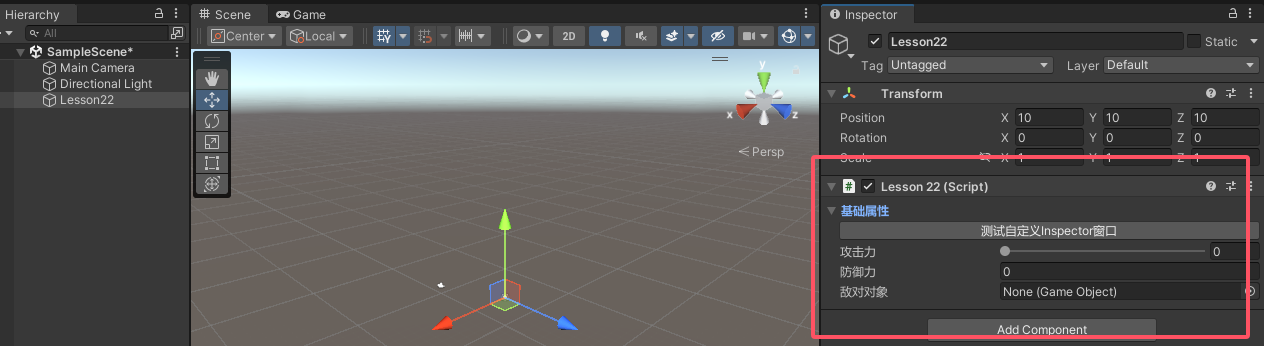
我可以完全自定义某一个脚本在Inspector窗口的相关显示
1.2 SerializedObject和SerializedProperty的作用
SerializedObject: https://docs.unity.cn/cn/2022.1/ScriptReference/SerializedObject.html https://docs.unity.cn/cn/2022.1/ScriptReference/SerializedProperty.html
1.3 自定义 脚本在Inspector窗口中显示的内容
关键步骤:
单独为某一个脚本实现一个自定义脚本,并且脚本需要继承Editor。一般该脚本命名为 自定义脚本名 + Editor
在该脚本前加上特性
命名空间:UnityEditor
特性名:CustomEditor(想要自定义脚本类名的Type)
声明对应SerializedProperty序列化属性 对象
主要通过它和自定义脚本中的成员进行关联
可以利用继承Editor后的成员serializedObject中的FindProperty(“成员变量名”)方法关联对应成员;
1
2
SerializedProperty mySerializedProperty; mySerializedProperty = serializedObject.FindProperty("自定义脚本中的成员名" );
重写OnInspectorGUI函数
该函数控制了Inspector窗口中显示的内容
只需要在其中重写内容便可以自定义窗口
注意:其中的逻辑需要包裹在这两句代码之间
1 2 3 4 serializedObject.Update(); serializedObject.ApplyModifiedProperties();
1.4 获取脚本依附的对象
通过Editor中的target成员变量获取,获取到的是依附在对象上的Lesson22组件对象并不是依附的GameObject
1.5 总结
为继承Editor的脚本添加[CustomEditor(typeof(想要自定义Inspector窗口的脚本))]特性
在该脚本中按照一定的规则进行编写
便可为Inspector窗口中的某个脚本自定义窗口布局
1.6 代码示例
Lesson22.cs(不能放在Editor文件夹下)
1 2 3 4 5 6 7 8 9 10 11 public int atk;public float def;public GameObject obj;void Start (){} void Update (){}
Lesson22Editor.cs(放在Editor文件夹下)
1 2 3 4 5 6 7 8 9 10 11 12 13 14 15 16 17 18 19 20 21 22 23 24 25 26 27 28 29 30 31 32 33 34 35 36 37 38 39 40 [CustomEditor(typeof(Lesson22)) ] public class Lesson22Editor : Editor { private SerializedProperty atk; private SerializedProperty def; private SerializedProperty obj; private bool foldOut; private void OnEnable () { atk = serializedObject.FindProperty("atk" ); def = serializedObject.FindProperty("def" ); obj = serializedObject.FindProperty("obj" ); } public override void OnInspectorGUI () { serializedObject.Update(); foldOut = EditorGUILayout.BeginFoldoutHeaderGroup(foldOut, "基础属性" ); if (foldOut) { if (GUILayout.Button("测试自定义Inspector窗口" )) { Debug.Log(target.name); } EditorGUILayout.IntSlider(atk, 0 , 100 , "攻击力" ); def.floatValue = EditorGUILayout.FloatField("防御力" , def.floatValue); EditorGUILayout.ObjectField(obj, new GUIContent("敌对对象" )); } EditorGUILayout.EndFoldoutHeaderGroup(); serializedObject.ApplyModifiedProperties(); } }
二、数组、List属性 自定义显示
2.1 数组、List属性在Inspector窗口显示 基础方式
主要知识点:
1
2
EditorGUILayout.PropertyField(SerializedProperty对象, 标题);
2.2 数组、List属性在Inspector窗口显示 自定义方式
如果我们不想要Unity默认的绘制方式去显示 数组、List相关内容
主要知识点:
(1) arraySize 获取数组或List容量
(2) InsertArrayElementAtIndex(索引) 为数组在指定索引插入默认元素(容量会变化)
(3).DeleteArrayElementAtIndex(索引) 为数组在指定索引删除元素(容量会变化)
(4).GetArrayElementAtIndex(索引) 获取数组中指定索引位置的 SerializedProperty 对象
2.3 代码示例
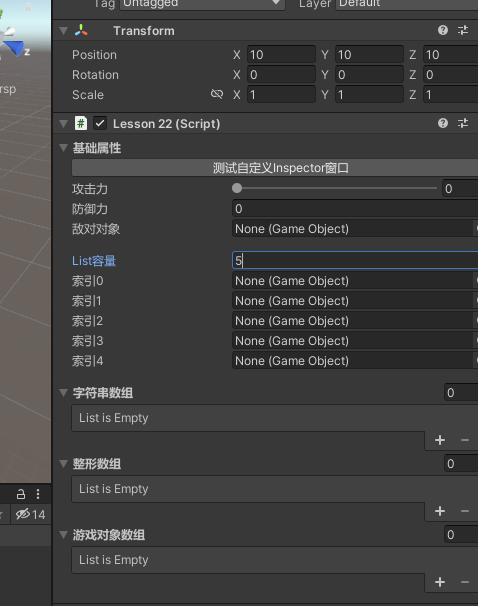
1 2 3 4 5 6 7 8 9 10 11 12 13 14 15 16 17 18 19 20 21 22 23 24 25 26 27 28 29 30 31 32 33 34 35 36 37 38 39 40 41 42 43 44 45 46 47 48 49 50 51 52 53 54 55 56 57 public string [] strs; public int [] ints; public GameObject[] gameObjects; public List<GameObject> listObjs; private int count; private SerializedProperty strs; private SerializedProperty ints; private SerializedProperty gameObjects; private SerializedProperty listObjs; private void OnEnable () strs = serializedObject.FindProperty("strs" ); ints = serializedObject.FindProperty("ints" ); gameObjects = serializedObject.FindProperty("gameObjects" ); listObjs = serializedObject.FindProperty("listObjs" ); count = listObjs.arraySize; } public override void OnInspectorGUI () { serializedObject.Update(); count = EditorGUILayout.IntField("List容量" , count); for (int i = listObjs.arraySize - 1 ; i >= count; i--) listObjs.DeleteArrayElementAtIndex(i); for (int i = 0 ; i < count; i++) { if (listObjs.arraySize <= i) listObjs.InsertArrayElementAtIndex(i); SerializedProperty indexPro = listObjs.GetArrayElementAtIndex(i); EditorGUILayout.ObjectField(indexPro, new GUIContent($"索引{i} " )); } EditorGUILayout.Space(10 ); EditorGUILayout.PropertyField(strs, new GUIContent("字符串数组" )); EditorGUILayout.PropertyField(ints, new GUIContent("整形数组" )); EditorGUILayout.PropertyField(gameObjects, new GUIContent("游戏对象数组" )); serializedObject.ApplyModifiedProperties(); }
2.4 效果
三、自定义属性 自定义显示
3.1 自定义属性 在Inspector窗口显示 基础方式
主要知识点:
1
2
EditorGUILayout.PropertyField(SerializedProperty对象, 标题);
3.2 自定义属性 在Inspector窗口显示 自定义方式
如果我们不想要Unity默认的绘制方式去显示 自定义数据结构类 相关内容
主要知识点:
1 2 3 SerializedProperty.FindPropertyRelative(属性) serializedObject.FindProperty(属性.子属性)
3.3 代码示例
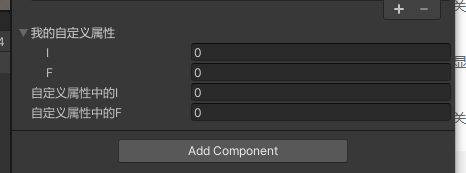
1 2 3 4 5 6 7 8 9 10 11 12 13 14 15 16 17 18 19 20 21 22 23 24 [Serializable ] public class MyCustonPro { public int i; public float f; } public class Lesson22 : MonoBehaviour { public MyCustonPro myCustom; } private void OnEnable () { serializedObject.Update(); myCustom = serializedObject.FindProperty("myCustom" ); myCustomI = serializedObject.FindProperty("myCustom.i" ); myCustomF = serializedObject.FindProperty("myCustom.f" ); serializedObject.ApplyModifiedProperties(); }
3.4 效果
四、字典属性 自定义显示
4.0 知识回顾 SerizlizeField特性
让私有字段可以被序列化(能够在Unity的Inspector窗口被看到)
4.1 如何在Inspector窗口编辑字典成员
Unity默认是不支持Dictionary在Inspector窗口被显示的利用两个List(或数组)成员来间接设置Dictionary
4.2 ISerializationCallbackReceiver接口
该接口是Unity提供的用于序列化和反序列化时执行自定义逻辑的接口
接口中函数:
OnBeforeSerialize: 在对象被序列化之前调用
OnAfterDeserialize: 在对象从磁盘反序列化后调用
由于我们需要用两个List存储Dictionary的具体值所以我们需要在 OnBeforeSerialize序列化之前:将Dictionary里的数据存入List中进行序列化 OnAfterDeserialize反序列化之后:将List中反序列化出来的数据存储到Dictionary中
4.3 利用两个List在Inspector窗口中自定义Dictionary显示
由于我们在Inspector窗口中显示的信息的数据来源是List
4.4 总结
由于Unity中不支持在Inspector窗口直接使用Dictionary
4.5 代码示例
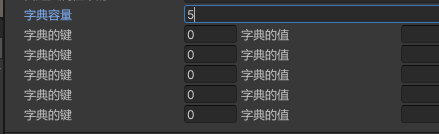
1 2 3 4 5 6 7 8 9 10 11 12 13 14 15 16 17 18 19 20 21 22 23 24 25 26 27 28 29 30 31 32 33 34 35 36 37 38 39 40 41 42 43 44 45 46 47 48 49 50 51 52 53 54 55 56 57 58 59 60 61 62 63 64 65 66 67 68 69 70 71 72 73 74 75 76 77 78 79 80 81 82 public class Lesson22 : MonoBehaviour , ISerializationCallbackReceiver { public Dictionary<int , string > myDic = new Dictionary<int , string >() { { 1 , "123" }, { 2 , "234" } }; [SerializeField ] private List<int > keys = new List<int >(); [SerializeField ] private List<string > values = new List<string >(); public void OnAfterDeserialize () { myDic.Clear(); for (int i = 0 ; i < keys.Count; i++) { if (!myDic.ContainsKey(keys[i])) myDic.Add(keys[i], values[i]); else Debug.LogWarning("字典Dictionary容器中不允许有相同的键" ); } } public void OnBeforeSerialize () { keys.Clear(); values.Clear(); foreach (var item in myDic) { keys.Add(item.Key); values.Add(item.Value); } } void Start () { foreach (var item in myDic) { print($"Dic:{item.Key} - {item.Value} " ); } } } private SerializedProperty keys; private SerializedProperty values; private int dicCount; private void OnEnable () { dicCount = keys.arraySize; } public override void OnInspectorGUI () { serializedObject.Update(); dicCount = EditorGUILayout.IntField("字典容量" , dicCount); for (int i = keys.arraySize - 1 ; i >= dicCount; i--) { keys.DeleteArrayElementAtIndex(i); values.DeleteArrayElementAtIndex(i); } for (int i = 0 ; i < dicCount; i++) { if (keys.arraySize <= i) { keys.InsertArrayElementAtIndex(i); values.InsertArrayElementAtIndex(i); } SerializedProperty indexKey = keys.GetArrayElementAtIndex(i); SerializedProperty indexValue = values.GetArrayElementAtIndex(i); EditorGUILayout.BeginHorizontal(); indexKey.intValue = EditorGUILayout.IntField("字典的键" , indexKey.intValue); indexValue.stringValue = EditorGUILayout.TextField("字典的值" , indexValue.stringValue); EditorGUILayout.EndHorizontal(); } serializedObject.ApplyModifiedProperties(); }
4.6 效果